Note: If
the Large File Transfer (the 10th System Check Type status from the top) is FAILED, this
System Check Type cannot be displayed.
Procedure
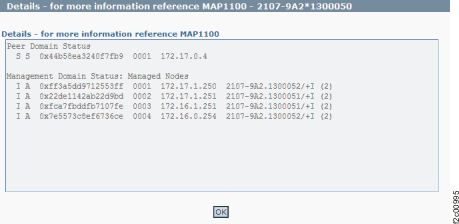
Figure 1 is
an example of the detail window for the HMC management domain (in
this example, an error condition is not shown).
Figure 1. Window: HMC
management domain details
Description: A problem with the status of the HMC
private networks has been detected.
Action: Display and repair any open serviceable events that are related to the private
networks. If there are none, run the HMC network topology tool and look for any node problems that
must be repaired. See MAP7001 Using the network topology tool. If there are no problems with
the topology, contact your next level of support. The next level of
support must remotely connect to repair this condition.
Next level of support only: The command -/usr/sbin/rsct/bin
# /usr/sbin/rsct/bin/rmcdomainstatus -s ctrmc was run.
The following is an example of the output that is displayed:
Management Domain Status: Managed Nodes
 I A  0xffdbc04234edc7c6  0002  9.43.250.171  2107-921.7516361/+ (2)
 I A  0xb040e7641b08303d  0001  9.43.250.169  2107-921.7516361/+ (2)
The
nodes that are managed by the HMC are displayed. These nodes are the
LPARs of the SFIs.
Note: When the management domain is completely
operational and there are no communication issues, the SFI MTMS is
displayed in the last column under Management domain.