MAP1100 Section-18 Systems Power State

About this task

Note: If the Large File Transfer (the 10th System Check Type status from the top) is FAILED, this System Check Type cannot be displayed.

Procedure

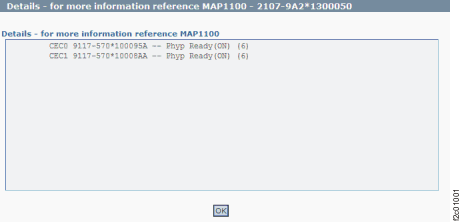
  1. Figure 1 is an example of the detail window for the systems power state (in this example, an error condition is not shown).
    Figure 1. Window: Systems power state details
    Window: Systems power state details
  2. Description: The systems power state is not as expected.
  3. Action: Ensure that any power settings changes have had time to complete and that no repair actions are in progress. Contact your next level of support. The next level of support must remotely connect to repair this condition.
  4. Next level of support only:
    - lsrsrc -Ad IBM.EssStorageFacilitySystem powerRunState
    Resource Dynamic Attributes for IBM.EssStorageFacilitySystem
    resource 1:
            powerRunState = 6
    resource 2:
            powerRunState = 6
    
    NORMAL STATES:
    StorageFacilitysystem_STANDBY = 1;
    StorageFacilitysystem_POWERING_ON = 3;
    StorageFacilitysystem_POWERING_OFF = 5;
    StorageFacilitysystem_PHYP_READY = 6;
    StorageFacilitysystem_PHYP_STANDBY = 7;
    
    ERROR STATES:
    StorageFacilitysystem_NO_POWER = 0;
    StorageFacilitysystem_INIT_FAIL = 2;
    StorageFacilitysystem_ERROR_DUMP = 4;
    StorageFacilitysystem_STATE_UNDETERMINED = -1;