Determining if new and existing racks are compatible
Procedure
-
Determine the model of Rack-1 and the expansion rack being installed. The model number is on
the machine type and model serial number (MTMS) label. The MTMS label 1
is on the front cover above the door latch release. See Figure 1.
Figure 1. Rack serial number and rack number labels (Models 98x, 8xE) Note: Rack-4 and Rack-5 not shown. Some models do not use a Rack-3.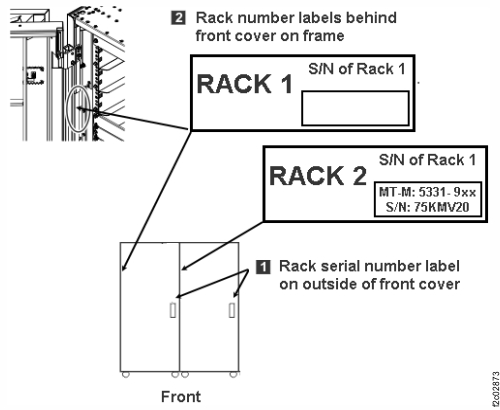
-
You are installing model 98B Rack-2. At the rear of Rack-1, observe the P1-C6 slots in both CEC
enclosures.
Do both CEC enclosures have a PCIe two-port card in slot P1-C6?
- Yes, go to step 8.
- No, stop the installation. Call the next level of support. Rack-1 does not have the feature installed to support expansion racks.
Figure 2. CEC enclosure location codes (rear view) (Models 980 and 984) 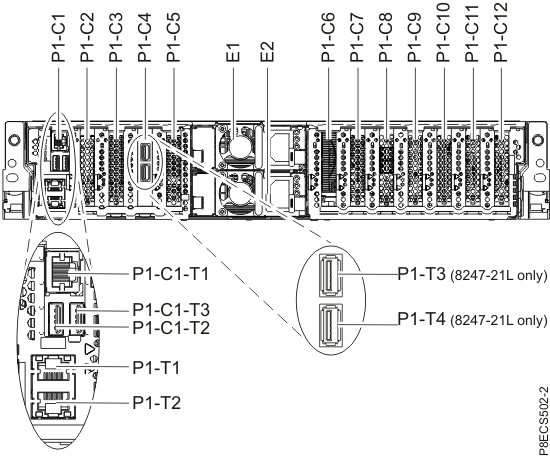
-
You are installing model 98E Rack-2. At the rear of Rack-1, observe the P1-C3 and P1-C5 slots
in both CEC enclosures.
Do both CEC enclosures have a PCIe two-port card in slots P1-C3 and P1-C5?
- Yes, go to step 8.
- No, stop the installation. Call the next level of support. Rack-1 does not have the feature installed to support expansion racks.
Figure 3. CEC enclosure location codes (rear view) (Models 981, 985, and 986) 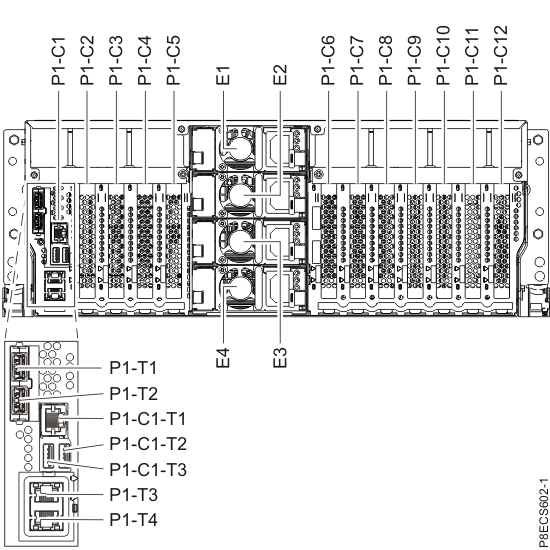
-
You are installing model 98F Rack-2. At the rear of Rack-1, observe the P1-C2 and P1-C3 slots
in both CEC enclosures.
Do both CEC enclosures have a PCIe two-port card in slots P1-C2 and P1-C3?- Yes, go to step 8.
- No, stop the installation. Call the next level of support. Rack-1 does not have the feature installed to support expansion racks.
Figure 4. CEC enclosure location codes (rear view) (Models 982, 988) 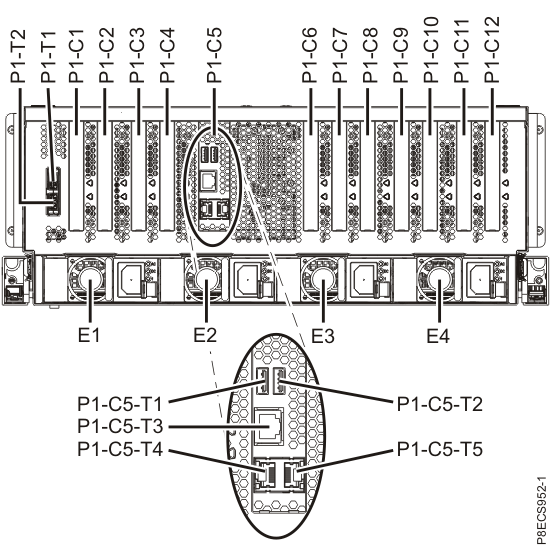
-
Observe the rear of Rack-2. Note which high-performance flash enclosures are present in
locations R2-B09 through R2-B16. Use Table 2, Figure 5, and Figure 6 to determine whether the Rack-2 has the
correct PCIe storage interfaces installed.
Table 2. Determining whether Rack-2 contains the necessary PCIe storage interfaces to support Rack-2 high-performance flash enclosures If the rear of Rack-2 has a high performance enclosure in location:
(See Figure 5)The rear of Rack-2 must have PCIe storage interface card in I/O enclosure locations:
(See Figure 5 and Figure 6)R2-B09 R2-XI1 Slot C6
R2-XI2 Slot C3
(DA pair 13)R2-B10 R2-XI3 Slot C6
R2-XI4 Slot C3
(DA pair 15)R2-B11 R2-XI1 Slot C3
R2-XI2 Slot C6
(DA pair 12)R2-B12 R2-XI3 Slot C3
R2-XI4 Slot C6
(DA pair 14)Zero high-performance flash enclosures in locations R2-B09 through R2-B12. (Any number of high-performance flash enclosures in locations R2-B13 through R2-B16) No additional interfaces required.
Any required PCIe storage interfaces are already present in R2-XIn-C7.Does Rack-2 have the necessary PCIe storage interfaces?- Yes, continue with Inspecting for shipping damage.
- No, stop the installation. To install the existing storage enclosures in Rack-2, you must first have the necessary PCIe storage interface cards and cables. It is possible to continue the installation without these parts, but you will not be able to install the affected Rack-2 high-performance flash enclosures. Work with your customer and next level of support to decide how to proceed. If the decision is to proceed, continue with Inspecting for shipping damage.
Figure 5. Rack 1-2 storage enclosure and I/O enclosure location codes (Models 982, 98F) (rear view) 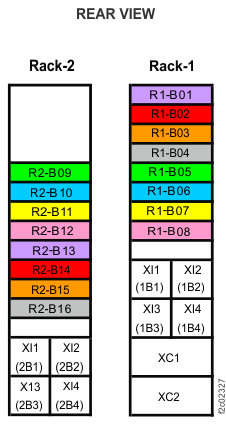
Figure 6. I/O enclosure locations (rear) (models 98x) 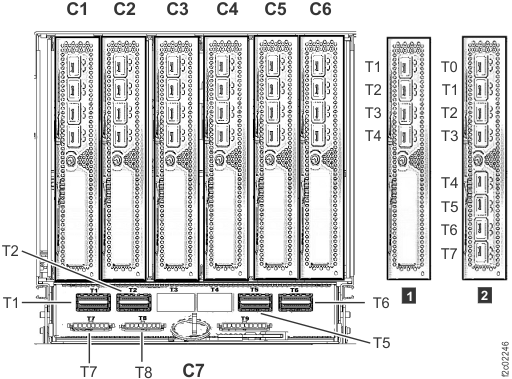 Note: I/O enclosure PCIe storage interface card (locations C3 and C6) not shown.Note: The older generation I/O enclosure PCIe and PCN card might not include T3, T4, and T10 ports.
 -
Observe the rear of Rack-2 (single-phase). Note which storage enclosures are present
in locations R2-G01 through R2-G12. Use Table 3,
Figure 7, and Figure 8 to determine whether the Rack-2 has enough
DA cards installed.
Note: A complete diagram of device adapter pair IDs for storage enclosures is included at the end of this section. See Figure 9 and Figure 10.
Table 3. Determining whether Rack-2 (single-phase) contains the necessary DA card pairs to support Rack-2 storage enclosures If the rear of Rack-2 has a storage enclosure in location:
(See Figure 7)The rear of Rack-2 must have a DA card pair in I/O enclosure locations:
(See Figure 7)R2-G05 R2-XI1 Slot C6
R2-XI2 Slot C3
(DA pair 5)R2-G07 R2-XI3 Slot C6
R2-XI4 Slot C3
(DA pair 7)R2-G09 R2-XI1 Slot C3
R2-XI2 Slot C6
(DA pair 4)R2-G11 R2-XI3 Slot C3
R2-XI4 Slot C6
(DA pair 6)Zero storage enclosures in locations R2-G01 through R2-G12 No DA card pairs required in Rack-2Does Rack-2 have the necessary DA cards?- Yes, continue with Inspecting for shipping damage.
- No, stop the installation. To install the existing storage enclosures in Rack-2, you must first install the MESs to add the necessary DA cards. It is possible to continue the installation without installing the MESs, but you will not be able to install the affected Rack-2 storage enclosures. Work with your customer and next level of support to decide how to proceed. If the decision is to proceed, continue with Inspecting for shipping damage.
Figure 7. Rack 1-5 storage enclosure and I/O enclosure location codes (single-phase Models 981, 98E) (rear view) 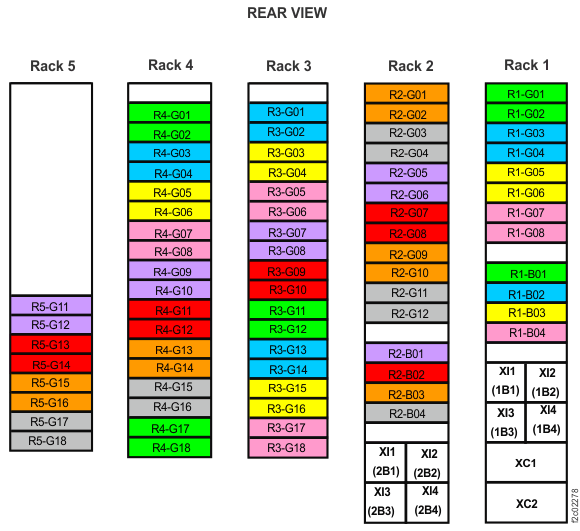
Figure 8. Location codes for device adapter and host adapter cards 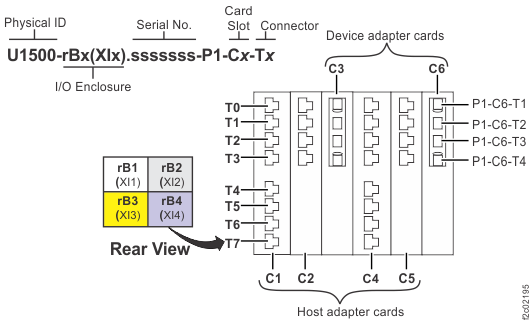
-
You are installing Rack-5 (single-phase). Observe the front of Rack-4. Use Table 6 and Figure 7 to determine whether Rack-4 has the
specific storage enclosures to connect the FC-AL cables from Rack-5 storage enclosures.
Table 6. Determining whether Rack-5 (single-phase) storage enclosures can be cabled to Rack-4 storage enclosures If the front of Rack-5 has a storage enclosure in location:
(see Figure 7)The front of Rack-4 must have a storage enclosure in location:
(see Figure 7)R5-G12 R4-G10 R5-G14 R4-G12 R5-G16 R4-G14 R5-G18 R4-G16 Does Rack-4 have the necessary storage enclosures to install Rack-5?- Yes, continue with Inspecting for shipping damage.
- No, stop the installation. To install all storage enclosures in Rack-5, you must install the MESs to add the necessary storage enclosures to Rack-4. It is possible to continue the installation without installing the MESs but you will not be able to install all the Rack-5 storage enclosures. Work with your customer and next level of support to decide how to proceed. If the decision is to proceed, continue with Inspecting for shipping damage.
Figure 9. Device adapter pair IDs for storage enclosures (Models 981, 98E (single-phase power)) (rear view, racks 1 and 2) 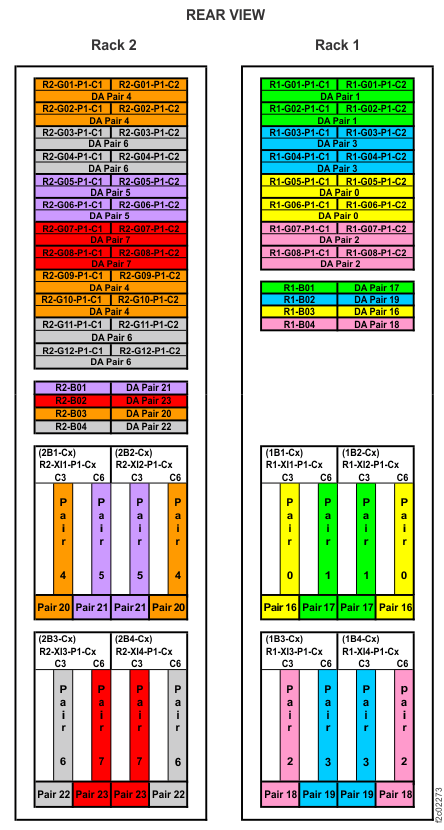
Figure 10. Device adapter pair IDs for storage enclosures (Models 981, 98E (single-phase power)) (rear view, racks 3, 4, 5) 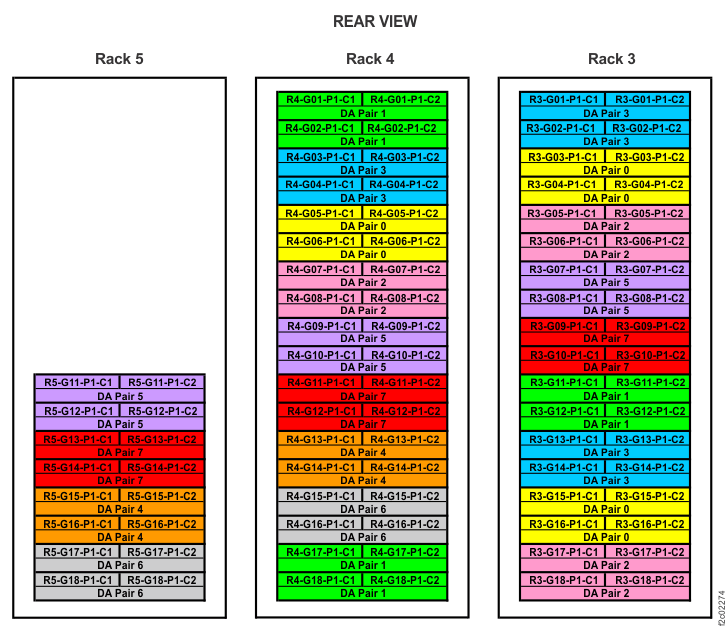
-
Observe the rear of Rack-1 and Rack-2 (three-phase). Note which storage enclosures are present
in locations R2-G01 through R2-G10. Use Table 7, Figure 11, and Figure 12 to determine whether Rack-1 and Rack-2 have
enough DA cards installed.
Note: A complete diagram of device adapter pair IDs for storage enclosures has been included at the end of this section. See Figure 13 and Figure 14.
Table 7. Determining whether Rack-1 and Rack-2 (three-phase) contain the necessary DA card pairs to support Rack-2 storage enclosures If the rear of Rack-2 has a storage enclosure in location:
(See Figure 11)The rear of Rack-1 must have a DA card pair in I/O enclosure locations:
(See Figure 11)The rear of Rack-2 must have a DA card pair in I/O enclosure locations:
(See Figure 11)R2-G01 R1-XI1 Slot C6
R1-XI2 Slot C3
(DA pair 1)Not applicable R2-G03 Not applicable R2-XI1 Slot C6
R2-XI2 Slot C3
(DA pair 5)R2-G05 Not applicable R2-XI3 Slot C6
R2-XI4 Slot C3
(DA pair 7)R2-G07 Not applicable R2-XI1 Slot C3
R2-XI2 Slot C6
(DA pair 4)R2-G09 Not applicable R2-XI3 Slot C3
R2-XI4 Slot C6
(DA pair 6)Zero storage enclosures in locations R2-G01 through R2-G10 Not applicable No DA card pairs required in Rack-2 Do Rack-1 and Rack-2 have the necessary DA cards?- Yes, continue with Inspecting for shipping damage.
- No, stop the installation. To install the existing storage enclosures in Rack-2, you must first install the MESs to add the necessary DA cards. It is possible to continue the installation without installing the MESs, but you will not be able to install the affected Rack-2 storage enclosures. Work with your customer and next level of support to decide how to proceed. If the decision is to proceed, continue with Inspecting for shipping damage.
Figure 11. Rack 1-5 storage enclosure and I/O enclosure location codes (three-phase Models 981, 98E) (rear view) 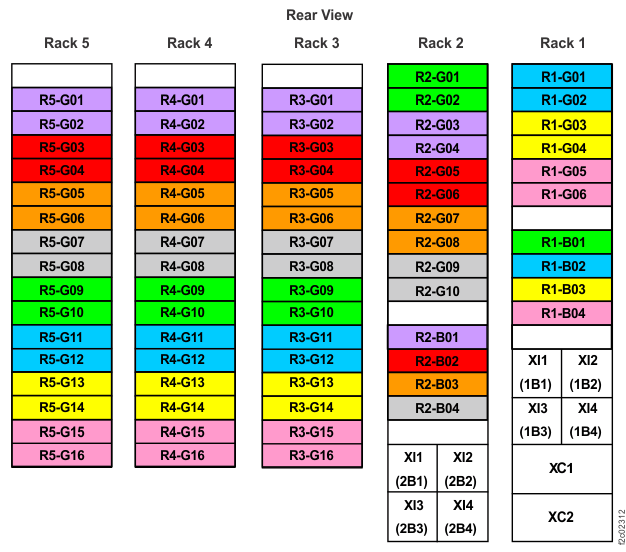
Figure 12. Location codes for device adapter and host adapter cards -
You are installing Rack-5 (three-phase). Observe the front of Rack-4. Use Table 10 and Figure 11 to determine whether Rack-4 has the
specific storage enclosures to connect the FC-AL cables from Rack-5 storage enclosures.
Table 10. Determining whether Rack-5 (three-phase) storage enclosures can be cabled to Rack-4 storage enclosures If the front of Rack-5 has a storage enclosure in location:
(See Figure 11)The front of Rack-4 must have a storage enclosure in location:
(See Figure 11)R5-G02 R4-G02 R5-G04 R4-G04 R5-G06 R4-G06 R5-G08 R4-G08 R5-G10 R4-G10 R5-G12 R4-G12 R5-G14 R4-G14 R5-G16 R4-G16 Does Rack-4 have the necessary storage enclosures to install Rack-5?- Yes, continue with Inspecting for shipping damage.
- No, stop the installation. To install all storage enclosures in Rack-5, you must install the MESs to add the necessary storage enclosures to Rack-4. It is possible to continue the installation without installing the MESs but you will not be able to install all the Rack-5 storage enclosures. Work with your customer and next level of support to decide how to proceed. If the decision is to proceed, continue with Inspecting for shipping damage.
Figure 13. Point-to-point cabling diagram for storage enclosure FC-AL and Flash PCIe cables (Models 981, 98E three-phase power, rear view, racks 1, 2) 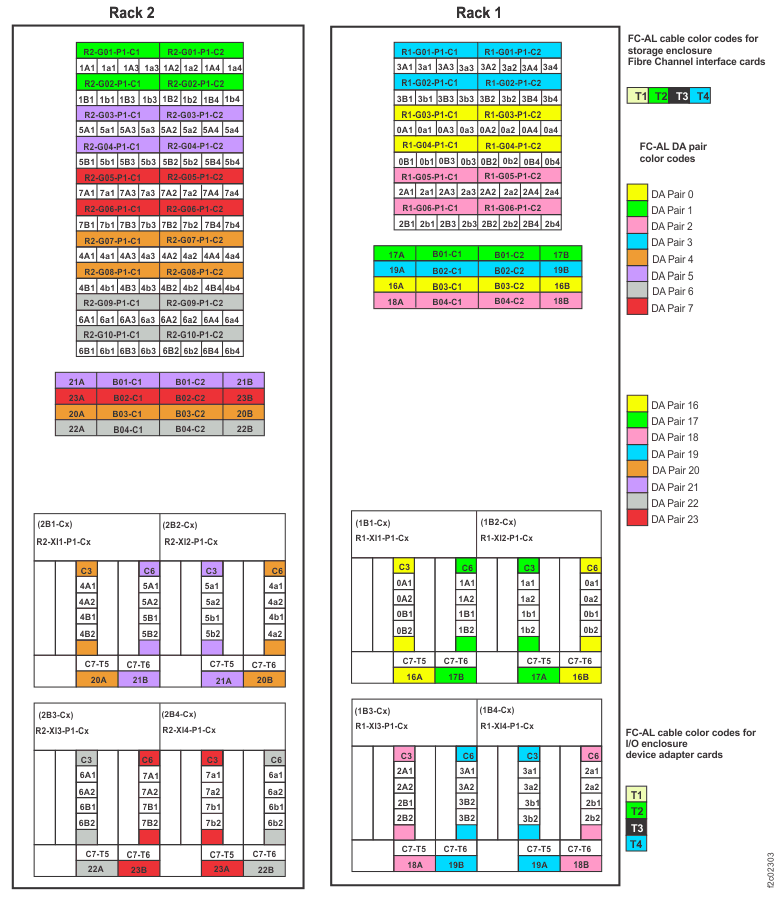
Figure 14. Point-to-point cabling diagram for the FC-AL cables (Models 981, 98E three-phase power, rear view, racks 3, 4, 5) 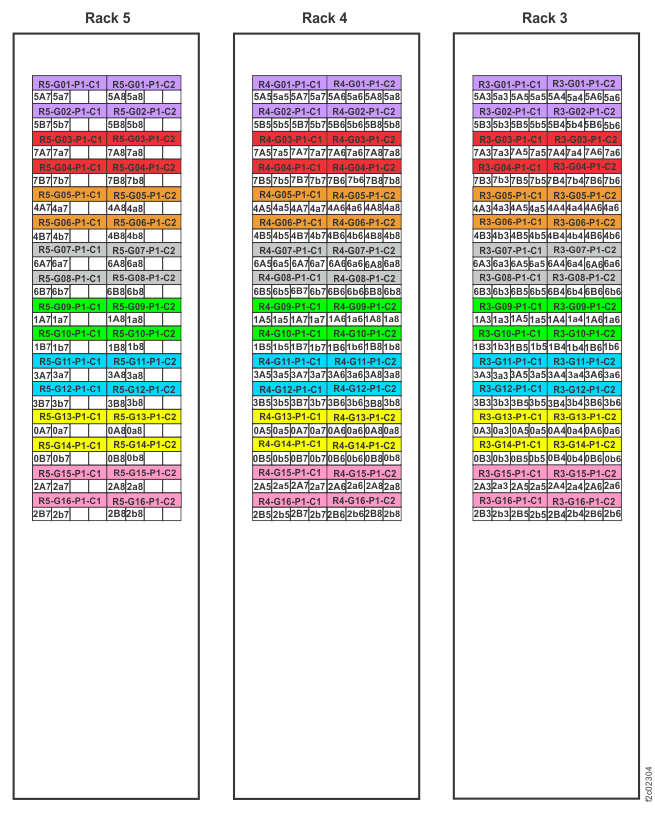
Attention: The remaining steps in this section only apply to model 98B expansion
racks.
-
Determine whether the existing racks have the correct storage enclosures and DA cards to
support the new rack. Refer to Table 11,
Figure 15, and Figure 16.
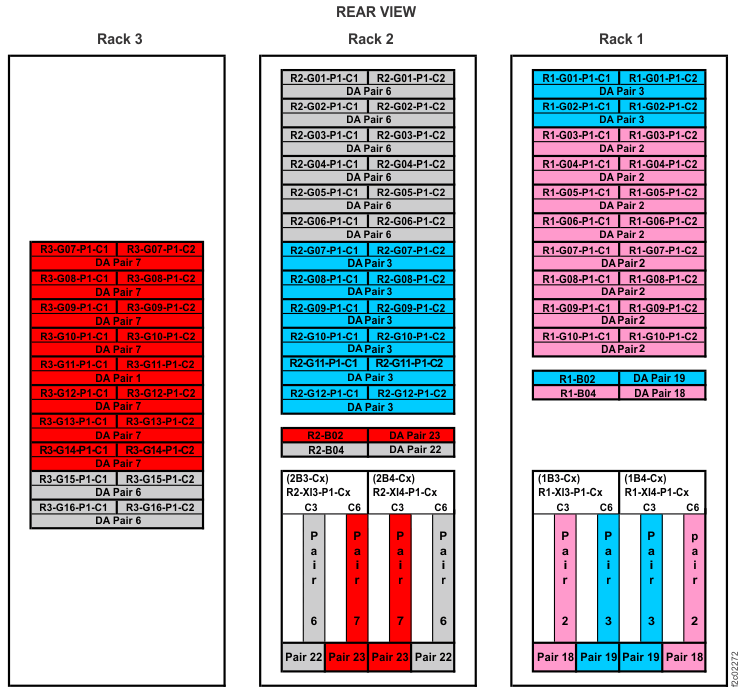
Note: A complete diagram of device adapter pair IDs for storage enclosures is included at the end of this section. See Figure 17.
Table 11. Business class: DA card pairs and corresponding storage enclosures for new expansion rack storage enclosures If new expansion rack has a storage enclosure in location: Existing rack must have a storage enclosure in location: Rack-2 must have a DA card pair in I/O enclosure locations: (see Figure 15) (see Figure 16) R2-G06 - R2-XI3 Slot C3
R2-XI4 Slot C6
(DA pair 6)R2-G12 R1-G02 - zero storage enclosures in Rack-2 locations R2-G01 through R2-G14 - - R3-G14 - R2-XI3 Slot C6
R2-XI4 Slot C3
(DA pair 7)R3-G16 R2-G02 - Do the existing racks have the necessary storage enclosures and DA cards as shown in Table 11?- Yes, continue with Inspecting for shipping damage.
- No, stop the installation. To install all storage enclosures in the new rack, you must use an MES procedure to add the necessary storage enclosures and DA cards to the existing racks. It is possible to continue the installation without completing the MES installation procedure, but you will not be able to install all the storage enclosures in the new rack. Work with your customer and next level of support to decide how to proceed. If the decision is to proceed, continue with Inspecting for shipping damage.
Figure 15. Rack 1-3 storage enclosure and I/O enclosure location codes (Models 980, 98B) (rear view) 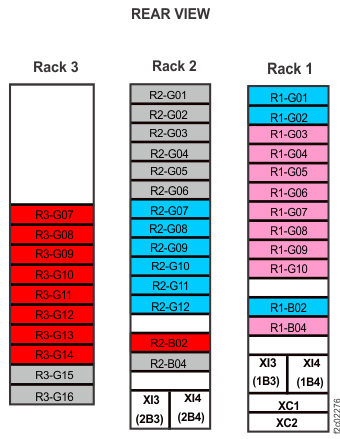
Figure 16. Location codes for device adapter and host adapter cards Figure 17. Device adapter pair IDs for storage enclosures (Models 980, 98B) (rear view, racks 1, 2, 3)