Remove the battery from the small form factor management console
At the product's end of life, measures must be taken to properly remove and recycle battery.
Note: Only IBM® Service personnel are authorized to remove the
battery from the small form factor management console (referred to as management console).
Remove the management console
Complete the following steps to safely remove the battery from the management console.- At the front of the management console, loosen the screw 4 and
carefully pull the tray out of the frame. See Figure 1.
Figure 1. Model 98x management console (front) 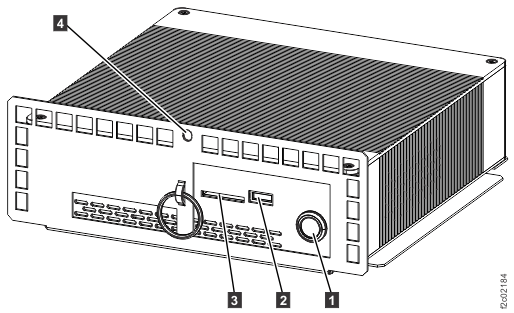
- At the rear of the management console, disconnect the power and communications cables. See Table 1 and Figure 2.
Table 1. Management console connections. Management console connections table Index Management console connection 1 Power 2 Ethernet eth3 (gray) 3 Ethernet eth2 (customer) 4 Ethernet eth0 (black) 5 VGA to keyboard/monitor patch panel 6 USB-2 to modem (cable still exists if modem is not present) 7 USB-3 to keyboard/monitor patch panel 8 Not used Figure 2. Model 98x management console cable connections (rear) 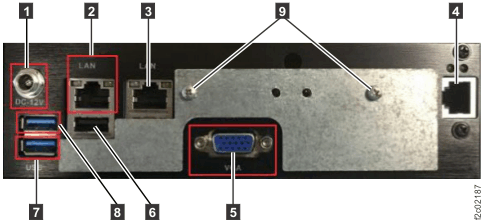
- Remove the management console from the tray by removing four M3 x 8 mm screws with lock washers.
- Remove the bottom cover of the management console. (See Figure 3.)
Figure 3. Underside of management console 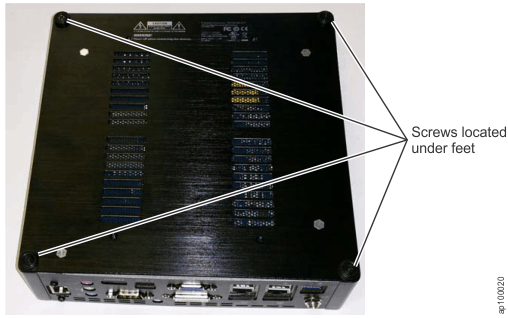
Remove the battery

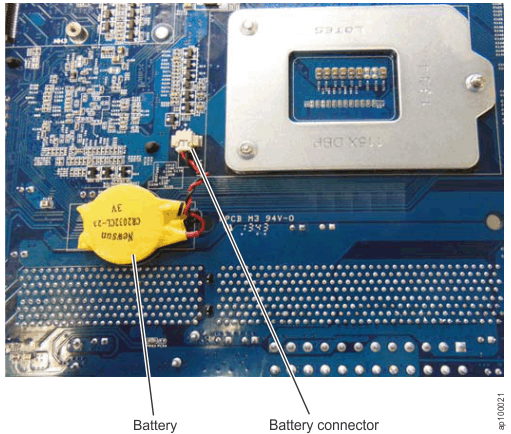
- Unplug the yellow battery from the battery connector and remove the battery. (See Figure 4.)
Figure 4. Battery location inside the management console