Exchange the mainline power cable

Before you begin

CAUTION:
This assembly contains mechanical moving parts. Use care when you service this assembly. (C025)

Icon for electrostatic discharge wrist strapUse approved ESD procedures to prevent damage.

Attention:
  • This procedure is not a stand-alone procedure. Customer disruption and damage to the hardware might occur when microcode and power boundaries are not in the proper conditions for this service action.
  • If a serviceable event FRU repair directed you to this procedure, the microcode and power boundaries are already set.
  • If a serviceable event FRU repair did not direct you to this procedure, see MAP1230 Replace a FRU without using a serviceable event.
Note: All the cables and FRUs to be removed must be uniquely identified so they can be reinstalled correctly.

Remove the mainline power cable

Procedure

  1. Locate the UPS to be replaced.
    1. There is no FRU identify LED indicator for the UPS.
    2. The UPS is part of the storage controller module, the group of enclosures shown in Figure 1.
    3. You must use the FRU location code information to locate the FRU.

      The location code is in the format Unnnn.mmm.ssssss-E6y. Example:
      nnnn = machine type
      mmm = model
      sssssss = storage facility serial number (Not the serial number of the customer-provided rack.)
      y = 1 (upper), 2 (lower)
      See Figure 1.

    4. Use the storage facility serial number label on the front of the management enclosure to confirm.
    Figure 1. Storage controller module (enclosures shown)
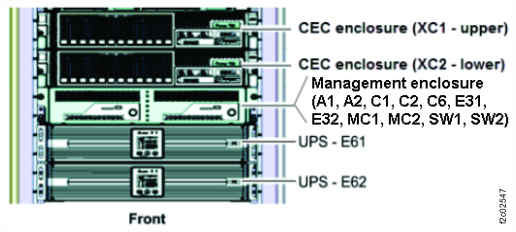
    Storage controller module (enclosures shown)
    Figure 2. Management enclosure front panel
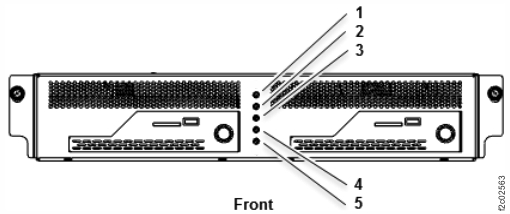
    Management enclosure front panel
  2. Power off the UPS.
    1. At the UPS control panel, press the OFF button for 3 seconds and release it after one beep. See Figure 3.
      Figure 3. UPS control panel
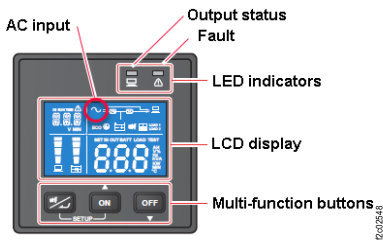
      UPS control panel
    2. Wait 30 seconds. Is the UPS control panel output status green LED indicator off? See Figure 3.
      Note: The control panel displays oFF status.
      • Yes. Go to step 3 to disconnect the input power cable.
      • No. The UPS cannot power down normally. Go to step 3 to force power off (by disconnecting the input power cable).
  3. At the rear of the UPS, unplug the input power cable from J10. See Figure 4.
    1. Loosen, but do not remove, the cable retention bracket screw Callout label 1 and lift up to remove the bracket Callout label 2. See Figure 5.
    2. Unplug the cable.
    Figure 4. UPS connectors (rear view)
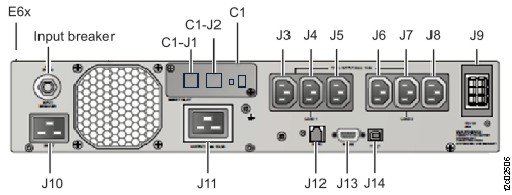
    Location codes for the UPS (Model 983), rear view
    Figure 5. UPS input power cable retention bracket (rear)
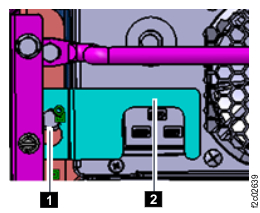
    UPS input power cable retention bracket (rear)
  4. Wait up to 5 minutes until the control panel changes to dark.
    Note: The UPS is temporarily powered by the battery until the "On battery" condition times out.
  5. A new serviceable event is opened for each enclosure power supply that stopped receiving input power when this UPS was powered off. (Management enclosure, CEC enclosures, I/O enclosure, and storage enclosures.)
    1. Wait to display open serviceable events until after the mainline power cable installation is complete.
    2. After the installation, each open serviceable caused by this part exchange is manually closed without repair.

Install the mainline power cable

Procedure

  1. At the rear of the rack, connect the power input cable J10 and install the cable retention bracket. See Figure 5.
  2. Wait up to 2 minutes for the UPS control panel to display status. Select the following that applies. See Table 1.
    Table 1. UPS J10 power connection state on control panel
    Output Status Green LED
    (Figure 6)
    AC icon
    (Figure 7)
    UPS State Go to:
    On On On Step 5
    Off On Standby Step 3
    Off Off Off Step 4
    Figure 6. UPS control panel
    UPS control panel
    Figure 7. UPS control panel LCD display AC icon (upper left)
    AC icon
  3. Standby state indication. Power on the UPS.
    1. Press the UPS control panel Power button for 3 seconds and release it after it beeps.
    2. Wait up to 2 minutes for the Output status green LED to be ON. See Figure 6.
    3. If the UPS Output status green LED is on, go to step 5.
    4. If the UPS Output status green LED is off, observe the AC icon.
      • If the AC icon is on, the UPS is stuck in standby mode. Exit this MAP and replace the UPS.
      • If the AC icon is off, return to step 1.
  4. Off state indication.
    1. If the UPS input breaker above connector J10 is tripped, replace the UPS or reset the breaker and return to step 2.
    2. If the UPS mainline power cable at the UPS J10 connector and the source power connector is not connected properly, correct the problem and return to step 2.
    3. Ensure that the source power connector has power. If it does not, correct the problem and return to step 2.
    4. If the UPS is receiving power, exit this MAP and replace the UPS.
  5. Exit this service information center parts exchange procedure and return to the procedure that sent you here.