Exchange the PJA or I/O enclosure to microbay power cable
Before you begin
 Use approved ESD procedures to prevent damage.
Attention:
- This procedure is not a stand-alone procedure. Customer disruption and damage to the hardware might occur when microcode and power boundaries are not in the proper conditions for this service action.
- If a serviceable event FRU repair directed you to this procedure, the microcode and power boundaries are already set.
- If a serviceable event FRU repair did not direct you to this procedure, see MAP1230 Replace a FRU without using a serviceable event.
Notes:
- All the cables and FRUs to be removed must be uniquely identified so they can be reinstalled correctly.
- If an installed earthquake resistance kit prevents you from accessing this FRU, refer to MAP1600.
Remove the microbay power cable
Procedure
-
At the rear of the rack, locate the microbay power cable
to be replaced.
Figure 1. Model 98x direct power junction assembly (direct PJA) locations - E51, E52, E53, and E54 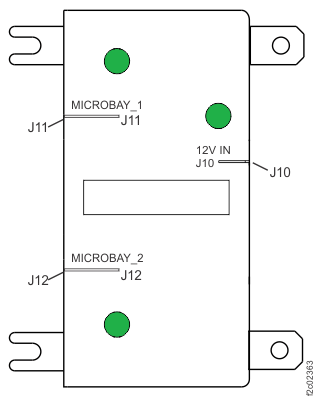
Figure 2. I/O enclosure locations (rear) (models 98x, 8xE) 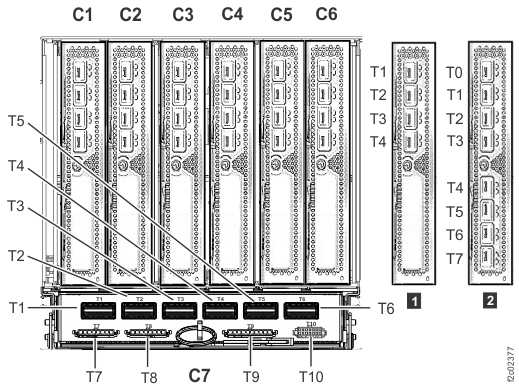
Figure 3. Microbay location codes 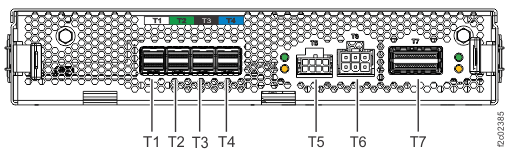
Install the microbay power cable
Procedure
- Route the cable exactly as noted above.
- Connect the cable to the PJA or I/O enclosure and microbay.
- Secure the cable ties.
- Ensure that the microbay power LED (next to J5) is lit (solid or flashing) on the attached microbay.
- Exit this service information center parts exchange procedure and return to the procedure that sent you here.