Management console (MC) server location codes (Models 961, 951, 941)
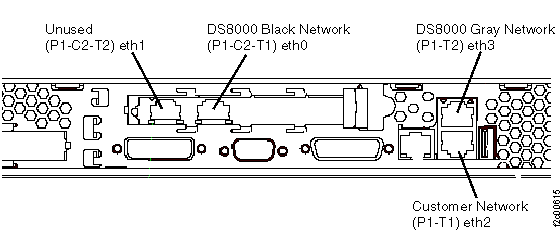
Figure 1 (X335
server), Figure 2 (X336
server), Figure 3 (X3550 server) and Table 1 contain location code
information for the management console (MC) server. For part numbers,
see Management console (MC) part numbers.
x335 management console
x336 management console
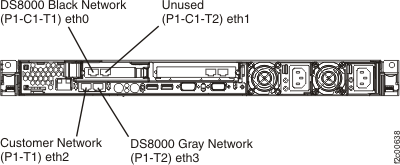
x3550 management console
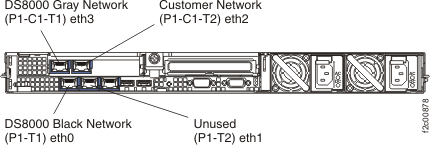
| Location code | Part name | Connected to |
|---|---|---|
| 8676.mmm.sssssss-P1-C2-T1 | Ethernet card | Ethernet |
| 8676.mmm.sssssss-P1-C2-T2 | Ethernet card | (not used) |
| 8676.mmm.sssssss-P1-T1 | System board1 | Ethernet |
| 8676.mmm.sssssss-P1-T2 | System board1 | Ethernet |
Notes:
|
||
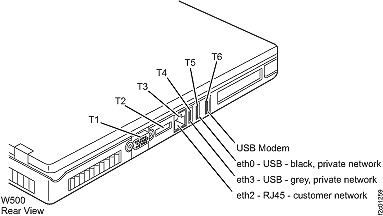
ThinkPad W500 laptop management console
The laptop port location codes are assigned only to allow cabling labels and installation and isolation procedures to reference specific ports. The port location codes are not tracked or reported by the microcode.
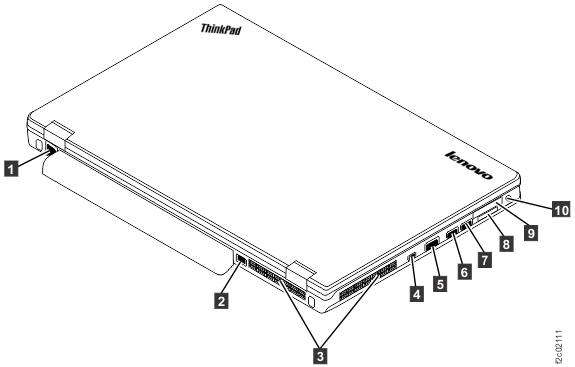
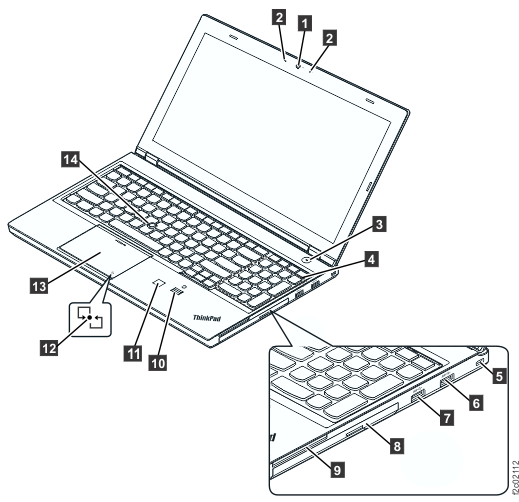
ThinkPad T510, T520, and T530 laptop management console
The laptop port location codes are assigned only to allow cabling labels and installation and isolation procedures to reference specific ports. The port location codes are not are not tracked or reported by the microcode.
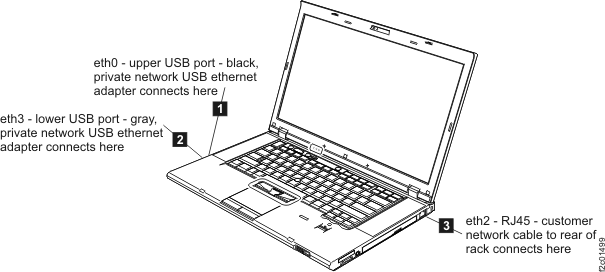
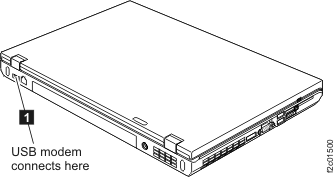
ThinkPad T540 laptop management console
| Cable label | Laptop connection | Port | Use | Refer to |
|---|---|---|---|---|
| T3 or "MGMT CONSOLE" | rear RJ45 Ethernet | eth2 | customer network |  Figure 7 Figure 7 |
| T5 | left side, front USB | eth0 | private network, black |  Figure 7 Figure 7 |
| T4 | left side, rear USB | eth3 | private network, gray |  Figure 7 Figure 7 |
| T6 | right side, rear USB | modem | modem | Figure 8 |