CEC enclosure LED indicators (Models 941, 951)
This section contains FRUs that have LED indicators. Each listed assembly is shown with a description of its LEDs. While CEC enclosure LED indicators might indicate a failure, they should not be used as a starting point for a repair.
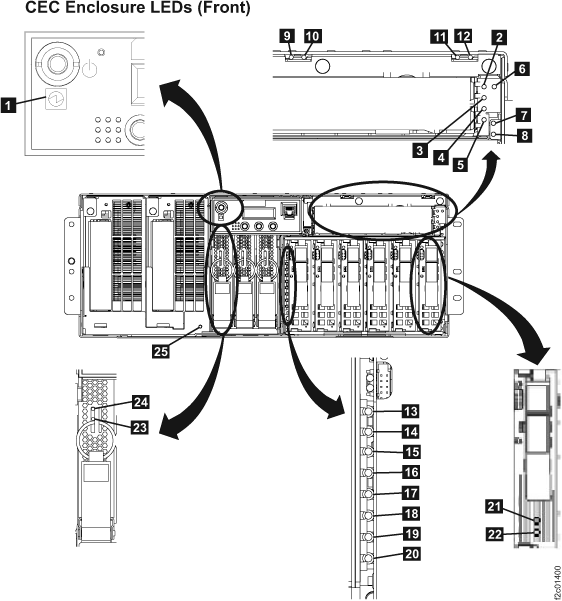
| Index | LED Function | Location | Color | LED Off | LED On | LED Flash |
|---|---|---|---|---|---|---|
| 1 | Power for CEC enclosure | MTMS | green | no input power | enclosure on | enclosure standby |
| 2 | Power for removable media upper slot | P4-D1 | green | power off | power on | n/a |
| 3 | Identify for removable media upper slot | P4-D1 | amber | normal | action | identify |
| 4 | Power for removable media lower slot | P4-D2 | green | power off | power on | n/a |
| 5 | Identify for removable media lower slot | P4-D2 | amber | normal | action | identify |
| 6 | Identify for media backplane assembly | P4 | amber | normal | n/a | identify |
| 7 | Power for CEC enclosure | P4 | green | power off | power on | n/a |
| 8 | Attention and identify for CEC enclosure | amber | normal | attention | identify | |
| 9 | Identify for CEC enclosure fan | A1 | amber | normal | n/a | identify |
| 10 | Power for CEC enclosure fan | A1 | green | power off | power on | n/a |
| 11 | Identify for CEC enclosure fan | A2 | amber | normal | n/a | identify |
| 12 | Power for CEC enclosure fan | A2 | green | power off | power on | n/a |
| 13 | Identify for CEC enclosure disk drive backplane assembly | P3 | amber | normal | n/a | identify |
| 14 | (not used in storage CECs) | |||||
| 15 | Identify for CEC enclosure disk drive | P3-D1 | amber | normal | action | identify |
| 16 | Identify for CEC enclosure disk drive | P3-D2 | amber | normal | action | identify |
| 17 | Identify for CEC enclosure disk drive | P3-D3 | amber | normal | action | identify |
| 18 | Identify for CEC enclosure disk drive | P3-D4 | amber | normal | action | identify |
| 19 | Identify for CEC enclosure disk drive | P3-D5 | amber | normal | action | identify |
| 20 | Identify for CEC enclosure disk drive | P3-D6 | amber | normal | action | identify |
| 21 | Activity for CEC enclosure disk drive | P3-Dx | green | not active | n/a | activity |
| 22 | Identify for CEC enclosure disk drive | P3-Dx | amber | normal | action | identify |
| 23 | Identify for CEC enclosure system processor voltage card | P2-Cx | amber | normal | n/a | fast: identify slow: com fail |
| 24 | Power for CEC enclosure system processor voltage card | P2-Cx | green | standby off | system on | standby |
| 25 | Identify for CEC enclosure system processor backplane assembly | P2 | amber | normal | n/a | identify |
CEC enclosure (left rear)
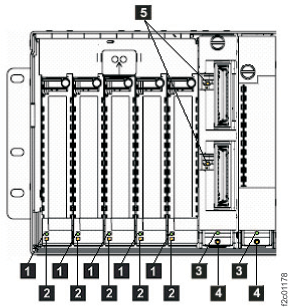
| Index | LED Function | Location | Color | LED Off | LED On | LED Flash |
|---|---|---|---|---|---|---|
| 1 | Power for CEC enclosure PCI slots 1-5 | P1-Cx | green | power off | power on | n/a |
| 2 | Identify for CEC enclosure PCI slots 1-5 | P1-Cx | amber | normal | n/a | identify |
| 3 | Power for CEC enclosure GX slots 8-9 | P1-Cx | green | power off | power on | n/a |
| 4 | Identify for CEC enclosure GX slots 8-9 | P1-Cx | amber | normal | n/a | identify |
| 5 | Identify for RIO ports 1 and 2 | P1-C8-Tx | amber | normal | n/a | identify |
CEC enclosure power supply (rear right)
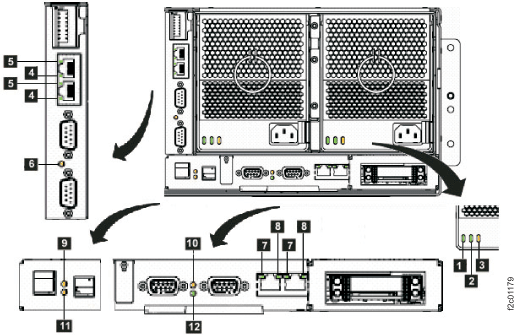
Note: Figure 3 shows a VPD pass-through
card with two Ethernet ports. Some CEC enclosures have a VPD pass-through
card with four Ethernet ports. The cards are functionally equivalent,
and the LED definitions for Ethernet port link (index 4), Ethernet
port activity (index 5), and CEC enclosure identify (index 6) remain
the same.
| Index | LED Function | Location | Color | LED Off | LED On | LED Flash |
|---|---|---|---|---|---|---|
| 1 | Input power for CEC enclosure power supply | E1, E2 | green | no input | input good | n/a |
| 2 | Output power for CEC enclosure power supply | E1, E2 | green | standby off | output on | standby |
| 3 | Identify for CEC enclosure power supply | E1, E2 | amber | normal | n/a | fast: identify slow: com fail |
| 4 | Link for Ethernet port | P1-C10-T1,T2 | green | link bad | link OK | n/a |
| 5 | Activity for Ethernet port | P1-C10-T1,T2 | green | no activity | n/a | activity |
| 6 | Identify for CEC enclosure VPD pass-through card | P1-C10 | amber | normal | n/a | identify |
| 7 | Link for HMC Ethernet port | P1-C11-T3,T4 | green | link bad | link OK | n/a |
| 8 | Activity for HMC Ethernet port | P1-C11-T3,T4 | bi-color | no activity | n/a | green: activity |
| 9 | Attention and identify for CEC enclosure | P1 | amber | normal | attention | identify |
| 10 | Identify for CEC enclosure service processor card | P1-C11 | amber | normal | n/a | identify |
| 11 | Identify for CEC enclosure I/O backplane | P1 | amber | normal | n/a | identify |
| 12 | Network | P1-C11 | green | undefined | undefined | n/a |