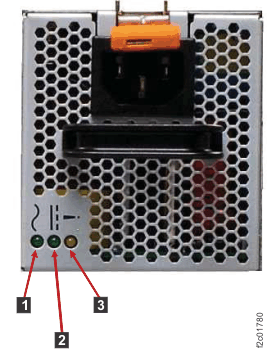
This section contains FRUs that have LED indicators. Each listed assembly is shown with a
description of its LEDs. While CEC enclosure LED indicators might indicate a failure, they should
not be used as a starting point for a repair.
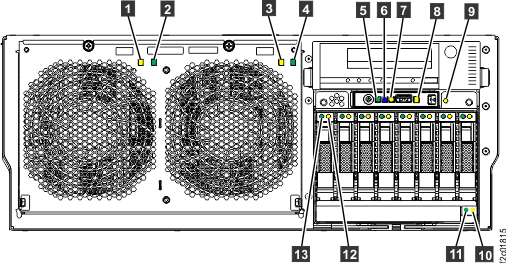
CEC enclosure front LED indicators Figure 1. CEC enclosure front LED indicators
Table 2. Interpreting the LEDs on the front of the CEC enclosure
Index
LED Function
Color
LED Off
LED On
LED Flash
1
Fan fault
Amber
Normal
Fault
Identify
2
Fan power
Green
Standby
Normal
N/A
3
Fan fault
Amber
Normal
Fault
Identify
4
Fan power
Green
Standby
Normal
N/A
5
CEC enclosure power
Green
No input
Normal
Standby
6
CEC enclosure ID
Blue
Normal
N/A
Identify
7
System information / Attention
Amber
Normal
Attention
N/A
8
CEC enclosure fault
Amber
Normal
Fault
Identify
9
Disk drive backplane fault
Amber
Normal
Fault
Identify
10
DVD drive fault
Amber
Normal
Fault
Identify
11
DVD drive activity
Green
Normal
Activity
Activity
12
Disk drive fault
Amber
Normal
Fault
Identify
13
Disk drive activity
Green
Not active
Active
Active
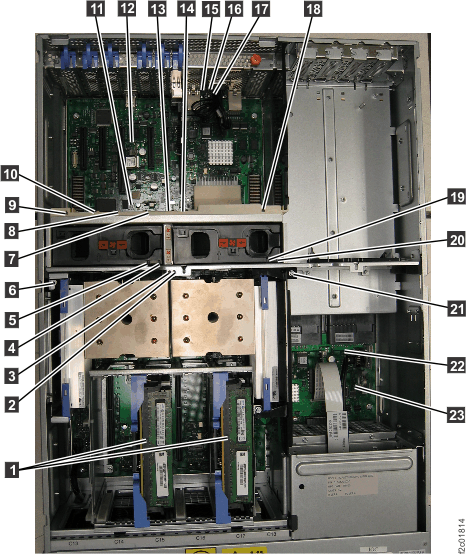
CEC enclosure top LED indicators Figure 2. CEC enclosure top LED indicators
Table 3. Interpreting the LEDs on the top of the CEC enclosure
Index
LED Function
Color
LED Off
LED On
LED Flash
1
Memory card
Amber
Normal
Fault
Identify
2
Processor module (P1-C11 right)
Amber
Normal
Fault
Identify
3
Processor module (P1-C10 left)
Amber
Normal
Fault
Identify
4
Fan power (A1)
Green
Standby
Normal
N/A
5
Fan fault (A1)
Amber
Normal
Fault
Identify
6
Voltage regulator module (P1-C9)
Amber
Normal
Fault
Identify
7
PCIe single-port card (P1-C4)
Amber
Normal
Fault
Identify
8
RS-485 serial interface card (P1-C5)
Amber
Normal
Fault
Identify
9
PCIe three-port card (P1-C8)
Amber
Normal
Fault
Identify
10
Not used. (P1-C6)
Amber
Normal
Fault
Identify
11
System backplane (P1)
Amber
Normal
Fault
Identify
12
Network reset
Amber
Normal
TBD
TBD
13
PCIe single-port card (P1-C3)
Amber
Normal
Fault
Identify
14
Ethernet two-port card (P1-C2)
Amber
Normal
Fault
Identify
15
CEC enclosure fault
Amber
Normal
Fault
N/A
16
System information / Attention
Amber
Normal
Attention
N/A
17
CEC enclosure ID
Blue
Normal
N/A
Identify
18
PCIe three-port card (P1-C8)
Amber
Normal
Fault
Identify
19
Fan (A2)
Amber
Normal
Fault
Identify
20
Fan (A2)
Green
Standby
Normal
N/A
21
Voltage regulator module (P1-C12)
Amber
Normal
Fault
Identify
22
VPD card
Amber
Normal
N/A
Identify
23
TOD battery
Amber
Normal
N/A
Identify
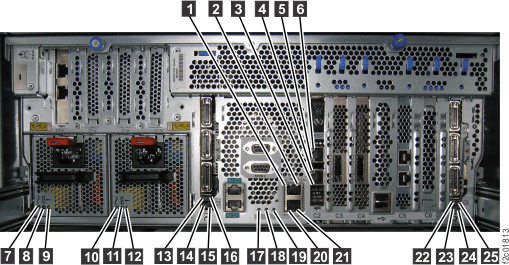
CEC enclosure rear LED indicators Figure 3. CEC enclosure rear LED indicators
Table 4. Interpreting the LEDs on the rear of the CEC enclosure
Index
LED Function
Color
LED Off
LED On
LED Flash
1
Ethernet Link
Green
Not connected
Connected
N/A
2
Ethernet Tx/Rx
Green
Not active
Active
Active
3
Ethernet Link
Green
Not connected
Connected
N/A
4
Ethernet Tx/Rx
Green
Not active
Active
Active
5
Ethernet Link
Green
Not connected
Connected
N/A
6
Ethernet Tx/Rx
Green
Not active
Active
Active
7
Power supply input Good
Green
No input
Input good
N/A
8
Power supply DC Good
Green
Standby off
On
Standby
9
Power supply fault
Amber
Normal
Fault
N/A
10
Power supply input Good
Green
No input
Input good
N/A
11
Power supply DC Good
Green
Standby off
On
Standby
12
Power supply fault
Amber
Normal
Fault
N/A
13
If LED present, not used for field service.
N/A
N/A
N/A
N/A
14
If LED present, not used for field service.
N/A
N/A
N/A
N/A
15
If LED present, not used for field service.
N/A
N/A
N/A
N/A
16
If LED present, not used for field service.
N/A
N/A
N/A
N/A
17
CEC enclosure ID
Blue
Normal
N/A
Identify
18
System information / Attention
Amber
Normal
Attention
N/A
19
CEC enclosure fault
Amber
Normal
Fault
N/A
20
Ethernet Link
Green
Not connected
Connected
N/A
21
Ethernet Tx/Rx
Green
Not active
Active
Active
22
If LED present, not used for field service.
N/A
N/A
N/A
N/A
23
If LED present, not used for field service.
N/A
N/A
N/A
N/A
24
If LED present, not used for field service.
N/A
N/A
N/A
N/A
25
If LED present, not used for field service.
N/A
N/A
N/A
N/A
CEC enclosure control
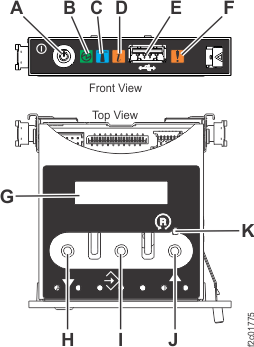
panel assembly LED indicatorsFigure 4. CEC enclosure control panel assembly (Model 961)
Table 5. Interpreting the LEDs on the CEC enclosure control
panel assembly
Index
LED Function
Color
LED Off
LED On
LED Flash
B
Power
Green
No power
Full power
Standby power1
C
Identifier
Blue
Normal
Identify
N/A
D
System information
Amber
Normal
Requires attention
N/A
F
Enclosure fault roll-up light
Amber
Normal
Fault
N/A
G
Function/Data display
Notes:
During CEC power-on there is approximately a 30-second transition
period between blinking to solid when the LED might blink faster.
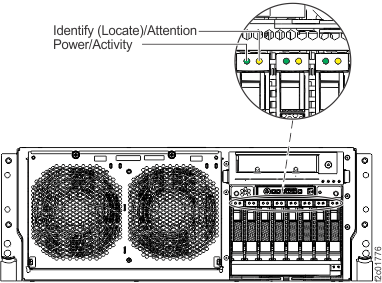
Disk Drive LED indicators Figure 5. CEC enclosure disk drive LED indicators
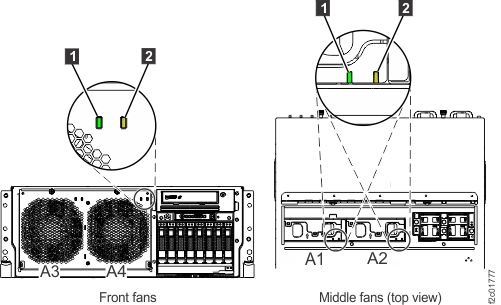
Fan, front and middle, LED indicators Figure 6. CEC enclosure fan LED indicators
Table 6. Interpreting the LEDs on the fan, front
and middle
Index
LED Function
Color
LED Off
LED On
LED Flash
1
Power input
Green
No power
Normal
N/A
2
Fault
Amber
Normal
Fault
N/A
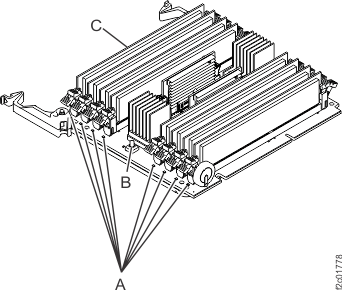
Memory card and memory module LED indicators Figure 7. Memory card and memory module LED indicators
Table 7. Interpreting the LEDs on the memory
card
Index
LED Function
Color
LED Off
LED On
LED Flash
A
Identify/Fault1
Amber
Normal
Identify/Fault
N/A
C
Identify/Fault
Amber
Normal
Fault
Identify
Notes:
Pressing the blue button
Power supply LED indicators Figure 8. Power supply LED indicators
Table 8. Interpreting the LED on the CEC enclosure PCIe three-port
card
Index
LED Function
Color
LED Off
LED On
LED Flash
1
AC power, input
Green
Input off
Normal
N/A
2
DC power, output
Green
CEC off
Normal
3
Error and identify
Amber
Normal
Error
Identify
 identifies the failing memory modules.