Storage enclosure LED indicators (Models 941, 94E)
This section contains storage enclosure FRUs that have LED indicators. Each listed assembly is shown with a description of its LEDs. While LED indicators may indicate a failure, they should not be used as a starting point for a repair.
Storage enclosure FRUs with LEDs
LEDs on the Fibre Channel interface card (FCIC)
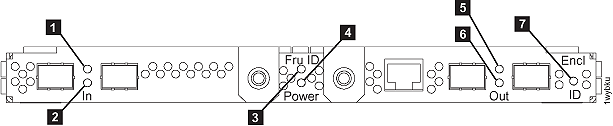
| Index | LED Function | Location | Color | LED Off | LED On | LED Flash |
|---|---|---|---|---|---|---|
| 1 | Status FCIC card port In | P1-Cx-T1 | Green | 1 | normal | n/a |
| 2 | Status FCIC card port In | P1-Cx-T2 | Green | 1 | normal | n/a |
| 3 | Identify FCIC card FRU | P1-Cx | Amber | normal | n/a | identify |
| 4 | Power FCIC card power | P1-Cx | Green | no power | normal | n/a |
| 5 | Status FCIC port Out | P1-Cx-T3 | Green | 1 | normal | n/a |
| 6 | Status FCIC port Out | P1-Cx-T4 | Green | 1 | normal | n/a |
| 7 | Identify Storage enclosure (not FCIC FRU) | P1-Cx | Amber | normal | n/a | identify |
Notes:
|
||||||
LEDs on disk drive modules (DDMs)
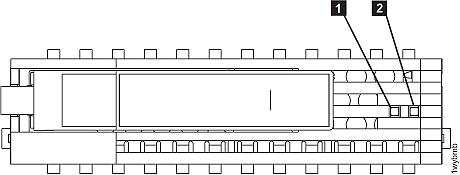
| Index | LED Function | Location | Color | LED Off | LED On | LED Flash |
|---|---|---|---|---|---|---|
| 1 | DDM status | Green | 1 | normal | 2 | |
| 2 | Identify DDM | Amber | normal | n/a | Identify | |
Notes:
|
||||||