This section contains storage enclosure FRUs that have
LED indicators. Each listed assembly is shown with a description of
its LEDs. While LED indicators might indicate a failure, they should
not be used as a starting point for a repair.
Storage enclosure FRUs with LEDs
Table 1. Parts of the storage enclosure that contain
LEDs
Part name
Reference
Storage enclosure
Figure 1
Disk drive module (DDM) -
(24 DDM slot storage enclosure)
Figure 2
Disk drive module (DDM) - (12 DDM slot storage
enclosure)
Figure 3
Fibre channel interface card (FCIC)
Figure 4
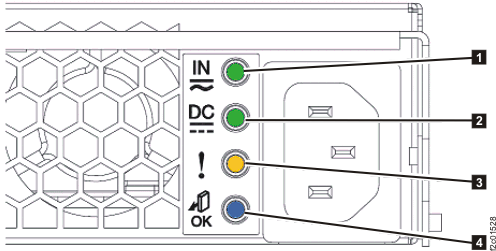
Storage enclosure power supply
Figure 5
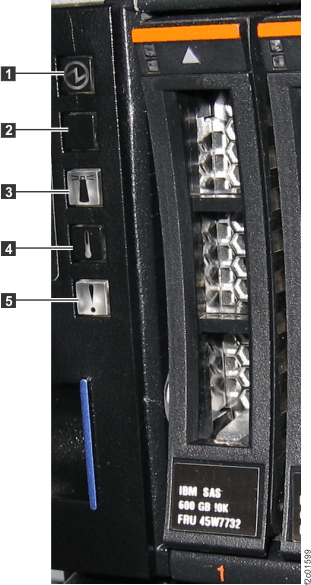
Storage enclosure LEDs Figure 1. Storage enclosure LEDs
Table 2. Storage enclosure LEDs
Index
LED name
LED color
Controlled by
LED state
Description
1
Power
Green
Hardware
Solid on
Storage enclosure is powered
on
Off
Storage enclosure is powered
off
2
Unused
3
Group identify
Blue
Microcode
Solid on
A FRU in this storage enclosure
is being identified
Off
Default state, unused
4
Over Temperature
Amber
Unused
5
Identify
/ Attention
Amber
Microcode
Solid on
Storage enclosure fault
Off
Default state
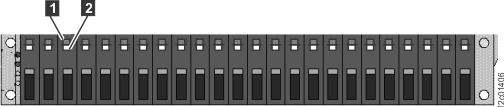
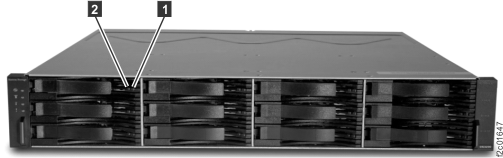
Disk drive modules (DDMs) LEDs Figure 2. Disk drive modules (DDMs) LEDs
(24 DDM slot storage enclosure)
Figure 3. Disk drive modules (DDMs) LEDs
(12 DDM slot storage enclosure)
Table 3. Disk
drive modules (DDMs) LEDs
Index
LED name
LED color
Controlled by
LED state
Description
1
Power / Activity
Green
Hardware
Solid on
Drive spinning, no data transfer
Fast blink
Data transferring
Medium blink
Drive spinning up; 2 sec blink, 50% on 50% off
Slow blink
Drive not spinning up; 2 sec blink, 20% on
80% off
Off
Drive not receiving power
2
Identify / Attention
Amber
Microcode
Solid on
Storage enclosure fault
Off
Default statue
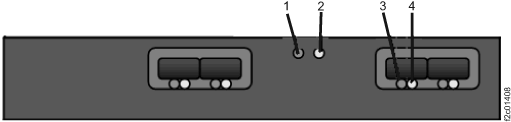
Fibre channel interface card (FCIC) LEDs Figure 4. Fibre channel interface
card (FCIC) LEDs
Table 4. Fibre channel interface card (FCIC)
LEDs
Index
LED name
LED color
Controlled by
LED state
Description
1
Card power
Green
Hardware
Solid on
Power good
Off
Power fault or input power missing
2
Identify / Attention
Amber
Microcode
Solid on
Fault
Blinking
FRU being identified
Off
Default state
3
SFP Status
Green
Firmware
Solid on
FC link active, no data transfer
Blinking
FC link active, data transfer
Off
Card not powered on
No SFP installed
No valid FC link to SFP
4
SFP Identify / Attention
Amber
Microcode
Solid on
Reserved to indicate a fault
Blinking
This FRU being identified
Off
Default state
Storage enclosure power supply LEDs Figure 5. Storage enclosure power supply
LEDs
Table 5. Storage enclosure power supply LEDs
Index
LED name
LED color
Controlled by
LED state
Description
1
DC Input
Good
Green
Hardware
Solid on
DC input good
Off
DC input not within limits
2
DC
Output Good
Green
Hardware
Solid on
DC output good
Off
DC output is off
3
Identify
/ Attention
Amber
Microcode
Solid on
Fault
Blinking
This FRU being identified
Off
Default state
4
Not used
Blue
Microcode
Off
Default state, unused