Power off the storage facility (the
internal HMC if present, stays powered up).
From the navigation area, click Storage Facility Management > storage
facility.
From the bottom Task area, click Service
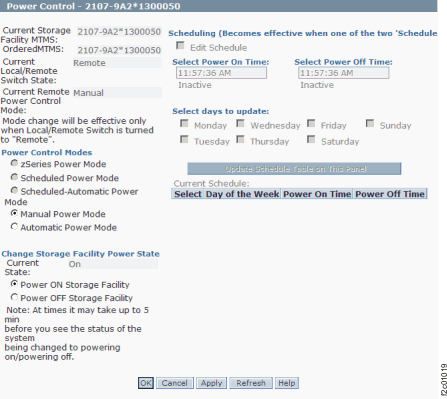
Utilities > Storage Facility Power Control. The Power Control window opens.
Figure 1. Window:
Power Control
In the option group that is labeled Power
Control Modes, select Manual Power Mode.
In the option group that is labeled Change
Storage Facility Power State, select Power
OFF Storage Facility.
Click Apply. To verify that the
current power state changed, click Refresh.
The value in the field labeled Current State changes
to Off.
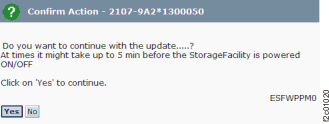
Click OK. A confirmation screen
opens. Click Yes to power off the storage facility.
Figure 2. Window:
Confirm Action
Power on the storage facility.
From the navigation area, click Storage Facility Management > storage
facility.
From the bottom Task area, click Service
Utilities > Storage Facility Power Control. The Power Control window opens.
In the option group that is labeled Power
Control Modes, select Manual Power Mode.
In the option group that is labeled Change
Storage Facility Power State, select Power
ON Storage Facility.
Click Apply. To verify that the
current power state changed, click Refresh.
The value in the field labeled Current State changes
to On.
Click OK. A confirmation screen
opens. Click Yes to power on the storage facility.
Set the HMC to manual power control mode.
From the navigation area, click Storage Facility Management > storage
facility.
From the bottom Task area, click Service Utilities > Storage Facility
Power Control. The Power Control window
opens.
In the option group that is labeled Power
Control Modes, select Manual Power Mode.
Click Apply. To verify that the
current power state changed, click Refresh.
The value in the field labeled Current Power Control Mode changes
to Manual.
Click OK. A confirmation screen
opens. Click Yes to change the HMC to manual
power control mode.