MAP1216 Displaying primary system reference code (SRC) extension words
Use this procedure if you have been directed to display SRC words
of which there can be a total of 10.
MAP1216 Section-1
Procedure
The complete SRC information can contain up to ten words (words
0 to 9). The 8-character SRCs that are most commonly listed in a serviceable event are
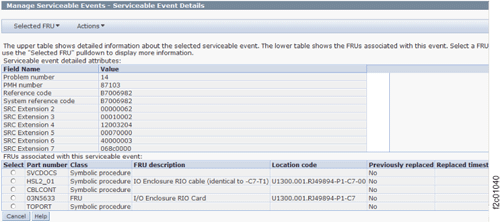
only words 0 and 1. Later levels of the DS8000® LIC code might
display the additional SRC words within the Serviceable Event Details window.
See Figure 1. If
the SRC extension words are not displayed in the Serviceable Event Details
window, go to the next step.
Figure 1. Window:
Serviceable Event Details
The HMC ASMI menu options can be used to display SRCs that have
been recorded in the ASMI error logs that are stored in the service processor.
SRCs that are created by functional code unique to the DS8000 (example:
LPARs, storage enclosures, rack power and cooling) do not store the SRC information
in the service processor, and therefore cannot be displayed.
Use the ASMI menus to display the SRC extension words.