MAP2051 Loss of AC Input to a single DC-UPS DC supply unit (DSU)

The DC-UPS DSU is reporting a loss of line cord AC input. This loss can be caused by a loss of customer line cord power or an internal failure in the DC-UPS DSU.

About this task

This MAP assumes that only one DC-UPS DSU in this storage facility reported a loss of line cord AC input. If more than one DC-UPS DSU in this storage facility lost AC input, a different serviceable event would be created to report customer power problems that did not require a repair action.

MAP2051 Section-1

About this task

Note: If power is restored to the DC-UPS DSU, a new serviceable event with reference code BE19BDAx (where x is the rack number; that is, BE19BDA1, BE19BDA2, BE19BDA3 or BE19BDA4) is created.
Then, this new serviceable event is automatically closed along with the serviceable event that referred to MAP2051. In this case, no further action is necessary.

Procedure

  1. Look for a serviceable event that contains reference code BE19BDAx (where x is the rack number).
    If it exists, this serviceable event is in the Closed state.
    Note the following information:
    1. The location of the affected DC-UPS DSU
    2. The last reported time of the serviceable event

    Did you find a serviceable event that contains reference code BE19BDAx ?

  2. Review the serviceable event that referred to MAP2051.
    Note the following information:
    1. The location of the DC-UPS DSU that reported the loss of line cord AC
    2. The last reported time of the serviceable event
    3. The current state of the serviceable event (Open or Closed)

    Is the serviceable event that referred to MAP2051 now in the Closed state?

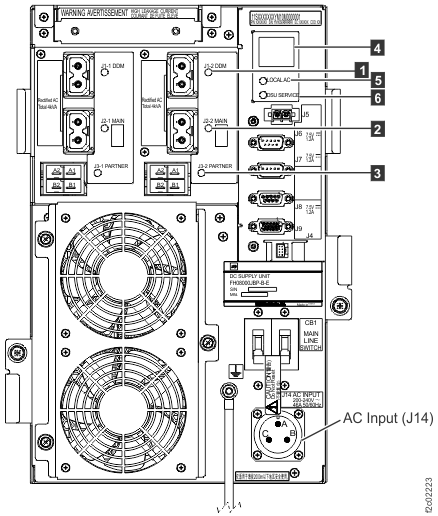
  3. Observe the LOCAL AC LED Callout label 5. See Figure 3, Models 961 or Models 98x, three-phase, or Figure 4, Models 98x, single-phase.
    Is the LOCAL AC LED lit?

MAP2051 Section-2

About this task

Procedure

  1. Using the location for the DC-UPS DSU FRU in the problem record, at the rear of the rack locate the DC-UPS DSU that reported the loss of line cord AC.
    Note: For models 961/96E, the E1 DC-UPS DSU is upper. The E2 DC-UPS DSU is lower. See Figure 1. For models 98x, the E1 DC-UPS DSU is bottom left, the E2 DC-UPS DSU is bottom right. See Figure 2.
    Figure 1. Model 961/96E base rack locations, front and rear
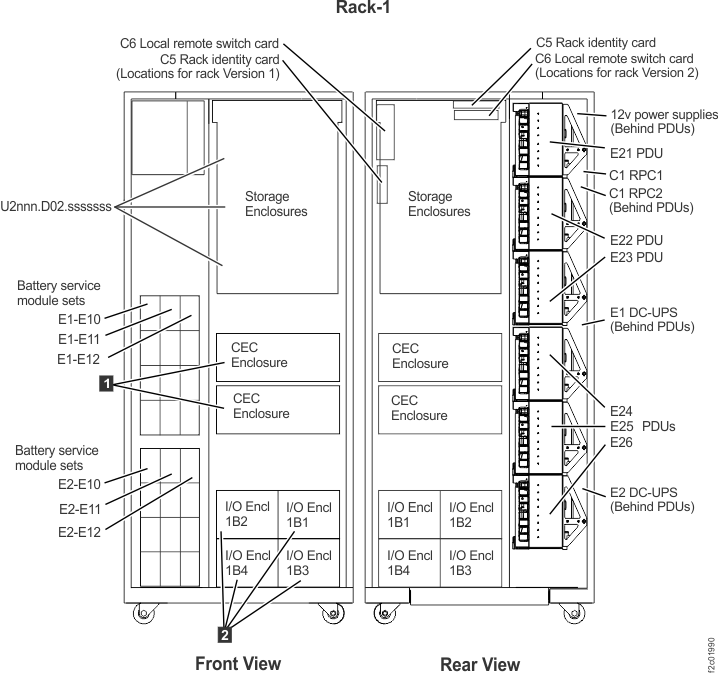
    Base rack locations, front and rear
    Figure 2. Models 980, 981, 982 base rack locations
    Note: Locations for models 980, 981, 982 are shown. DC-UPS locations are similar for models 98x and 8xE.
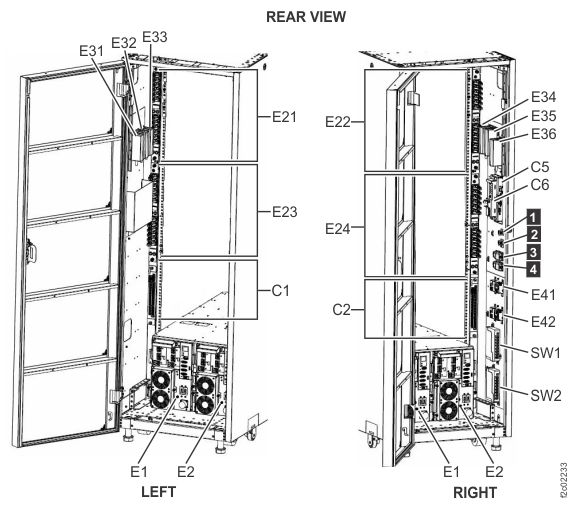
    Model 980, 981, 982 base rack locations
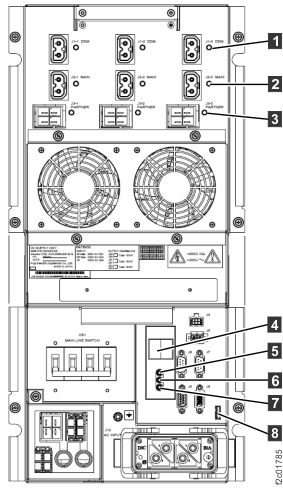
  2. Observe the LOCAL AC LED Callout label 5. See Figure 3, Models 961 or Models 98x, three-phase, or Figure 4, Models 98x, single-phase.
    Is the LOCAL AC LED lit?
    • Yes, go to step 3.
    • No, go to step 4.
    Figure 3. LEDs on the DC-UPS DC Supply Unit (DSU), rear of rack (Models 961, 96E) and Models 98x, three-phase
    LEDs on the DC-UPS DC Supply Unit (DSU), rear of rack
    Figure 4. LEDs on the DC-UPS DC Supply Unit (DSU) (Models 98x, single-phase), rear of rack
    LEDs on the DC-UPS DC Supply Unit (DSU) (Models 98x, 8xE), rear of rack
  3. One of the following conditions applies:
    • The customer AC power to the DC-UPS DSU might have gone off and then been restored. If so, go to step 9.
    • The DC-UPS DSU is incorrectly reporting the loss of line cord AC. Return to the repair screen that sent you here to continue and replace the DC-UPS DSU FRU.
  4. Locate and observe the customer line cord circuit breaker. Is it set to the On position?
    • Yes, go to step 5.
    • No, have the customer determine why the circuit breaker was off. When it is safe, have the customer set the circuit breaker to On and ensure that the DC-UPS DSU powers on properly. Then, go to step 9.
  5. Ensure that all of the power connections between the customer power source and the DC-UPS DSU that is reporting the failure are properly connected before you continue with the next step.
  6. At the rear of the rack, switch the failing DC-UPS DSU input circuit breaker to off (down).
  7. At the rear of the rack, disconnect the mainline power cable from the failing DC-UPS DSU.
  8. Measure the customer power on the line cord to the failing DC-UPS DSU. Use step 2 and step 3 in the procedure Checking customer voltage with customer CB on (wired) to check the line cord voltages.

    Is the correct customer voltage present?

    • Yes, the DC-UPS DSU is failing. Return to the repair procedure to complete the replacement of the DC-UPS DSU. The line cord is reconnected as part of the FRU replacement.
      1. Click Close in the current service information window.
      2. One or more HMC repair screens might prompt you for the result of using the service procedure in the MAP. Select Problem not fixed.
      3. Select No when prompted for whether you exchanged any parts.
      4. Select Yes when prompted for whether you isolated the problem.
      5. Select the DC-UPS DSU from the FRU list. The HMC begins the FRU exchange process for the selected FRU.
    • No, ensure that the line cord is correctly connected to the customer power system. Report the problem to the customer, and after they restored proper power that you can verify by measuring once again, complete the repair procedure for the DC-UPS DSU. These steps should reset any DC-UPS DSU fence that occurred. Then, go to step 9 to ensure that the DC-UPS DSU is available.
  9. The functional code might have fenced (removed from active use) the DC-UPS DSU as part of the error recovery. Determine whether the DC-UPS DSU is fenced.
    1. Start the View Storage Facility State task:
      • In the Service interface, click Storage Facility Management > storage facility:
        1. From the navigation area, click Storage Facility Management > storage facility.
        2. From the bottom Task area, click Service Utilities > View Storage Facility State.
      • In the DS8000 storage management GUI system area, click Service > Storage System > View Storage Facility State.
    2. A window displays the status (passed/failed) of 25 or more system checks.
    3. At the bottom of the System Check Type column, observe the status of the Fenced Resources.

    Find the status that is displayed:

    • PASSED (no resources are fenced), close the serviceable event and exit this MAP.
    • FAILED, go to step 10.
  10. Display the fenced resource details.
    1. Click Fenced Resources to highlight it.
    2. Click Details.

      Does the Details screen list the DC-UPS DSU as a fenced resource?

    • Yes, go to step 11.
    • No, the DC-UPS DSU is not fenced. Close the serviceable event and exit this MAP. There should be serviceable events for resources that are fenced. These fenced resources need to be repaired.
  11. The DC-UPS DSU fence needs to be reset by using the DC-UPS DSU FRU replace procedure. Return to the repair screen you followed to this point and do a pseudo repair of the FRU. A pseudo repair of the DC-UPS DSU means that you use the normal FRU replacement procedures, but you do not replace the DC-UPS DSU.
    1. Read all these substeps before you go to substep b, which closes this information center window. To view this MAP in a separate information center window, click Help in the upper right corner of the main HMC GUI screen and navigate to the MAP.
    2. Click Close in the current service information window.
    3. One or more HMC repair screens might prompt you for the result of using the service procedure in the MAP. Select Problem not fixed.
    4. Select No when prompted for whether you exchanged any parts.
    5. Select Yes when prompted for whether you isolated the problem.
    6. Select the DC-UPS DSU from the FRU list. The HMC begins the FRU exchange process for the selected FRU.