MAP2061 Only one DC-UPS in the rack reports a UEPO power-off request (Model 961, 96E)

Use this procedure when only one DC-UPS of a pair of DC-UPSs in the same rack is reporting that the UEPO circuit loop through the UEPO switch is open. The other DC-UPS is reporting the UEPO circuit loop through the UEPO switch is closed (normal operation).

MAP2061 Section-1

Procedure

  1. Use the FRU list to determine the location of the DC-UPS reporting the UEPO circuit open loop.
    Note: All The DC-UPS LED indicators will be off. The internal processor logic is still active.
  2. Is the Ex-J5 cable properly connected to rear of the DC-UPS? See Figure 1.
    • Yes, continue at the next step.
    • No, go to step 4.
    Figure 1. Location codes for the DC-UPS (Models 961, 96E) (rear)
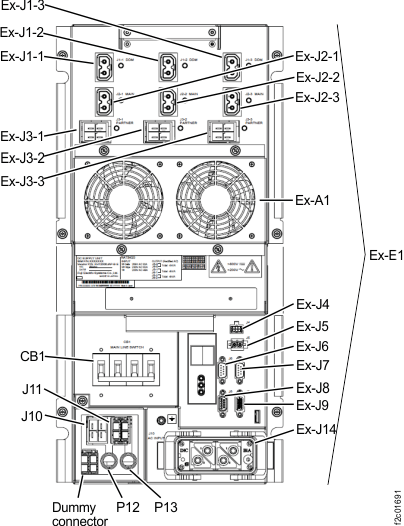
    Location codes for the DC-UPS (Models 961, 96E) (rear)
  3. At the front of the rack, visually inspect the rack UEPO switch. See Figure 2.

    Is the switch in the full up position (not UEPO)?

    • Yes, continue at the next step.
    • No, the switch needs to be set to the full up position. Schedule a time with the customer when they can stop all host activity or when the storage facility can be powered off.
    Figure 2. UEPO switch
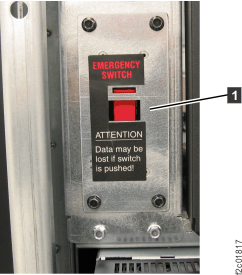
    UEPO switch
  4. Check the continuity of the UEPO circuit through the UEPO cable and switch.
    Note: The cable is hard-wired to the UEPO switch. The UEPO switch and cable FRU control both DC-UPSs in the rack. The switch is a double-pole, single-throw switch. Each DC-UPS has its own dedicated two-wire loop through the UEPO switch.
    1. Disconnect the UEPO cable from the failing DC-UPS J5 connector.
    2. Use a digital volt/ohm meter to check the continuity between the two wires of the cable connector.

    Is the continuity 1 ohm or less?

    • Yes, the UEPO cable and switch are working properly. Return to the screen that sent you here to replace the DC-UPS DC supply unit (DSU) FRU.
    • No, replace the UEPO switch and attached cable. Go to Exchange the UEPO switch and cable assembly.