MAP2090 Primary power supply 208 VDC overcurrent
Use this procedure when the primary power supply (PPS) reports an overcurrent in the 208 VDC power boundary.
About this task
DANGER
Hazardous
voltage, current, or energy levels are present inside of a component
to which this label is attached. (L001) 
MAP2090 Section -1
Procedure
- Observe the LED on the PPS sequencer module labeled
S0
 .
.  shows the disable/enable switch.
 Figure 1. PPS sequencer module and LED enable/disable switch 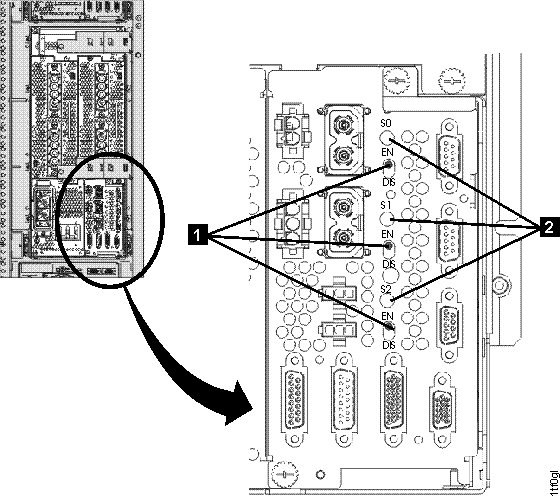 Find the condition that applies:
- LED is amber, go to the next step.
- LED is green, the failure is not occurring now so you will not be able to isolate the problem with this MAP. Exit this MAP and close the problem.
- The LED is amber. Disconnect the cable from the PPS sequencer module to the 208 VDC
bus bar. Reset the
S0
output by setting the enable/disable switch below the LED to disable (down) and then enable (up).Figure 2. Disconnecting the cable from the PPS sequencer module to the 208VDC bus bar 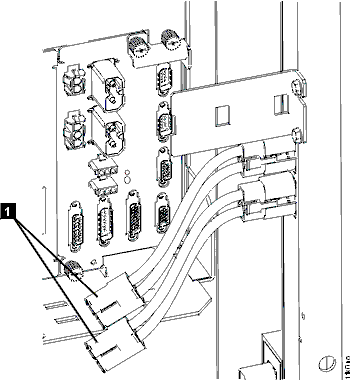
- Observe the LED on the PPS sequencer module labeled
S0
. Find the condition that applies:
- LED is amber, the PPS is failing. Return to the repair screen to continue the repair and replace the PPS.
- LED is green, the failure is external to the PPS. Go to the next step.
- Observe the LED on the PPS sequencer module labeled
- There is an overcurrent in the bus bar distribution system.
Note: The power supplies connected to the output connectors of the secondary 208 VDC bus bar are protected by individual fuses as shown in Figure 3. Those fuses would blow before the PPS would detect an overcurrent.The possible failing FRUs are:
- PPS to primary 208 VDC bus bar cable
- Primary 208 VDC bus bar

- Primary 208 VDC bus bar to secondary 208 VDC bus bar cable

- Secondary 208 VDC bus bar

Figure 3. Power supplies connected to output connectors of the 208VDC bus bar 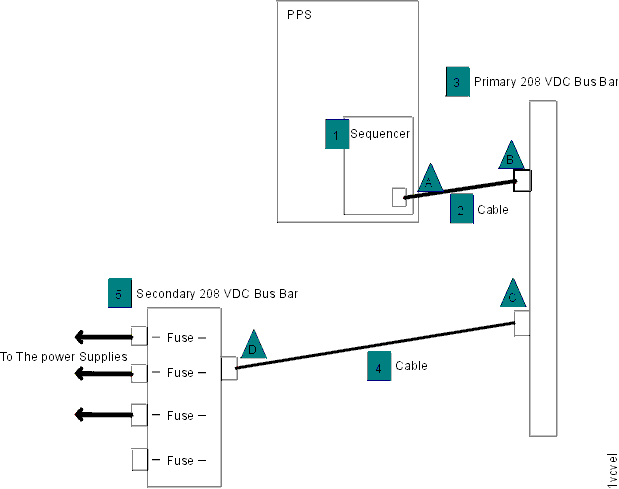
- PPS to primary 208 VDC bus bar cable
- Disconnect cable from connector C. Reset the
S0
output by setting the enable/disable switch below the LED to disable (down) and then enable (up).- Observe the LED on the PPS sequencer module labeled
S0
. Find the condition that applies:
- LED is amber, the failing FRU is cable or bus bar. Go to the next step.
- LED is green, the failing FRU is cable or bus bar . Go to step 7.
- Observe the LED on the PPS sequencer module labeled
- Disconnect cable at connector B. Reset the
S0
output by setting the enable/disable switch below the LED to disable (down) and then enable (up). Observe the LED on the PPS sequencer module labeledS0
. Find the condition that applies: - Connect cable to connector C.
- Disconnect cable from connector D. Reset the
S0
output by setting the enable/disable switch below the LED to disable (down) and then enable (up). Observe the LED on the PPS sequencer module labeledS0
. Find the condition that applies:
- Disconnect cable
- Select the FRU to be replaced:
FRU to replace Action PPS to primary 208 VDC bus bar cable Go to Cables to replace the FRU and then go to the next step. Primary 208 VDC bus bar cable Go Cables to replace the FRU then return to the next step. Primary 208 VDC bus bar to secondary 208 VDC bus bar cable Replace the FRU and then go to the next step. Secondary 208 VDC bus bar Go to Exchange the bus bar, 208VDC secondary to replace the FRU and then return to the next step.