MAP20B0 Protected 208 VDC is off for both PPSs

The protected 208 VDC output is off for both PPSs. Either both PPSs have the enable/disable switch set to disable, or both PPSs have an overcurrent condition on output P9/P10 connectors.

MAP20B0 Section-1

Procedure

  1. Determine the location of the failing primary power supply (PPS) by using the location code listed in the problem FRU list. Both PPSs in the same frame should be listed.
  2. Observe the S1 LED on the sequencer module for each PPS.
    Figure 1. LED basic power supply
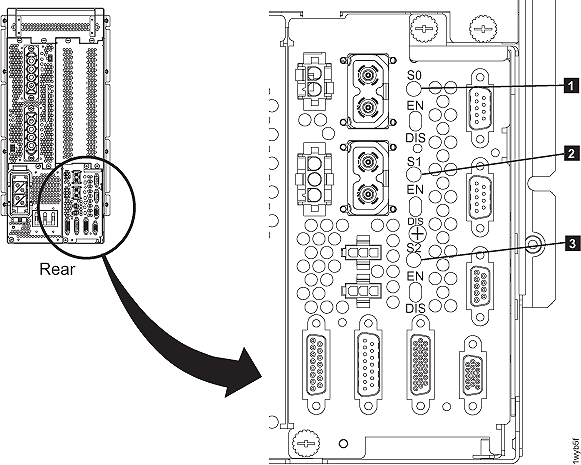
    LED basic power supply

    Find the condition that applies:

    • LED is amber, go to step 3.
    • LED is green, the failure is not occurring now so this MAP will not be able to isolate it. Exit this MAP and close the problem.
  3. Observe the S1 enable/disable switch on the sequencer module of each PPS FRU. Is either switch in the disable position?
    • Yes, set the switch to the enable position. Return to the repair process screen and do a pseudo repair of the next FRU in the list. This will run verification tests to ensure the repair is successful. Note: A pseudo repair means you use the normal procedures to replace the FRU, but do not exchange the original FRU with a new FRU. You still must power off, disconnect cables, and physically remove the FRU as guided. This ensures the error conditions are properly reset and all verification tests, including FRU power on self-test, are correctly run.
    • No, there may be an overcurrent condition. Go to step 4.
  4. Determine if PPS-1 is creating an overcurrent condition. Disconnect the cable from the PPS-1 sequencer module connector J9. Reset the "S1" output on both PPSs by setting the enable/disable switch below the LED to disable (down) and then enable (up). Does the PPS-1 S1 LED display green?
    • Yes, PPS-1 is not failing. Reconnect the cable and then go to step 5.
    • No, PPS-1 is failing and needs to be replaced. Return to the repair screen to select and replace the FRU.
  5. Determine if PPS-2 is creating an overcurrent condition. Disconnect the cable from PPS-2 sequencer module connector J9. Reset the "S1" output on both PPSs by setting the enable/disable switch below the LED to disable (down) and then enable (up). Did the PPS-2 S1 LED display green?
    • Yes, PPS-2 is not failing. Reconnect the cable and then go to step 6.
    • No, PPS-2 is failing and needs to be replaced. Return to the repair screen to select and replace the FRU.
  6. Both PPSs are not failing, but there is an overcurrent condition present. The cable connected to J9 of each PPS is a single Y cable that connects to both PPS J9 connectors and also to the following in this rack:
    • the management console eServerâ„¢ enclosure (if present)
    • the management console display/keyboard enclosure (if present)
    • both Ethernet switches (if present)

    The enclosures previously listed should already be in a powered off state from the overcurrent failure.

  7. Determine which enclosure is causing the overcurrent.
    1. Unplug the power input cable from each enclosure, one at a time.
    2. Reset the "S1" output on both PPSs by setting the enable/disable switch below the LED to disable (down) and then enable (up).
    3. Observe the sequencer module S1 LED.

      Do both PPS S1 LEDs display green?

    • Yes, the enclosure just unplugged is failing. Repair or replace the enclosure. Return to the display screen that sent you here to replace the failing FRU. Remember to close any related problem records when the repair is complete. There may be repair records for network failures.
    • No, reconnect the power input cable to the enclosure and repeat this step for the next enclosure. If all enclosures have been tested and it still fails, replace the cable assembly.