MAP2112 Activating or Deactivating CEC or I/O enclosure indicators
About this task
Attention: For models 98x,
this MAP applies only to the CEC enclosure. Do not use this MAP for
I/O enclosures.
You can test CEC and I/O enclosure indicators (LEDs) by using the ASMI menus.
MAP2112 Section-1
Procedure
- To test or display the status for:
- System attention indicator for CEC enclosure
 in Figure 1, go to MAP2112 Section-2.
 - System information indicator D in Figure 2 (model 961), go to MAP2112 Section-2.
- System information indicator C in Figure 3 (models 98x), go to MAP2112 Section-2.
- Identity indicators, go to MAP2112 Section-3
- Indicators by location code, go to MAP2112 Section-4
- All indicators (lamp test), go to MAP2112 Section-5
Figure 1. The Identify/Attention indicator (LED) on a CEC enclosure (front view), Models 951, 941, and earlier models 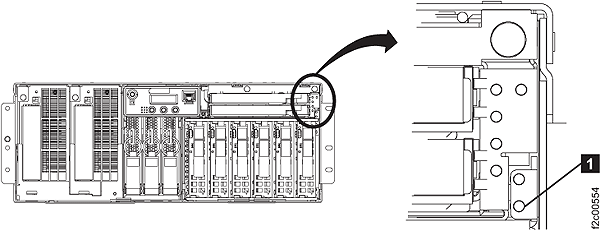
Figure 2. Control panel LEDs, Model 961 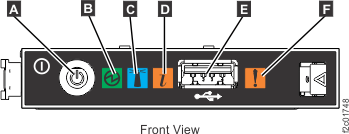
Figure 3. Control panel LEDs, Models 98x 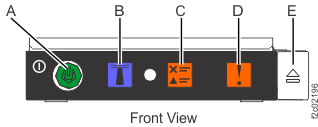
- System attention indicator for CEC enclosure
MAP2112 Section-2
About this task
Note: For models 951, 941, and earlier models,
the System Information Indicator is referred
to as the System Attention Indicator.
Procedure
MAP2112 Section-3
Procedure
MAP2112 Section-4
Procedure
MAP2112 Section-5
Procedure
- Log in to the ASMI menus. Refer to MAP6F10 Accessing the ASMI using the management console.
- Expand System Configuration, select Service Indicators, select Lamp test.
- All CEC and I/O enclosure indicators light for 4 minutes and then automatically turn off.