MAP2222 DC-UPS communication failure to both RPC cards (Models 961 and 98x)
One or more communications paths to the DC-UPS DSU are failing.
MAP2222 Section-1
Procedure
-
Inspect the following cables. (Model 96x or 98x
three-phase, see Figure 1; Model 98xsingle-phase, see Figure 2.)
- If the Ex-J9 (DC-UPS DSU to DSU communication cable) appears damaged or misplugged, go to step 2.
- If the Ex-J6 or Ex-J7 (RPC card to DC-UPS cable) appears damaged or misplugged, go to step 3.
- For Models 96x, if the Ex-J5 (UEPO switch and cable assembly) appears damaged or misplugged, go to step 4.
- For Models 98x, if the Ex-J5 (UEPO connector block) appears damaged or missing, order a new one. To install, you must do a pseudo-repair of the DSU.
- If you did not find any damaged or mis-plugged cables, exit this procedure and replace the DC-UPS DSU FRU listed in the serviceable event.
Figure 1. Location codes for the DC-UPS (Models 961, 96E, 98x three-phase) (rear) 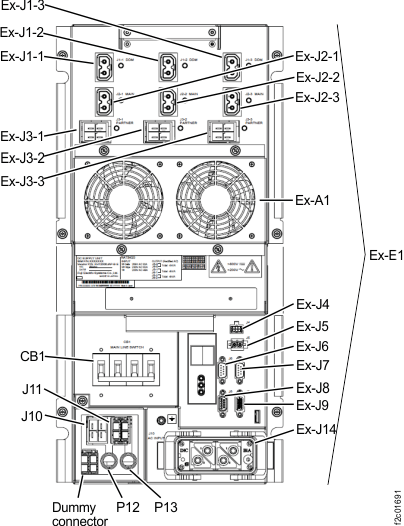
Figure 2. Location codes for the DC-UPS (Models 98x, single-phase) (rear) 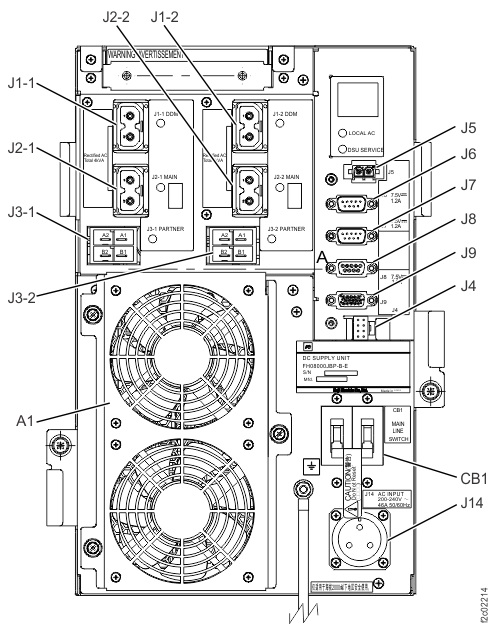
- Read the following and then select the
appropriate action.
-
If there is a DSU to DSU communication error, "XA" should be displayed in the DSU status
display
 . See Figure 3 for Models 96x or 98x three-phase; see Figure 4 for Models 98x
single-phase.
Note: DSU status codes are defined in MAP2341 Codes on the DC-UPS DSU status display. MAP2341 is not used to begin repairs.
. See Figure 3 for Models 96x or 98x three-phase; see Figure 4 for Models 98x
single-phase.
Note: DSU status codes are defined in MAP2341 Codes on the DC-UPS DSU status display. MAP2341 is not used to begin repairs.
Figure 3. LEDs on the DC-UPS DC Supply Unit (DSU) (Models 961, 96E, 98x, 8xE three-phase), rear of rack 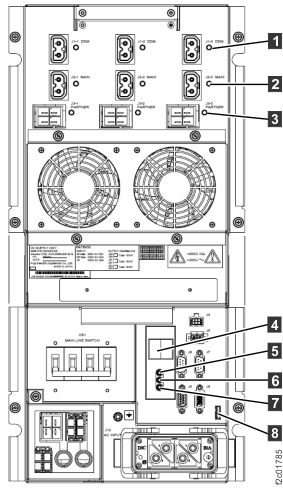
Figure 4. LEDs on the DC-UPS DC Supply Unit (DSU) (Models 98x, 8xE single-phase), rear of rack 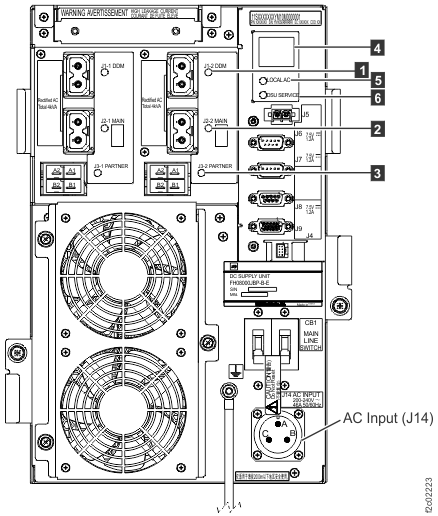
-
If there is a DSU to DSU communication error, "XA" should be displayed in the DSU status
display