MAP22A0 Standby power overcurrent failure detected by PPS-1 and PPS-2

Both primary power supplies have reported a standby power overcurrent failure.

About this task

There are four separate standby power outputs from each PPS that provide power as soon as line cord AC is available. Each of the four standby power outputs is shared by both PPSs, so a short on any of the four outputs will create an overcurrent in both PPSs. A short on one output will not affect the other three outputs. The four outputs go to the following:
  • RPC-1 card (also provides power to the rack identity card and local remote switch card)
  • RPC-2 card (also provides power to the rack identity card and local remote switch card)
  • Front fan sense card (Model 941 only)
  • Rear fan sense card (Model 941 only)

Procedure

MAP22A0 Section-1

Procedure

Determine which standby power output circuit has the overcurrent.
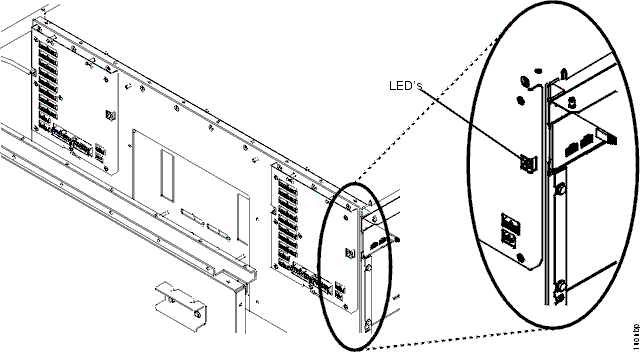
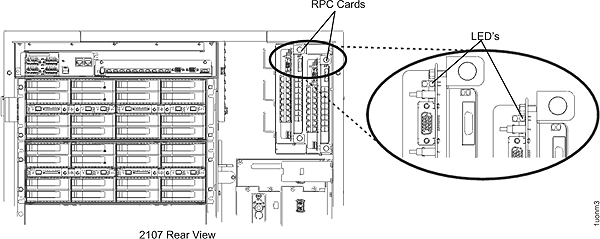
  1. At the rear of the rack, observe the green LED near the top of both RPC cards.
  2. Model 941 only: At the front of the rack, observe the green LED on the front and rear fan sense cards. Do one of the following:
    Green LED display Action
    RPC-1 card LED is off Go to MAP22A0 Section-2
    RPC-2 card LED is off Go to MAP22A0 Section-3
    Front fan sense card LED is off Go to MAP22A0 Section-4
    Rear fan sense card LED is off Go to MAP22A0 Section-5
    Figure 1. RPC cards and green LEDs
    enter alt text here
    Figure 2. Fan sense cards and LEDs
    Fan sense cards and LEDs

MAP22A0 Section-2

About this task

The green LED located on RPC-1 card is off so that card does not have power and the failure is in the associated standby voltage distribution network.

Procedure

  1. At the front of the rack, observe and record the error code on the PPS status display. This will be considered the original value. Both PPSs will be displaying the same value.
  2. Disconnect the cable at J201 (location C1-T201) on the RPC-1 card. Observe the display on PPS-1. Has the display value changed from the original value?
    • Yes, plug in the cable at J201 and then go to step 3.
    • No, plug in the cable at J201 and go to step 5.
  3. Disconnect the cable at J1 (location C1-T1) on the rack identity card. Observe the display on PPS-1. Has the display value changed from the original value?
  4. Disconnect the cable at J1 (location C1-T1) on the RPC-1 card. Observe the display on PPS-1. Has the display value changed from the original value?
    • Yes, the failure has been isolated. Use the replace FRU option to replace the cable from the RPC-1 card to the rack identity card (PSCBL0B).
    • No, the failure has been isolated. Use the replace FRU option to replace the RPC-1 card (cpRPC0)
  5. Disconnect the cable at J1 (location E1-T1) on PPS-1. Observe the display on PPS-1. Has the display value changed from the original value?
    • Yes, plug in the J1 cable and then go to step 6.
    • No, the failure has been isolated. Use the replace FRU option to replace PPS-1 (cpPPS-10).
  6. Disconnect the cable at J1 (location E2-T1) on PPS-2. Observe the display on PPS-2. Has the display value changed from the original value?
    • Yes, the failure has been isolated. Use the replace FRU option to replace the cable that connects the RPC-1 card and both PPSs (PSCBL0E).
    • No, the failure has been isolated. Use the replace FRU option to replace PPS-2 (cpPPS11).

MAP22A0 Section-3

The green LED located on RPC-1 card is off so that card does not have power and the failure is in the associated standby voltage distribution network.

Procedure

  1. At the front of the rack, observe and record the error code on the PPS status display. This will be considered the original value. Both PPSs will be displaying the same value.
  2. Disconnect the cable at J201 (location C1-T201) on the RPC-2 card. Observe the display on PPS-1. Has the display value changed from the original value?
    • Yes, plug in the cable at J201 and then go to step 3.
    • No, plug in the cable at J201 and go to step 5.
  3. Disconnect the cable at J2 (location C1-T2) on the rack identity card. Observe the display on PPS-1. Has the display value changed from the original value?
    • Yes, the failure has been isolated. Replace the FRU (cpRackId1). See Exchange the rack identity card.
    • No, plug in the J1 cable and then go to the next step.
  4. Disconnect the cable at J1 (location C2-T1) on the RPC-2 card. Observe the display on PPS-1. Has the display value changed from the original value?
    • Yes, the failure has been isolated. Use the replace FRU option to replace the cable from the RPC-2 card to the rack identity card (PSCBL0C).
    • No, the failure has been isolated. Use the replace FRU option to replace the RPC-2 card (cpRPC1).
  5. Disconnect the cable at J2 (location E1-T2) on PPS-1. Observe the display on PPS-1. Has the display value changed from the original value?
    • Yes, plug in the J1 cable and then go to step 6.
    • No, the failure has been isolated. Use the replace FRU option to replace PPS-1 (cpPPS10).
  6. Disconnect the cable at J2 (location E2-T2) on PPS-2. Observe the display on PPS-2. Has the display value changed from the original value?
    • Yes, the failure has been isolated. Use the replace FRU option to replace the cable that connects the RPC-2 card and both PPSs (PSCBL0F).
    • No, the failure has been isolated. Use the replace FRU option to replace PPS-2 (cpPPS11).

MAP22A0 Section-4

About this task

The green LED located on the front fan sense card is off so that card does not have power and the failure is in the associated standby voltage distribution network.

Procedure

  1. At the front of the rack, observe and record the error code on the PPS status display. This will be considered the original value. Both PPSs will be displaying the same value.
  2. Disconnect the cable at J11 (location C3-T11) on the front fan sense card. Observe the display on PPS-1. Has the display value changed from the original value?
    • Yes, plug in the cable at J11 and then go to step 3.
    • No, plug in the cable at J11 and then go to step 4.
  3. Disconnect the cable at J12 (location C3-T12) on the front fan sense card. Observe the display on PPS-2. Has the display value changed from the original value?
    • Yes, the failure has been isolated. Use the replace FRU option to replace the front fan sense card (cpFanSns10)
    • No, plug in the J12 cable and then go to step 5.
  4. Disconnect the cable at J11 (location E1-T11) on PPS-1. Observe the display on PPS-1. Has the display value changed from the original value?
    • Yes, the failure has been isolated. Use the replace FRU option to replace the cable between PPS-1 and the front fan sense card (PSCBL04).
    • No, the failure has been isolated. Use the replace FRU option to replace PPS-1 (cpPPS10).
  5. Disconnect the cable at J12 (location E2-T12) on PPS-2. Observe the display on PPS-2. Has the display value changed from the original value?
    • Yes, the failure has been isolated. Use the replace FRU option to replace the cable between PPS-2 and the front fan sense card (PSCBL04).
    • No, the failure has been isolated. Use the replace FRU option to replace PPS-2 (cpPPS11).

MAP22A0 Section-5

About this task

The green LED located on the rear fan sense card is off so that card does not have power and the failure is in the associated standby voltage distribution network.

Procedure

  1. At the front of the rack, observe and record the error code on the PPS status display. This will be considered the original value. Both PPSs will be displaying the same value.
  2. Disconnect the cable at J12 (location C3-T12) on the rear fan sense card. Observe the display on PPS-1. Has the display value changed from the original value?
    • Yes, plug in the cable at J12 and then go to step 3.
    • No, plug in the cable at J12 and then go to step 4.
  3. Disconnect the cable at J11 (location C3-T11) on the rear fan sense card. Observe the display on PPS-2. Has the display value changed from the original value?
    • Yes, the failure has been isolated. Use the replace FRU option to replace the rear sense card (cpFanSns11).
    • No, plug in the J11 cable and then go to step 5.
  4. Disconnect the cable at J12 (location E1-T12) on PPS-1. Observe the display on PPS-1. Has the display value changed from the original value?
    • Yes, the failure has been isolated. Use the replace FRU option to replace the cable between PPS-1 and the rear fan sense card (PSCBL02).
    • No, the failure has been isolated. Use the replace FRU option to replace PPS-1 (cpPPS10).
  5. Disconnect the cable at J11 (location E2-T11) on PPS-2. Observe the display on PPS-2. Has the display value changed from the original value?
    • Yes, the failure has been isolated. Use the replace FRU option to replace the cable between PPS-2 and the rear fan sense card (PSCBL02).
    • No, the failure has been isolated. Use the replace FRU option to replace PPS-2 (cpPPS11).