MAP2700 Power distribution unit (PDU) isolation/exchange
MAP2700 Section-1 Entry for SRC list
Procedure
- Find the SRC in the SRC column of Table 1.
- Use the third column for that SRC to continue the repair.
| SRC | Resource reporting error | Go to: |
|---|---|---|
| 1x0015x0 BED10800 BED10801 |
Single CEC or I/O enclosure power supply (racks 1 and 2 only) | MAP2700 Section-4 Single CEC or I/O enclosure power supply reporting power loss |
| BE1913Fx (x is the rack) | PDU group | MAP2700 Section-3 PDU group is off because of an overcurrent |
| BE19140x (x is the rack) | PDU group | MAP2700 Section-3 PDU group is off because of an overcurrent |
| BE193805 BE193806 |
PDU E25 (racks 1 and 2 only) PDU E26 (racks 1 and 2 only) |
MAP2700 Section-5 Multiple CEC or I/O enclosure power supplies reporting power loss |
| BE1952Cx (x is the rack) | PDU group | MAP2700 Section-3 PDU group is off because of an overcurrent |
| BE1952Dx (x is the rack) | PDU group | MAP2700 Section-3 PDU group is off because of an overcurrent |
| BE3202B9 BE3202BA BE327001 BE327002 |
One or more storage enclosure power supplies | MAP2700 Section-2 One or more storage enclosure power supplies reporting power loss |
MAP2700 Section-2 One or more storage enclosure power supplies reporting power loss
Procedure
- Does the FRU list for the serviceable event that sent you
here, include a storage enclosure power supply?
- Yes. Not all storage enclosure power supplies attached to this PDU are reporting loss of input power, or only one storage enclosure power supply is attached and reporting loss of input power. Go to step 3.
- No. There are at least two storage enclosure power supply units attached to this PDU, and all are reporting loss of input power. Continue with the next step.
- Do the following in the order listed.
- Locate the PDU listed in the serviceable event FRU list.
- Ensure there are no loose or disconnected
cables for the PDU input and output connectors. If a problem is found,
you will reconnect or replace the cable(s), as applicable.
You will perform a pseudo-repair of the PDU. Instead of replacing the PDU, reconnect or replace the power cable(s). After the repair process is complete, you will exit this MAP. Go to MAP2700 Section-6 Exit this map and exchange or pseudo-repair a FRU to continue the repair process and perform a pseudo-repair of the PDU listed in the FRU list.
- Replace the PDU.
After the repair process is complete, you will exit this MAP. Go to MAP2700 Section-6 Exit this map and exchange or pseudo-repair a FRU to continue the repair process and replace the PDU listed in the FRU list.
Figure 1. Power distribution units (PDUs) location codes 
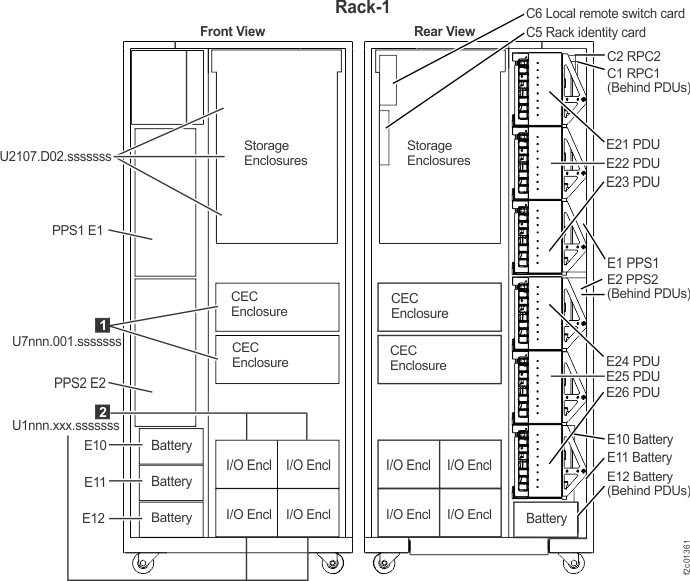
- Locate the storage enclosure power supply listed in the serviceable event FRU list.
- Observe the storage enclosure power supply
LEDs.
Find the condition that applies:- The Attention LED
is lit, the DC Input Good LED
is off. Input power is missing, go
to step 6. - Attention LED
is lit, DC Input Good LED
is lit and the DC Output Good LED
is lit or off. Go to step 5. - All LEDs
,
, and
are off. Go to step 5. - The Attention LED
is off, the DC Input Good LED
is lit, and the DC Output Good LED
is lit. The failure is no longer occurring,
exit this MAP and close the serviceable event that sent you here.
Figure 2. Storage enclosure power supply LEDs 
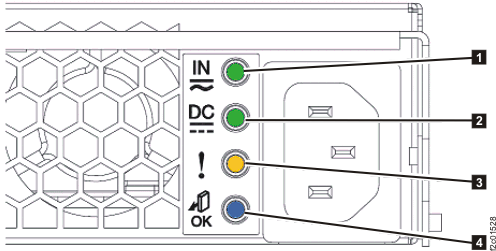
Table 2. Storage enclosure power supply LEDs Index LED name LED color Controlled by LED state Description 1 DC Input Good Green Hardware Solid on DC input good Off DC input not within limits 2 DC Output Good Green Hardware Solid on DC output good Off DC output is off 3 Identify / Attention Amber Microcode Solid on Fault Blinking This FRU being identified Off Default state 4 Not used Blue Microcode Off Default state, unused - The Attention LED
- The storage enclosure power
supply is failing, replace it.
After the repair process is complete, you will exit this MAP. Go to MAP2700 Section-6 Exit this map and exchange or pseudo-repair a FRU to continue the repair process and replace the storage enclosure power supply listed in the FRU list.
- The storage enclosure power
supply is either not receiving input power or has an internal failure.
Locate the power cable at the power supply and trace it to the PDU.
Is the cable properly connected at both ends and not visibly damaged?
- Yes, go to step 7.
- No, you will reconnect or replace the cable, as applicable.
You will perform a pseudo-repair of the power supply. Instead of replacing the power supply, reconnect or replace the power cable. After the repair process is complete, you will return here and go to MAP2700 Section-2 One or more storage enclosure power supplies reporting power loss, step 4 to confirm power supply operation. Go to MAP2700 Section-6 Exit this map and exchange or pseudo-repair a FRU to continue the repair process and perform a pseudo-repair of the power supply listed in the FRU list.
- At the PDU output connector that supplies this storage enclosure power supply, is the output power green LED lit?
- The possible failing
FRUs are the storage enclosure power supply and power cable.
Has the storage enclosure power supply already been replaced?
- Yes, you will now replace the storage enclosure power cable.
You will perform a pseudo-repair of the power supply. Instead of replacing the power supply, replace the power cable. After the repair process is complete, you will return here and go to MAP2700 Section-2 One or more storage enclosure power supplies reporting power loss, step 4 to confirm power supply operation. Go to MAP2700 Section-6 Exit this map and exchange or pseudo-repair a FRU to continue the repair process and perform a pseudo-repair of the power supply listed in the FRU list. - No, you will now replace the storage enclosure power supply.
After the repair process is complete, you will return here and go to MAP2700 Section-2 One or more storage enclosure power supplies reporting power loss, step 4 to confirm power supply operation. Go to MAP2700 Section-6 Exit this map and exchange or pseudo-repair a FRU to continue the repair process and replace the storage enclosure power supply listed in the FRU list.
- Yes, you will now replace the storage enclosure power cable.
- If a PDU port LED is off,
and other port LEDs on the same PDU are lit, the port fuse is blown.
The PDU will be replaced, but you will first attempt to isolate any additional failed parts. Do the following:- YOU MUST UNPLUG the storage enclosure power cable at the failing PDU output port before continuing.
- Disconnect the power cable from the storage enclosure power supply.
- Inspect both ends and the entire length of the power
cable looking for any evidence of a short.
Was visible evidence of a cable short found?
- Yes, replace the power cable at this time. Leave both ends of the power cable disconnected. No guided repair process is necessary. Next, you will prepare to isolate a power supply problem. Continue to step 10.
- No, visible evidence was not found. Leave both ends of the power cable disconnected. To further isolate a power supply or cable problem, continue to step 10.
- This step will isolate
whether the power cable has an internal short that caused the PDU
output fuse to blow.
- At the storage enclosure power supply, disconnect the power cable (if not already disconnected).
- At the failing PDU, ensure the power cable from the storage enclosure enclosure power supply is still unplugged.
- AT THE SAME FAILED PDU, find an available output connector with the port LED lit.
- Temporarily connect the power cable to the available PDU connector with the port LED lit.
After connecting the cable, is the port LED still lit?
- Yes, it is lit. The power cable does not have a solid short. Go to step 11.
- No, it is off. The power cable has a short and must be replaced along with the PDU. You will use a single repair action of the PDU with the failed port to replace both the cable and the PDU. During the repair, connect the power cable to the original PDU port. After the repair process is complete, you will return here and go to MAP2700 Section-2 One or more storage enclosure power supplies reporting power loss, step 4 to confirm power supply operation. Go to MAP2700 Section-6 Exit this map and exchange or pseudo-repair a FRU to continue the repair process and replace the PDU listed in the FRU list.
- This step will isolate
whether the storage enclosure power supply has an internal fault that
caused the PDU output fuse to blow.
- At the storage enclosure power supply, connect the power cable.
After connecting the cable, is the PDU port LED still lit?
- Yes, it is lit. The storage enclosure power supply and existing power cable do not have the fault condition present at this time. Go to step 12.
- No, it is off. The power supply is failing and has blown
the PDU fuse.
You will replace the storage enclosure power supply first, and then the PDU. Go to step 13.
Note: If you do not have a PDU FRU onsite and you want to temporarily restore the redundant power to the storage enclosure while waiting for the FRU to arrive, you can disconnect the cable from the failing PDU output connector and connect it to an output connector (if available) on the SAME PDU with the port LED lit. Ensure you label the cable at the connector to remind the person who replaces the PDU to properly plug the cable back to the original connector. DO NOT connect the power cable to a different PDU. Connecting to the wrong PDU can cause incorrect isolation of further power problems. - You will attempt to recreate
the intermittent fault condition to isolate the failing FRU. Gently
move and flex the power cable along its full length. If you recreate
the fault, the PDU port LED will change from lit to off.
Is the PDU port LED now off?
- Yes, it is off.
You have recreated an intermittent fault in the power cable. You will use a single repair action of the PDU with the failed port to replace both the cable and the PDU. During the repair, connect the power cable to the original PDU port. After the repair process is complete, you will return here and go to MAP2700 Section-2 One or more storage enclosure power supplies reporting power loss, step 4 to confirm power supply operation. Go to MAP2700 Section-6 Exit this map and exchange or pseudo-repair a FRU to continue the repair process and replace the PDU listed in the FRU list. - No, it is lit.
You have not recreated a cable fault, but the PDU still has a failed port and will be replaced. During the repair, connect the power cable to the original PDU port. After the repair process is complete, you will return here and go to MAP2700 Section-2 One or more storage enclosure power supplies reporting power loss, step 4 to confirm power supply operation. Go to MAP2700 Section-6 Exit this map and exchange or pseudo-repair a FRU to continue the repair process and replace the PDU listed in the FRU list.Note: You could also replace the power cable if you have that available.
- Yes, it is off.
- You will use MAP2700 Section-6 Exit this map and exchange or pseudo-repair a FRU to replace more than one FRU in the
FRU list: the affected power supply first, and then the PDU.
When the power supply replacement has been completed in MAP2700 Section-6 Exit this map and exchange or pseudo-repair a FRU step 3, continue with MAP2700 Section-6 Exit this map and exchange or pseudo-repair a FRU step 4 to replace the PDU. During the PDU repair, connect the power cable to the original PDU port. After the repair process is complete, you will exit this MAP. Go to MAP2700 Section-6 Exit this map and exchange or pseudo-repair a FRU to continue the repair process.
MAP2700 Section-3 PDU group is off because of an overcurrent
A PDU group consists of one, two or three PDUs that share the same input power from two PPS power supplies. An overcurrent (short) condition in one PDU will be detected by both PPS power supplies which will then shutdown their power output. Each pair of PPS modules supply power to only one PDU group.
About this task
Procedure
- Observe the SRC listed in the serviceable event that sent you here. The last digit in the SRC is the rack that contains the failing PDU. For example, if the last value in the SRC is "1" this is R1; if the last digit is "2" this is R2. You will notice the rack is listed in Table 3, column one.
- Observe the serviceable event FRU list and determine the location code of each PDU listed.
- Find the row (using the rack information from step 1 above) in Table 3 third column that lists all the PDU location codes in the FRU list.
- The last two columns in Table 3 identify the location
code of both PPS power modules that supply power to each PDU group.
Table 3. PDU power group locations for each rack position Rack PDU group color Location codes for PDUs in each PDU group Rack resources powered by the PDU group Location code of PPS-1 module supplying power to PDU group Location code of PPS-2 module supplying power to PDU group R1 Yellow R1-E21,
R1-E23Storage enclosures R1-E1-E3 R1-E2-E3 R1 Green R1-E22,
R1-E24Storage enclosures R1-E1-E1 R1-E2-E1 R1 Yellow R1-E25 CEC and I/O enclosures R1-E1-S1 n/a R1 Green R1-E26 CEC and I/O enclosures n/a R1-E2-S1 R2 Yellow R2-E21,
R2-E23Storage enclosures R2-E1-E3 R2-E2-E3 R2 Green R2-E22,
R2-E24Storage enclosures R2-E1-E1 R2-E2-E1 R2 Yellow R2-E25 I/O enclosures R2-E1-S1 n/a R2 Green R2-E26 I/O enclosures n/a R2-E2-S1 R3 Yellow R3-E21,
R3-E23,
R3-E25Storage enclosures R3-E1-S1 R3-E2-E1
R3-E2-E3R3 Green R3-E22,
R3-E24,
R3-E26Storage enclosures R3-E1-E1
R3-E1-E3R3-E2-S1 R4 Yellow R4-E21
R4-E23
R4-E25Storage enclosures R4-E1-S1R4-E2-E1
R4-E2-E3R4 Green R4-E22
R4-E24
R4-E26Storage enclosures R4-E1-E1
R4-E1-E3R4-E2-S1Figure 3. PDU location codes, rear view
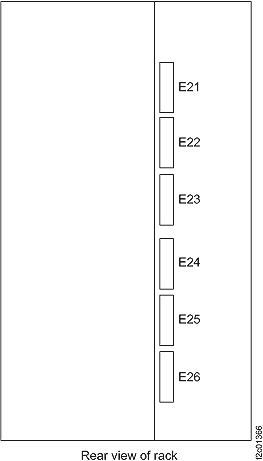
Note: In Figure 4, if this were rack 1 (R1), the list would be R1-Ex-E1, R1-Ex-E2 and so on.Figure 4. PPS module locations, rear view 
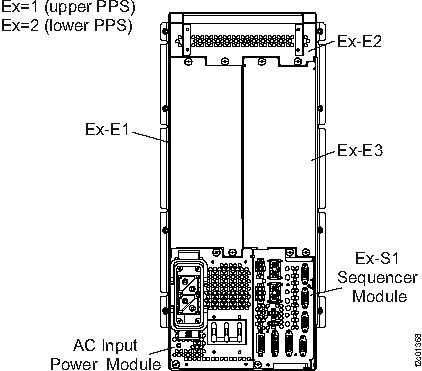
- The next two steps ensure you will be working with the
PDU and PPS modules for the failing PDU group. Attention: If you accidentally work with the wrong PDU or PPS module you can cause an outage.
- Physically locate each PDU in the FRU list. Refer to Figure 3. Observe the eight
output power LEDs on each PDU. Are all eight LEDs off on each PDU?
- Yes, go to the next step.
- No, the failure this MAP isolates is no longer present. Stop and contact your next level of support.
- Using the rack number to find the row in Table 3, physically locate
the two or three PPS modules using the location codes in the last
two columns of your table row. Reference Figure 4. On each PPS module,
observe the power output LED indicator. Is at least one of the module
output LED indicators lit green?
- Yes, the error condition is no longer present, exit this MAP and contact your next level of support.
- No, the switches can be used to isolate which PDU is causing the overcurrent. Go to the next step.
- This step is to ensure that all PPS modules are turned
on. At the PPS modules identified above, check the switch. If the
switch is in the Off position, set it to the On position (up).
Notes:
- The PPS module has the output LED indicator and a switch.
- Setting the switch to Off (down) will switch the output off (if it is on) and also reset any detected overcurrent condition.
- Setting the switch to On (up) will switch output on. If there is no overcurrent, the LED will be lit green. If the overcurrent is present, the LED will either be lit amber or be off.
- Observe the power output LED indicators on all PPS modules
and all PDUs.
Are all LED indicators lit green?- Yes, the error condition is no longer present, exit this MAP and close this problem.
- No, the switches can be used to isolate which PDU is causing the overcurrent. Go to the next step.
- Each PDU in the PDU group will be isolated and tested
until the failing one has been isolated.
- At each PDU, when viewed from the rear of the rack, the two power input cables connect to the right side of the PDU.
- If there are more than one PDU in the PDU group, disconnect the interconnect cable that connects this PDU to the next PDU in the PDU group. If not, go to step 11.
- Going to the next PDU in the PDU group, disconnect the interconnect cable and so on until the interconnect cable has been removed from all PDUs in this PDU group.
- At each PPS module identified above, switch
off the output using the switch.
- Wait two seconds.
- Switch each output on using the switch.
- Wait 10 seconds for the power to sequence.
- Observe the power output LED indicators on the one, two,
or three PPS modules and all PDU(s).
Are all LED indicators lit green?- Yes, physically replace the failing PDU interconnect cable now, do not use the HMC repair screens. Go to the next step.
- No, the PDU that has none of the 8 power output LEDs lit may be the source of the overcurrent. Go to step 14.
- Observe the PDU LEDs. Is there a PDU with none of its output
power LED indicators lit green?
- Yes, exit this MAP and contact your next level of support.
- No, the problem has been fixed. Exit this MAP and close the open serviceable event.
- Disconnect the supply cable from the
PDU that has none of its power output LEDs lit green.
- At the PPS module end (the one with its output LED off or Amber) switch off the output using the switch.
- Wait two seconds.
- Switch the output on using the switch.
- Wait 10 seconds for the power to sequence.
- Observe the power output LED indicator on this PPS module.
Is the LED indicator lit green?- Yes, physically replace the failing PDU, do not use the HMC repair screens. Reconnect any disconnected cables, exit this MAP, and close the open serviceable event.
- No, this PPS module is bad. Return to the HMC screen and use the normal FRU replace procedure to replace this module.
MAP2700 Section-4 Single CEC or I/O enclosure power supply reporting power loss
About this task
- Storage complex repair actions must always be managed from the management console. To replace any FRUs identified in this procedure, use Storage Facility Management > storage facility > Exchange Parts. If the FRUs are listed in the Serviceable Event, select them from there.
- To prevent a 100015x2 SRC from being logged when adding or replacing a power supply on an I/O enclosure, immediately (within 10 seconds) after installation connect the power cable to the replacement power supply. If the power supply is not in the ready state and you received a 100015x2 reference code, follow the rest of this procedure.
Procedure
- Use the SRC to determine the affected CEC or I/O enclosure power supply. 1xxxx1510 will be the E1 power supply and 1xxxx1520 will be the E2 power supply.
- Refer to Location codes in serviceable events to determine the location and part number of the affected item.
- The affected power supply is either not receiving
input power or has an internal failure. Locate the power cable and
trace it to the PDU. Is the cable properly connected at both ends
and not visibly damaged?
- Yes, go to step 4.
- No, you will reconnect or replace the cable, as applicable.
You will perform a pseudo-repair of the power supply. Instead of replacing the power supply, reconnect or replace the power cable. After the repair process is complete, you will return here and go to step 4 (the next step). Go to MAP2700 Section-6 Exit this map and exchange or pseudo-repair a FRU to continue the repair process and perform a pseudo-repair of the power supply listed in the FRU list.
- On the affected CEC and/or I/O enclosures, observe
the input power LEDs on both power supplies (E1 and E2).
- E1 and E2 power supplies, see Figure 5 and Figure 7.
- CEC enclosure input power LEDs, see Figure 8 index

- I/O enclosure input power LEDs, see Figure 9 indexes
and
.
- E1 and E2 input power LEDs are both lit, go to step 5
- E1 or E2 input power LED is not lit, go to step 6
- E1 and E2 input power LEDs are both not lit, attempt to reset the affected CEC or I/O enclosure power using a pseudo-repair of a FRU in the enclosure. Refer to MAP2600 Pseudo FRU exchange needed to reset existing FRU.
- Both power supplies are receiving input power.
Observe the output power LEDs on both power supplies (E1 and E2).
See Figure 8
and Figure 9 indexes
and
. Find the condition that applies: - E1 and E2 output power LEDs are both lit, the problem does not seem to be occurring. Exit this MAP and close the serviceable event that sent you here.
- E1 or E2 output power LED is off, replace the failing
power supply.
After the repair process is complete, you will exit this MAP. Go to MAP2700 Section-6 Exit this map and exchange or pseudo-repair a FRU to continue the repair process and replace the power supply listed in the FRU list.If the power supply is not listed in the serviceable event FRU list, refer to MAP1230 Replace a FRU without using a serviceable event.
- E1 and E2 output power LEDs are both off, attempt to reset the affected enclosure power using a pseudo-repair of a FRU in the enclosure. Refer to MAP2600 Pseudo FRU exchange needed to reset existing FRU.
- At the CEC or I/O enclosure power supply with
the input power LED that is not lit, perform the following steps:
- Disconnect the power cable from the power supply.
- Use a multimeter to measure the DC voltage at the power supply end of the power cable.
- Check for 208 VDC (+/- 2.0 V). Is the voltage correct?
- Yes, continue with the next step.
- No, go to step 8.
- Replace the failing power supply.
After the repair process is complete, you will exit this MAP. Go to MAP2700 Section-6 Exit this map and exchange or pseudo-repair a FRU to continue the repair process and replace the power supply listed in the FRU list.If the power supply is not listed in the serviceable event FRU list, refer to MAP1230 Replace a FRU without using a serviceable event.
- Trace the power cable from the affected
power supply to the PDU output connector. At the PDU output connector,
is the port LED lit?
- Yes, you have isolated a power cable fault. Replace the power cable at this time. No guided repair process is necessary. When you have replaced the cable, go to MAP2700 Section-2 One or more storage enclosure power supplies reporting power loss, step 4 to confirm power supply operation.
- No, the PDU output for this power supply is failing. Go to step 10.
- Perform the following steps
if the new power supply does not fix the problem:
- Reinstall the original power supply.
- Try the new power supply in each of the other positions listed in the table.
- If the problem still is not fixed, reinstall the original power supply and go to the next FRU in the list.
- Exchange the FRU the power supply plugs into. For the CEC enclosure, it is the CEC enclosure I/O backplane assembly. For the I/O enclosure, it is the I/O enclosure backplane.
- If a PDU port LED is off, and other
port LEDs on the same PDU are lit, the port fuse is blown. The PDU
will be replaced, but you will first attempt to isolate any additional
failed parts. Do the following:
- YOU MUST UNPLUG the CEC or I/O enclosure power cable at the failing PDU output port before continuing.
- Disconnect the power cable from the CEC or I/O enclosure power supply.
- Inspect both ends and the entire length of the power
cable looking for any evidence of a short. Was visible evidence of a cable short found?
- Yes, replace the power cable at this time. Leave both ends of the power cable disconnected. No guided repair process is necessary. Next, you will prepare to isolate a power supply problem. Continue to step 11.
- No, visible evidence was not found. Leave both ends of the power cable disconnected. To further isolate a power supply or cable problem, continue to step 11.
- This step will isolate whether the
power cable has an internal short that caused the PDU output fuse
to blow.
- At the affected power supply, disconnect the power cable (if not already disconnected).
- At the failing PDU, ensure the power cable from the affected power supply is still unplugged.
- AT THE SAME FAILED PDU, find an available output connector with the port LED lit.
- Temporarily connect the power cable to the available PDU connector with the port LED lit.
After connecting the cable, is the port LED still lit?
- Yes, it is lit. The power cable does not have a solid short. Go to step 12.
- No, it is off. The power cable has a short and must be replaced
along with the PDU.
You will use a single repair action of the PDU with the failed port to replace both the cable and the PDU. During the repair, connect the power cable to the original PDU port. After the repair process is complete, you will exit this MAP. Go to MAP2700 Section-6 Exit this map and exchange or pseudo-repair a FRU to continue the repair process and replace the PDU listed in the FRU list.
- This step will isolate whether the
power supply has an internal fault that caused the PDU output fuse
to blow.
- At the power supply, connect the power cable.
After connecting the cable, is the PDU port LED still lit?
- Yes, it is lit. The power supply does not have the fault condition present at this time. Go to step 13.
- No, it is off. The power supply is failing and has blown the
PDU fuse.
You will use MAP2700 Section-6 Exit this map and exchange or pseudo-repair a FRU to replace more than one FRU in the FRU list: the affected power supply first, and then the PDU. When the power supply replacement has been completed in Section-6 step 3, continue with Section-6 step 4 to replace the PDU. During the PDU repair, connect the power cable to the original PDU port. After the repair process is complete, you will exit this MAP. Go to MAP2700 Section-6 Exit this map and exchange or pseudo-repair a FRU to continue the repair process.Note: If you do not have a PDU FRU onsite and you want to temporarily restore the redundant power to the CEC or I/O enclosure while waiting for the FRU to arrive, you can disconnect the cable from the failing PDU output connector and connect it to an output connector on the SAME PDU with the port LED lit. Ensure you label the cable at the connector to remind the person who replaces the PDU to properly plug the cable back to the original connector. Connecting the cable to a different PDU can cause incorrect isolation of further power problems.
- You will attempt to recreate the
intermittent fault condition to isolate the failing FRU. Gently move
and flex the power cable along its full length. If you recreate the
fault, the PDU port LED will change from lit to off.
Is the PDU port LED now off?
- Yes, it is off. You have recreated an intermittent fault in
the power cable.
You will use a single repair action of the PDU with the failed port to replace both the cable and the PDU. During the repair, connect the power cable to the original PDU port. After the repair process is complete, you will return here and go to MAP2700 Section-4, step 4 to confirm power supply operation. Go to MAP2700 Section-6 Exit this map and exchange or pseudo-repair a FRU to continue the repair process and replace the PDU listed in the FRU list. - No, it is lit. You have not recreated a cable fault, but the PDU still has a failed port and will be replaced. During the repair, connect the power cable to the original PDU port. After the repair process is complete, you will return here and go to MAP2700 Section-4, step 4 to confirm power supply operation. Go to MAP2700 Section-6 Exit this map and exchange or pseudo-repair a FRU to continue the repair process and replace the PDU listed in the FRU list.
- Yes, it is off. You have recreated an intermittent fault in
the power cable.
MAP2700 Section-5 Multiple CEC or I/O enclosure power supplies reporting power loss
About this task
Procedure
- Observe the serviceable event FRU list and determine the location code of the PDU listed, as follows:
- This problem could be caused by a failure of a primary
power supply in the rack that contains the failing CEC or I/O enclosures.
Are there any serviceable events that list a PPS as the failing FRU?
- Yes, repair those problems first. If that does not resolve the problem, then return here and continue with the next step.
- No, continue with the next step.
- Observe the six vertical LED indicators at the front of
each primary power supply (to the left of the fans) in the rack that
contains the failing CEC or I/O enclosure. Are the LED indications
on both PPSs as shown in Table 4?
- Yes, continue with the next step.
- No, go to MAP21A0 PPS fault isolation during install.
Table 4. PPS LED indicator state AC INPUT GOOD UEPO LOOP GOOD 208V PWR GOOD DDM PWR GOOD PPS FAULT On BATTERY PWR On On On On Off Off - On the affected CEC and/or I/O enclosures, observe the
input power LEDs on both power supplies (E1 and E2).
- E1 and E2 power supplies, see Figure 5 and Figure 7.
- CEC enclosure input power LEDs, see Figure 8 index
. - I/O enclosure input power LEDs, see Figure 9 indexes
and
.
- E1 and E2 input power LEDs are both lit, go to step 5.
- E1 or E2 input power LEDs are not lit, go to step 6.
- E1 and E2 input power LEDs are both not lit, attempt to reset the affected enclosure power using a pseudo-repair of a FRU in the enclosure. Refer to MAP2600 Pseudo FRU exchange needed to reset existing FRU.
- Both power supplies are receiving input power.
Observe the output power LEDs on both power supplies (E1 and E2).
See Figure 8
and Figure 9 indexes
and
. Find the condition that applies:- E1 and E2 output power LEDs are both lit, the problem does not seem to be occurring. Exit this MAP and close the serviceable event that sent you here.
- E1 or E2 output power LED is off, replace the failing power supply. If it is not listed in the serviceable event FRU list, refer to MAP1230 Replace a FRU without using a serviceable event.
- E1 and E2 output power LEDs are both off, attempt to reset the affected enclosure power using a pseudo-repair of a FRU in the enclosure. Refer to MAP2600 Pseudo FRU exchange needed to reset existing FRU.
- At the CEC or I/O enclosure power supply
with the input power LED that is not lit, perform the following steps:
- Disconnect the power cable from the power supply.
- Use a multimeter to measure the DC voltage at the power supply end of the power cable.
- Check for 208 VDC (+/- 2.0 V). Is the voltage correct?
- Yes, continue with the next step.
- No, go to step 8.
- Replace the failing power supply.
After the repair process is complete, you will exit this MAP. Go to MAP2700 Section-6 Exit this map and exchange or pseudo-repair a FRU to continue the repair process and replace the power supply listed in the FRU list.If the power supply is not listed in the serviceable event FRU list, refer to MAP1230 Replace a FRU without using a serviceable event.
- Trace the power cable from the
affected power supply to the PDU output connector. At the PDU output
connector, are all eight port LEDs off on the PDU?
- Yes, the primary bus bar may be failing. Continue with the next step.
- No, the PDU output for this power supply is failing. Return to the HMC repair process to replace the PDU.
- Trace the power cable from the failing PDU to the 208 VDC
primary bus bar at the rear of the rack. Is the bus bar end of the
cable connected?
- Yes, go to the next step.
- No, connect the cable. if the power supply output power LED
becomes lit, exit this MAP and close the serviceable event that sent
you here. If the LED is not lit, attempt to reset the failing enclosure
power using a pseudo-repair on a FRU in the enclosure. Refer to MAP2600 Pseudo FRU exchange needed to reset existing FRU. Note: The two cables from each CEC or I/O enclosure are connected in pairs. One cable must go to the PDU E25 and the other to PDU E26. This ensures that they have redundant power. Never connect both cables to the same PDU. Also, make sure PDU E25 is connected to the one bus bar and PDU E26 is connected to the other bus bar.
- Unplug the power cable to the failing PDU from the 208
VDC primary bus bar.
- Use a multimeter to measure the DC voltage at the primary bus bar.
- Check for 208 VDC (+/- 2.0 V). Is the voltage correct?
- Yes, the PDU is failing. Return to the HMC repair process to replace the PDU.
- No, go to step 11.
- The 208 VDC primary bar does not have output
power. Read all the following before replacing any FRUs:
- The 208 VDC primary bus bar is failing and needs to be replaced.
- The 208 VDC primary bus bar is not receiving power from the one PPS it is connected to. Ensure the cable between the PPS and 208 VDC primary bus bar is connected. Check for 208 VDC voltage at primary bus bar end of the cable. Check for 208 VDC voltage at the PPS connector.
- The PPS output connector and circuit is damaged and the PPS cannot detect the output power is missing (not likely).
Figure 5. Location codes for the CEC enclosure (rear view) (Models 941, 951) 
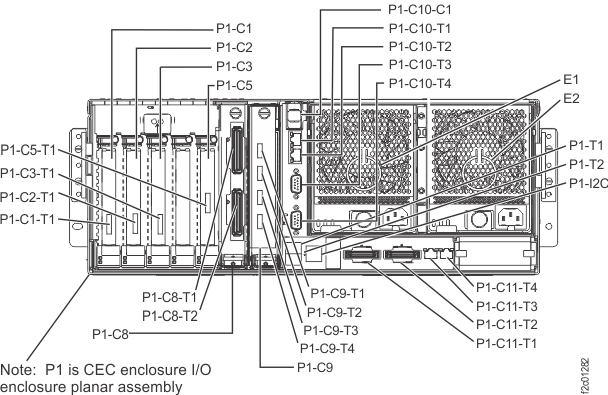
Figure 6. I/O enclosure locations in front of rack 
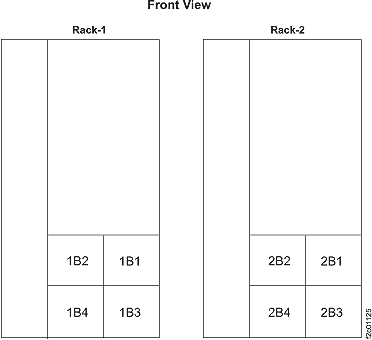
Figure 7. I/O enclosure locations (front) 
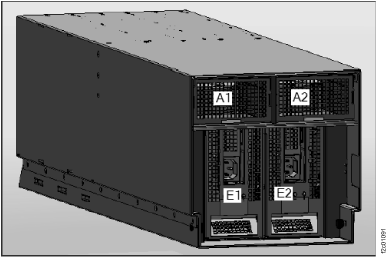
Figure 8. LED CEC enclosure right rear 
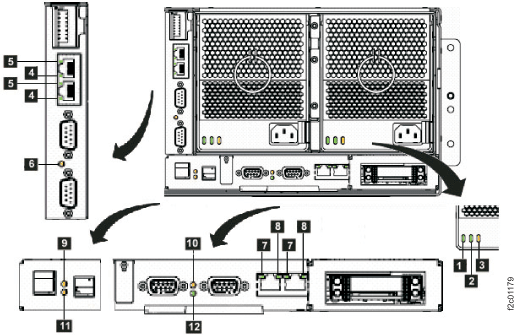
Table 5. Interpreting the LEDs on the CEC enclosure (right rear) Index LED Function Location Color LED Off LED On LED Flash 1 Input power for CEC enclosure power supply E1, E2 green no input input good n/a 2 Output power for CEC enclosure power supply E1, E2 green standby off output on standby 3 Identify for CEC enclosure power supply E1, E2 amber normal n/a fast: identify
slow: com fail4 Link for Ethernet port P1-C10-T1,T2 green link bad link OK n/a 5 Activity for Ethernet port P1-C10-T1,T2 green no activity n/a activity 6 Identify for CEC enclosure VPD pass-through card P1-C10 amber normal n/a identify 7 Link for HMC Ethernet port P1-C11-T3,T4 green link bad link OK n/a 8 Activity for HMC Ethernet port P1-C11-T3,T4 bi-color no activity n/a green: activity 9 Attention and identify for CEC enclosure P1 amber normal attention identify 10 Identify for CEC enclosure service processor card P1-C11 amber normal n/a identify 11 Identify for CEC enclosure I/O backplane P1 amber normal n/a identify 12 Network P1-C11 green (tbd) (tbd) n/a Figure 9. LEDs on the I/O enclosure (front) 
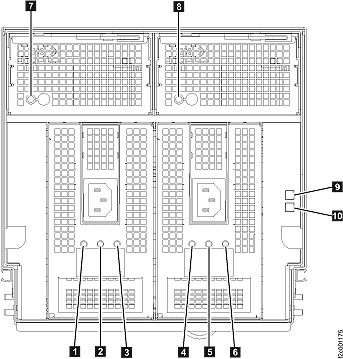
Table 6. Interpreting the LEDs on the I/O enclosure (front) Index LED Function Location Color LED Off LED On LED Flash 1 Input power for I/O enclosure power supply E1 green no input input good n/a 2 Output power for I/O enclosure power supply E1 green standby off output on standby 3 Identify for I/O enclosure power supply E1 amber normal n/a fast = identify, slow = com fail 4 Input power for I/O enclosure power supply E2 green no input input good n/a 5 Output power for I/O enclosure power supply E2 green standby off output on standby 6 Identify for I/O enclosure power supply E2 amber normal n/a fast = identify, slow = com fail 7 Identify for I/O enclosure fan A1 amber normal n/a identify 8 Identify for I/O enclosure fan A2 amber normal n/a identify 9 Identify for I/O enclosure P1 blue normal identify n/a 10 Power for I/O enclosure P1 green power off power on standby
MAP2700 Section-6 Exit this map and exchange or pseudo-repair a FRU
Procedure
- The next step will have you close this window to allow
the parts exchange process to continue normally.
- View this MAP in a separate information center window that will remain open so you can continue to reference this MAP.
- Click Help in the upper right corner of the main HMC GUI screen and navigate to this MAP.
- Return to the original MAP2700 window (the MAP window launched as part of repair).
- Use the normal FRU exchange process
to replace or pseudo-repair the desired part. Note: If you are here to perform a pseudo-repair of a CEC enclosure power supply, you must follow all steps in the exchange procedure. This includes disconnecting the power cables to both CEC enclosure power supplies, even though you will not actually replace the affected power supply.
- If you were directed to return to a step in this MAP, you will do so after the exchange process is complete.
- Click Close in the current service information window (that is, this window).
- One or more HMC repair screens will prompt you for the result of using the service procedure in the MAP. Select Problem not fixed.
- Select No when prompted for whether you exchanged any parts.
- Select Yes when prompted for whether you isolated the problem.
- Select the FRU to be repaired from the FRU list. Click Next.
- The HMC begins the FRU exchange process for the selected FRU.
After the FRU exchange process is complete, go to step 4.
- Were you directed to replace more than one FRU? (For example, "replace the storage enclosure power supply first, and then the PDU.")
- Is the original serviceable event still
open?
- Yes, you will use that serviceable event to replace the additional
FRU.
- Select the additional FRU to be repaired from the FRU list. Click Next.
- The HMC begins the FRU exchange process for the selected FRU.
After the FRU exchange process is complete, go to step 6.
- No, the serviceable event is closed. You will use the Exchange
Parts menu to replace the additional FRU.
- From the navigation area, click Storage Facility Management > storage facility .
- From the bottom Tasks area, click Exchange Parts.
- Select the affected area (for example, Exchange Rack Components).
- Navigate to and select the additional FRU, and click Exchange FRU.
After the FRU exchange process is complete, go to step 6.
- Yes, you will use that serviceable event to replace the additional
FRU.
- Were you directed to return to
a step in this MAP?
- Yes, return to that step at this time.
- No, you may now exit and close this MAP.