MAP2720 Ethernet switch tray fans error isolation (Model 961)
Overview
About this task
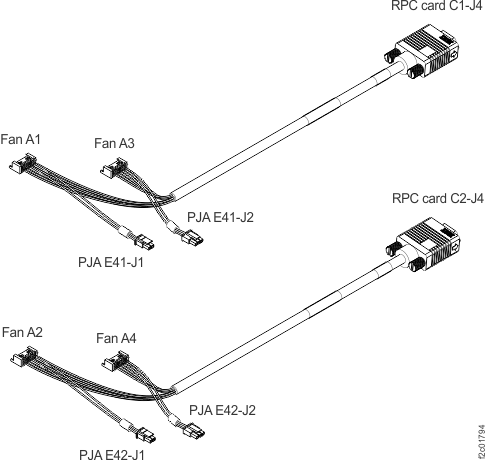
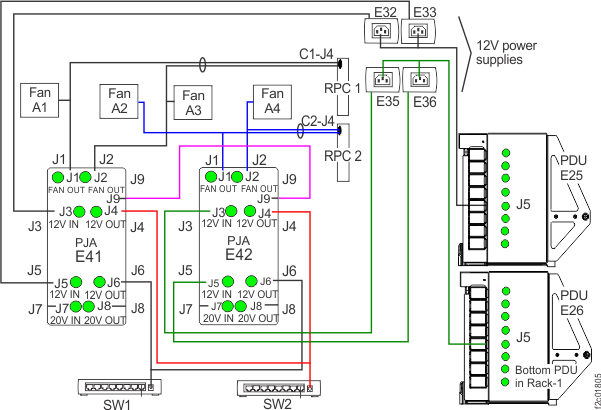
- There are four fan FRUs. Each fan FRU contains two separate impeller assemblies. Both impeller assemblies share common input power. Each impeller outputs a separate impeller rotation signal to the RPC card that monitors it. The fan FRU input power comes from a PJA power output connector J1 or J2.
- The PJA J2 power output connector provides power to the connected fan FRU. If this cable were left unplugged, both impellers in the connected fan FRU would report as failing.
- The PJA J1 power output connector provides power to the connected fan FRU and the connected RPC card impeller rotation reporting circuitry. If this cable were left unplugged, the RPC card impeller rotation reporting circuitry would fail and both impellers in both connected fan FRUs would report as failing.
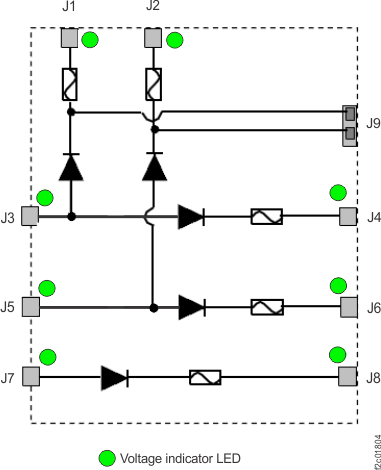
- The PJA has internal diodes and LEDs, there is no active logic. The purpose of the PJAs is to provide redundant power to the fan FRUs, Ethernet switches and management console laptop. This MAP only repairs fan FRU errors.
- Serviceable events are not created until two fan FRUs have failed. A fan FRU is considered failed when one or both impeller assemblies are reporting a rotation error. There is a unique SRC for each type of failure, and unique SRCs for each fan. There are a total of eight unique SRCs, two for each fan FRU.
- There is a separate open serviceable event for each failed fan FRU.
- There are always two open serviceable events for fan FRUs. The serviceable event for the first fan FRU failure is not opened until the second fan FRU fails. If only one fan FRU is failing, there is no open serviceable event to repair. There is adequate cooling air flow even with two fan FRUs failing.
- SRC definitions
Table 1. Ethernet switch tray fan SRC definitions SRC SRC definition BED20011 Fan 1 with one bad impeller BED20012 Fan 1 with two bad impellers BED20021 Fan 2 with one bad impeller BED20022 Fan 2 with two bad impellers BED20031 Fan 3 with one bad impeller BED20032 Fan 3 with two bad impellers BED20041 Fan 4 with one bad impeller BED20042 Fan 4 with two bad impellers
MAP2720 Section-1
About this task
The code can only detect the rotation of each fan impeller reported by the RPC cards. The code cannot directly detect unplugged/damaged cables or diode failures inside a PJA. Therefore, this MAP starts with a visual inspection of cables and LEDs indicators and you repair those issues first.
Procedure
- Determine the rack version.
- At the rear of Rack-1, observe the location of the Rack identity and Local remote switch cards. See Figure 3.
- Version 1, the cards are vertical and mounted to the left sidewall, go to step 2.
- Version 2, the cards are horizontal and mounted to the top of the rack, go to step 3.
Figure 3. Identifying rack version 1 versus version 2 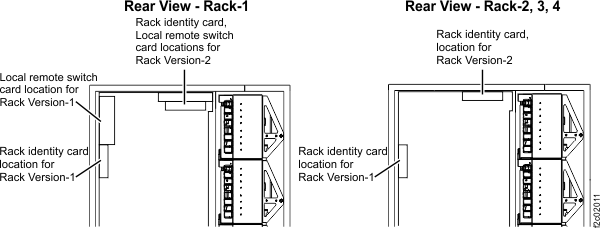
- At the rear of Rack-1, observe the following
to ensure all cables are correctly plugged and have no visual damage:
- PJAs E41 and E42 on the Ethernet switch tray. (See Figure 4.)
- Fans A1, A2, A3, A4 on the Ethernet switch tray. (See Figure 4.)
- RPC card connectors C1-J4 and C2-J4 (See Figure 5.)
Are any cables unplugged or visually damaged?
- No, go to step 4.
- Yes, all cables checked in this step can be hot-plugged.
Exit this map and perform a pseudo-repair on the fan FRU. When directed
to replace the fan, you instead reconnect or replace the cable, as
appropriate.
- Exit this MAP.
- To the question "What was the result of using the service procedure?", select Problem not fixed and click Next.
- To the question "Did you exchange any parts?", select No and click Next.
- To the question "Did you isolate the problem?", select No and click Next.
- The next FRU in the list is displayed. If it is not the affected fan, select go to the next FRU until the affected fan is displayed.
- Select the fan for repair. When directed to replace the fan, reconnect or replace the cable.
Figure 4. Ethernet switch tray locations (Model 961, rack version 1) 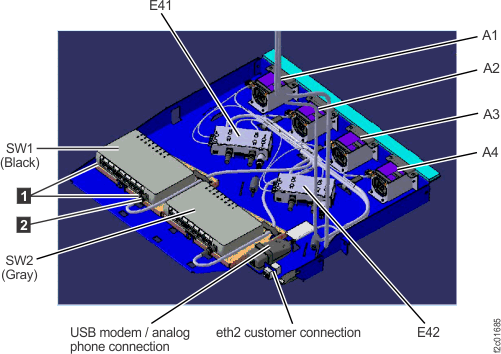
Figure 5. Location codes for the RPC cards (Model 961) 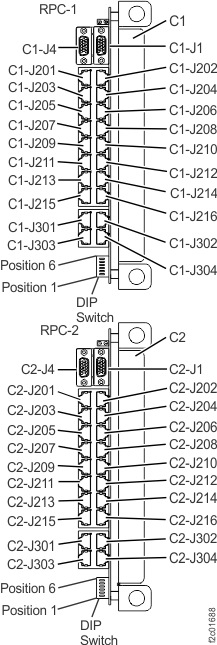
- At Rack-1,
observe the following to ensure all cables are correctly plugged and
have no visual damage:
- Rack-1 rear, PJAs E41 and E42 on the Ethernet switch tray. (See Figure 6.)
- Rack-1 front, fans A1, A2, A3, A4 on the laptop tray (See Figure 7.)
- Rack-1 rear, RPC card connectors C1-J4 and C2-J4 (See Figure 5.)
Are any cables unplugged or visually damaged?
- No, go to the next step.
- Yes, all cables checked in this step can be hot-plugged.
Exit this map and perform a pseudo-repair on the fan FRU. When directed
to replace the fan, you instead reconnect or replace the cable, as
appropriate.
- Exit this MAP.
- To the question "What was the result of using the service procedure?", select Problem not fixed and click Next.
- To the question "Did you exchange any parts?", select No and click Next.
- To the question "Did you isolate the problem?", select No and click Next.
- The next FRU in the list is displayed. If it is not the affected fan, select go to the next FRU until the affected fan is displayed.
- Select the fan for repair. When directed to replace the fan, reconnect or replace the cable.
Figure 6. Ethernet switch tray locations (Model 961 rack version 2 rear) 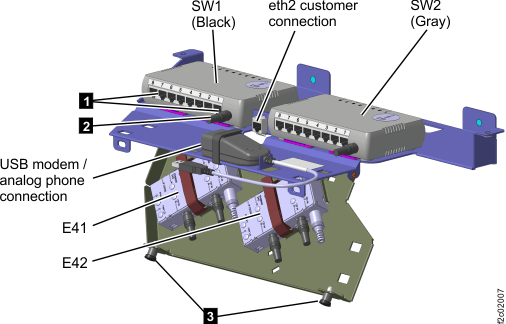
Figure 7. Laptop tray locations (Model 961 rack version 2 front) 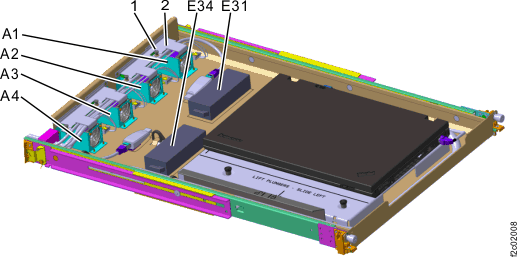
- Observe both PJAs (E41 and E42), See Figure 4, Figure 6.
Are any of the PJA LED indicators off? See Figure 8.
- No, go to the next step.
- Yes, go to MAP2730 Visual symptoms for Ethernet switch tray (switches, fans, power junction assemblies) (Model 961).
Figure 8. Power junction assembly (PJA) locations 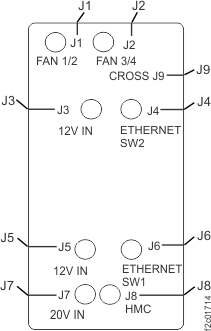
- Replace one fan FRU using the following
procedure.
Figure 9. PJA, RPC, fan cables (rack version 1 shown, rack version 2 similar)