Use this procedure when the UPS control panel AC input icon is not lit.
About this task
A UPS failure or an overcurrent to one of the J3-J9 output connectors can cause the AC input icon
to not be lit.
Procedure
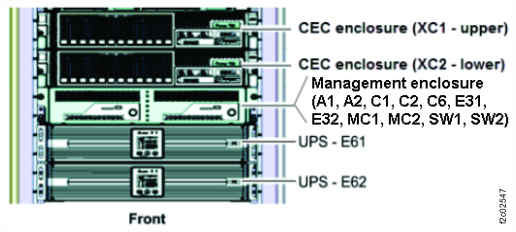
Determine the location of the UPS by using the location code (E61, E62) listed in the
serviceable event FRU list or the MAP procedure that sent you here. See Figure 1.
Figure 1. Locations for the storage controller module in the rack
Ensure that the overcurrent that trips the UPS breaker is still occurring:
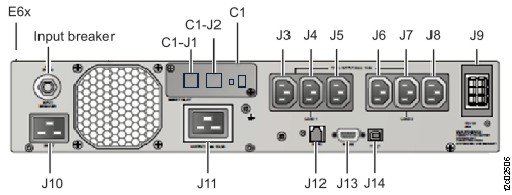
At the rear of the UPS, reset the input breaker by pushing it in. See Figure 2.
At the front of the UPS, is the control panel AC icon lit?
Yes, the overcurrent is not occurring. Exit this MAP and return to the procedure that sent you
here.
No, the input power cable might not be providing input power. Exit this MAP and return to the
procedure that sent you here. Power must be restored to the input power cable before
continuing.
Figure 2. Locations of the UPS (rear)
To determine whether the overcurrent is internal or external to the UPS:
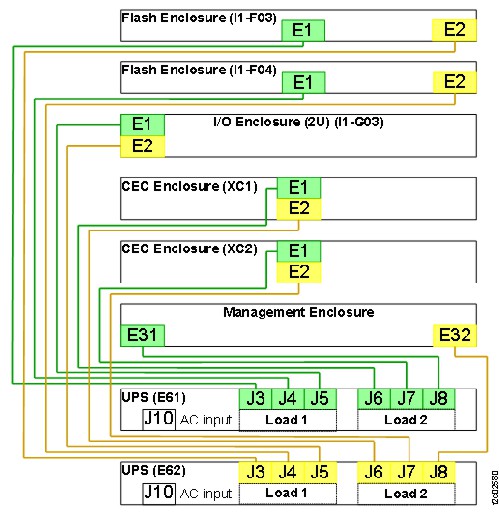
Ensure that the J3-J8 UPS output cables are correctly labeled and then disconnect them.
Reset the input breaker by pushing it in.
Does the input breaker trip again?
Yes. The failure is internal to the UPS. Exit this MAP and replace the UPS.
No, go to the next step.
Figure 3. UPS power output cables to enclosures
The UPS overcurrent is caused by an overcurrent from one of the power output cables
(J3-J8).
Connect the power output cables (J3-J8) one at a time until the UPS input breaker trips. That
is the cable with the overcurrent.