MAP4962 Storage enclosure PCIe cable analysis
MAP4962 Section-1
About this task
- MAP4962
- Storage Enclosure RAID controller card: U2107.D03.sssssss-P1-Cx
- PCIe storage interface card and cable: U1400.rBn.sssssss-P1-Cx
- Various other FRUs or symbolic procedures, based on system reference code (SRC)
Do the following:
Procedure
- Note the FRU location of the first PCIe storage interface
card in the FRU list.
This procedure refers to that card as the "affected storage interface".
FRU location code format is U1400.rBn.sssssss-P1-Cx, where:
x=2 or 5
r = rack (1-2); Bn = I/O enclosure (1-8)Note: There might be multiple PCIe storage interface card locations in the FRU list, as either "FRU" or as "Symbolic procedure. This procedure uses the first location on the FRU list, the "affected storage interface", as a reference point. - Find the FRU location of the first PCIe storage
interface card in the first column of Table 1 or Table 2. Note the following:
- Physical location of the affected storage interface card (format: Rr-XIn-P1-Cx)
- DA pair (link) that is associated with the affected storage interface
- RAID controller card that is associated with the affected storage interface (the "affected RAID controller")
- The other PCIe storage interface card and RAID controller card in the same DA pair (the "partner storage interface" and "partner RAID controller")
- The other PCIe storage interface card in the same I/O enclosure as the affected storage interface (the "adjacent storage interface")
- The PCIe storage interface card in the I/O enclosure slot above or below the affected storage interface (the "vertically adjacent storage interface")
Point-to-point diagrams are provided at the end of this procedure if needed. See Figure 1, Figure 2, and Figure 3.
Example:
For FRU location: U1400.1B4.RJ26817-P1-C5
The affected storage interface is: R1-XI4-P1-C5 (10A)
The DA pair is 10 (links 10A and 10B)
The affected RAID controller is: R1-B04-P1-C1 (10A)
The partner storage interface is: R1-XI3-P1-C2 (10B)
The partner RAID controller is: R1-B04-P1-C2 (10B)
The adjacent storage interface is: R1-XI4-P1-C2 (11B) (same I/O enclosure as affected)
The vertically adjacent storage interface is: R1-XI2-P1-C2 (9B) (same slot in I/O enclosure above the affected enclosure)Table 1. Storage enclosure PCIe cabling matrix - DS8870 standard or business class configuration FRU location From: Physical location of PCIe storage interface card (cable port is T1) To: Physical location of RAID controller card (cable port is T3) DA Pair (link) U1400.1B3.sssssss-P1-C2 R1-XI3-P1-C2 R1-B04-P1-C2 10B U1400.1B4.sssssss-P1-C5 R1-XI4-P1-C5 R1-B04-P1-C1 10A U1400.1B1.sssssss-P1-C2 R1-XI1-P1-C2 R1-B03-P1-C2 8B U1400.1B2.sssssss-P1-C5 R1-XI2-P1-C5 R1-B03-P1-C1 8A U1400.1B3.sssssss-P1-C5 R1-XI3-P1-C5 R1-B02-P1-C1 11A U1400.1B4.sssssss-P1-C2 R1-XI4-P1-C2 R1-B02-P1-C2 11B U1400.1B1.sssssss-P1-C5 R1-XI1-P1-C5 R1-B01-P1-C1 9A U1400.1B2.sssssss-P1-C2 R1-XI2-P1-C2 R1-B01-P1-C2 9B U1400.2B3.sssssss-P1-C2 R2-XI3-P1-C2 R2-B04-P1-C2 14B U1400.2B4.sssssss-P1-C5 R2-XI4-P1-C5 R2-B04-P1-C1 14A U1400.2B1.sssssss-P1-C2 R2-XI1-P1-C2 R2-B03-P1-C2 12B U1400.2B2.sssssss-P1-C5 R2-XI2-P1-C5 R2-B03-P1-C1 12A U1400.2B3.sssssss-P1-C5 R2-XI3-P1-C5 R2-B02-P1-C1 15A U1400.2B4.sssssss-P1-C2 R2-XI4-P1-C2 R2-B02-P1-C2 15B U1400.2B1.sssssss-P1-C5 R2-XI1-P1-C5 R2-B01-P1-C1 13A U1400.2B2.sssssss-P1-C2 R2-XI2-P1-C2 R2-B01-P1-C2 13B Table 2. Storage enclosure PCIe cabling matrix - DS8870 all-flash configuration FRU location From: Physical location of PCIe storage interface card (cable port is T1) To: Physical location of RAID controller card (cable port is T3) DA Pair (link) U1400.1B3.sssssss-P1-C2 R1-XI3-P1-C2 R1-B04-P1-C2 10B U1400.1B4.sssssss-P1-C5 R1-XI4-P1-C5 R1-B04-P1-C1 10A U1400.1B1.sssssss-P1-C2 R1-XI1-P1-C2 R1-B03-P1-C2 8B U1400.1B2.sssssss-P1-C5 R1-XI2-P1-C5 R1-B03-P1-C1 8A U1400.1B3.sssssss-P1-C5 R1-XI3-P1-C5 R1-B02-P1-C1 11A U1400.1B4.sssssss-P1-C2 R1-XI4-P1-C2 R1-B02-P1-C2 11B U1400.1B1.sssssss-P1-C5 R1-XI1-P1-C5 R1-B01-P1-C1 9A U1400.1B2.sssssss-P1-C2 R1-XI2-P1-C2 R1-B01-P1-C2 9B U1400.1B7.sssssss-P1-C2 R1-XI7-P1-C2 R1-B14-P1-C2 14B U1400.1B8.sssssss-P1-C5 R1-XI8-P1-C5 R1-B14-P1-C1 14A U1400.1B5.sssssss-P1-C2 R1-XI5-P1-C2 R1-B13-P1-C2 12B U1400.1B6.sssssss-P1-C5 R1-XI6-P1-C5 R1-B13-P1-C1 12A U1400.1B7.sssssss-P1-C5 R1-XI7-P1-C5 R1-B12-P1-C1 15A U1400.1B8.sssssss-P1-C2 R1-XI8-P1-C2 R1-B12-P1-C2 15B U1400.1B5.sssssss-P1-C5 R1-XI5-P1-C5 R1-B11-P1-C1 13A U1400.1B6.sssssss-P1-C2 R1-XI6-P1-C2 R1-B11-P1-C2 13B - Did the serviceable event that
sent you here occur during an MES to install high performance flash
enclosures?
- Yes, go to MAP4962 Section-2, Error during flash enclosure installation.
- No, go to the next step.
- For each of the following locations, confirm that the PCIe
cable is not damaged and is securely connected to the correct adapter:
- Both (affected and partner) storage enclosure RAID controller cards in the DA pair
- Both (affected and partner) PCIe storage interface cards in the DA pair
- The adjacent storage interface
The most likely locations for a disconnected or incorrectly connected cable are listed in Table 3:
Table 3. Possible locations for damaged, disconnected, or crossed cables SRC Possible location of cause BE1E2546
BE1E255B
BE382565
BE382573
BE382577
BE820180
BE820188Affected storage interface
Affected RAID controllerBE340048 Affected storage interface
Adjacent storage interface (same I/O enclosure)
Affected RAID controller
Partner RAID controller (same storage enclosure)BE3400E9 Affected storage interface
Vertically adjacent storage interface (same slot in I/O enclosure above or below affected storage interface)BE3400EA Affected storage interface
Adjacent storage interface (same I/O enclosure)BE3400EB Affected RAID controller
Partner RAID controller (same storage enclosure) - Are any cables disconnected, damaged, or connected to the wrong adapter?
- A visual inspection confirmed that the cables
are correctly connected and are not damaged.
SRC Action BE3400EA or BE3400EB Contact your next level of support. A system check detected crossed cabling but a visual inspection confirmed that cables are not crossed. BE1E2546, BE1E255B, BE340048, BE382565, BE382573, BE382577, BE820180, or BE820188 Continue the repair, replacing the next FRU in the FRU list. Exit this MAP. Answer the following questions to continue the repair process with the next FRU on the FRU list.- To the question
What was the result of using the service procedure?
click Problem not fixed and then click Next. - To the question
Did you exchange any parts?
click No and then click Next. - To the question
Did you isolate the problem?
click No and then click Next.
- To the question
- Is a cable damaged?
- Yes, a cable is damaged. Replace the PCIe storage interface card and storage enclosure PCIe
cable in the FRU list.Answer the following questions to continue the repair process with the next FRU on the FRU list.
- To the question
What was the result of using the service procedure?
click Problem not fixed and then click Next. - To the question
Did you exchange any parts?
click No and then click Next. - To the question
Did you isolate the problem?
click No and then click Next.
- To the question
- No, a cable is disconnected or is connected to the wrong adapter. Go to step 8.
- Yes, a cable is damaged. Replace the PCIe storage interface card and storage enclosure PCIe
cable in the FRU list.
- A cable is disconnected or is connected to
the wrong adapter.
SRC Action BE1E2546, BE1E255B, BE382565, BE382573, BE382577, BE820180, or BE820188 Continue the repair of this serviceable event with the next FRU on the FRU list (the affected storage enclosure RAID controller card).
When directed to exchange the FRU, instead reconnect the disconnected cable.Answer the following questions to continue the repair process with the next FRU on the FRU list.- To the question
What was the result of using the service procedure?
click Problem not fixed and then click Next. - To the question
Did you exchange any parts?
click No and then click Next. - To the question
Did you isolate the problem?
click No and then click Next.
BE340048, BE3400EA, BE3400EB This situation is the result of a repair action. Perform the same repair again as a pseudo-repair. When directed to exchange the FRU, correct the cable connections and continue. BE3400E9 This situation is the result of an invalid cabling scenario. Contact next level of support. Figure 1. PCIe cable connections (standard configuration, Rack-1, rear) (Models 961/96E) 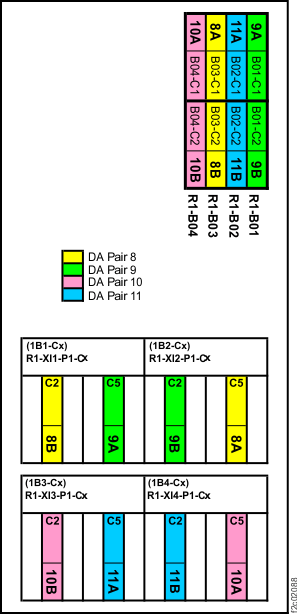
Figure 2. PCIe cable connections (standard configuration, Rack-2, rear) (Models 961/96E) 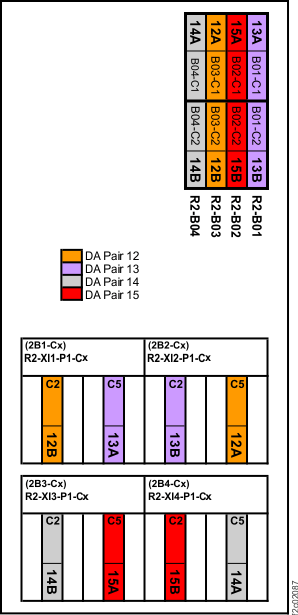
Figure 3. PCIe cable connections (DS8870 all-flash, Rack-1, rear) (Model 961) 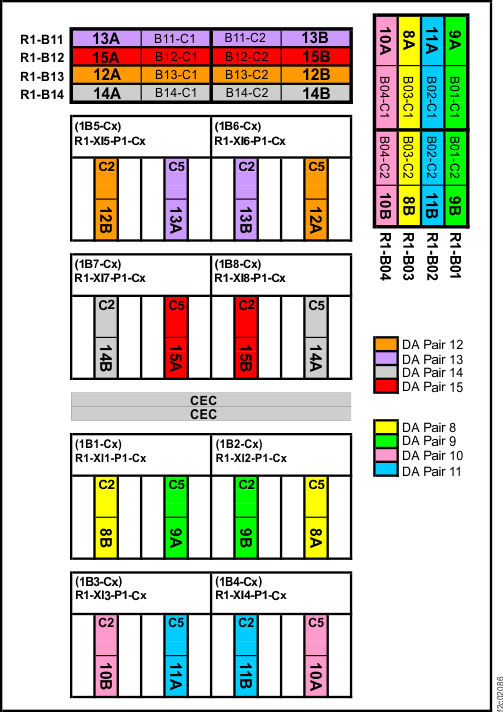
- To the question
MAP4962 Section-2, Error during flash enclosure installation
About this task
Do the following:
Procedure
- Confirm that both PCIe storage interface cards that you are installing have been inserted into the correct I/O enclosure locations. Correct I/O enclosure locations are Rn-XIn-P1-C2 and Rn-XIn-P1-C5 . See the point-to-point diagrams in Figure 1, Figure 2, and Figure 3.
- For each of the following locations, confirm that the PCIe
cable is not damaged and is securely connected to the correct adapter:
- Both (affected and partner) storage enclosure RAID controller cards in the DA pair
- Both (affected and partner) PCIe storage interface cards in the DA pair
- The adjacent storage interface
The most likely locations for a disconnected or incorrectly connected cable are listed in Table 4:
Table 4. Possible locations for damaged, disconnected, or crossed cables SRC Possible location of cause BE1E2010 (from MAP4970)
BE1E218C (from MAP4970)
BE1E2546
BE1E255B
BE382565
BE382573
BE382577
BE820180
BE820188Affected storage interface
Affected RAID controllerBE340048 Affected storage interface
Adjacent storage interface (same I/O enclosure)
Affected RAID controller
Partner RAID controller (same storage enclosure)BE3400E9 Affected storage interface
Vertically adjacent storage interface (same slot in I/O enclosure above or below affected storage interface)BE3400EA Affected storage interface
Adjacent storage interface (same I/O enclosure)BE3400EB Affected RAID controller
Partner RAID controller (same storage enclosure) - Are any cables disconnected, damaged, or connected to the wrong adapter?
- Were one or both PCIe storage interface cards inserted into the wrong I/O enclosure locations?
- A visual inspection confirmed that the cables
are correctly connected and are not damaged, and both PCIe interface
cards were inserted into the correct locations.
SRC Action BE3400EA or BE3400EB Contact your next level of support. A system check detected crossed cabling but a visual inspection confirmed that cables are not crossed. BE1E2010 or BE1E218C (from MAP4970)
BE1E2546, BE1E255B, BE340048, BE382565, BE382573, BE382577, BE820180, or BE820188- Using the serviceable event FRU list locations, or
the locations found in MAP4962 Section-1, step 2 (Table 1 or Table 2) replace parts
one at a time, in the following order:
- Storage Enclosure RAID controller card (location of the "Affected RAID controller")
- PCIe storage interface card and cable (location of the "Affected storage interface")
- I/O enclosure PCIe/SPCN card
- I/O enclosure backplane
- Go to step 8.
- Using the serviceable event FRU list locations, or
the locations found in MAP4962 Section-1, step 2 (Table 1 or Table 2) replace parts
one at a time, in the following order:
- Is a cable damaged?
- A cable is disconnected or is connected
to the wrong adapter, or one or both PCIe storage interface cards
were inserted into the wrong I/O enclosure locations.
SRC Action BE1E2010 or BE1E218C (from MAP4970)
BE1E2546, BE1E255B, BE382565, BE382573, BE382577, BE820180, or BE820188- If any PCIe storage interface cards were inserted into the wrong locations, move them to the correct locations. Insert any slot fillers into the unused locations.
- Correct any incorrect cable connections.
- Reconnect any disconnected cables.
- Go to step 8.
BE340048, BE3400EA, BE3400EB - If any PCIe storage interface cards were inserted into the wrong locations, move them to the correct locations. Insert any slot fillers into the unused locations.
- Correct any incorrect cable connections.
- Reconnect any disconnected cables.
- Go to step 8.
BE3400E9 This situation is the result of an invalid cabling scenario. Contact next level of support. - Close the serviceable events containing MAP4962.
- Close any related serviceable event containing SRC BE1E2010 or BE1E218C that called MAP4970.
- Exit this procedure and restart the storage enclosure installation.