Exchange the I/O enclosure PCIe optical transceiver

Before you begin

Icon for electrostatic discharge wrist strapUse approved ESD procedures to prevent damage.

Attention:
  • This procedure is not a stand-alone procedure. Customer disruption and damage to the hardware might occur when microcode and power boundaries are not in the proper conditions for this service action.
  • If a serviceable event FRU repair directed you to this procedure, the microcode and power boundaries are already set.
  • If a serviceable event FRU repair did not direct you to this procedure, see MAP1230 Replace a FRU without using a serviceable event.
Notes:
  • All the cables and FRUs to be removed must be uniquely identified so they can be reinstalled correctly.
  • If an installed earthquake resistance kit prevents you from accessing this FRU, refer to MAP1600.

Remove the I/O enclosure PCIe optical transceiver

About this task

Procedure

  1. To locate this FRU, look for the flashing amber port identify LED above the affected port.
  2. At the rear of the rack, label and disconnect any optical cables that are connected to the transceiver that you are removing.
    Note: If a wrap plug was installed for troubleshooting, remove it now.
  3. Pull the release handle and remove the transceiver from the port.
    Figure 1. I/O enclosure locations (rear) (models 98x, 8xE)
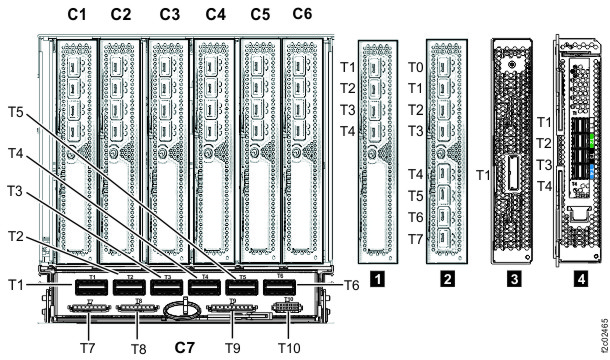
    I/O enclosure locations (rear) (models 98x, 8xE)

Install the I/O enclosure PCIe optical transceiver

Procedure

  1. Install the transceiver and ensure it is latched.
    Important: The optical cable plugs (MPO or MTP connectors) and transceiver ports must be cleaned before you connect them. Use cleaning tool 43W3044 or IBM-approved alternative. Cleaning procedures are provided with the tool. After you clean the transceiver ports with the tool, use air bulb 45D2645 or IBM-approved alternative. For detailed procedures, refer to current DS8000 Info Alerts or contact your next level of support.
  2. Reconnect the optical cable to the transceiver, if one was removed.
  3. Exit this service information center parts exchange procedure and return to the procedure that sent you here.