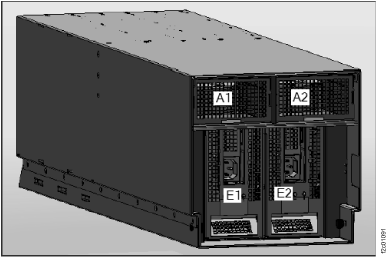
PWRSPLY
A power supply might be the failing item.
Before you begin
About this task
Attention: When replacing a power supply in an I/O enclosure, verify that the green "Input good" and green "DC good" LEDs on the power supply that is not being replaced are on solid before starting to replace the failing power supply.
Attention: When replacing a redundant power supply in the CEC or I/O enclosures, a 1xxx1504, 1xxx1514, 1xxx1524, or 1xxx1534 SRC serviceable event may be created. If you just removed and replaced the power supply in the location associated with this reference code, and the power supply became ready (input power good LED is illuminated) after the install, disregard this reference code and close the serviceable event. If you had not previously removed and replaced a power supply, the power supply did not become ready after installation, or there are repeated fan fault errors after the power supply replacement, continue to follow this procedure.
| LED | Description |
|---|---|
| Input good | This LED is green and will be on (lit) if input voltage is present and off (not lit) if input voltage is not present. For normal system operation, this LED will be on solid. |
| DC good | This LED is green and will be on solid if the power supply output voltages are correct. If the power supply control voltage is present and the power supply outputs are not powered up, the power supply is in standby and the dc good LED will blink at a rate of 1-3 times per second. The dc good LED will be off if both the power supply control voltage and the output voltages are bad. For normal system operation, this LED will be on solid. |
| Identify | The identify LED is amber and will be toggled on and off at a 4 second rate, 10 seconds after the application of input power to the supply, if serial communication isn't established with the service processor. For normal system operation, this LED will be off. |
Procedure
- Is the reference code 1xxx15xx, 1xxx60x6, or
1xxx71xx?
- No: Continue with the next step.
- Yes: Complete the following steps:
- Find the unit reference code in the following table to determine the FRU part number and location for the failing power supply.
- Ensure that the power cables to the power supply are properly connected and seated. The green "Input good" LED on the power supply will illuminate when power is correctly connected to the power supply.
- Is the reference code 1xxx1510 or 1xxx1520 ?
- Yes: Before replacing any parts, perform isolation procedure PWR1911.
- No: Continue with step 1.d.
- Replace the failing power supply (see the following table to determine
which power supply to replace and its location). Attention: For reference codes 1xxx1510 and 1xxx1520 before replacing any parts, perform isolation procedure PWR1911.
- Complete the following steps if the new power supply does not
fix the problem:
- Reinstall the original power supply.
- Try the new power supply in each of the other positions listed in the table.
- If the problem still is not fixed, reinstall the original power supply and go to the next FRU in the list.
- For reference codes 1xxx1510 and 1xxx1520 if a problem persists after replacing the power supply, replace the power distribution backplane. For the CEC enclosure, this is the CEC enclosure system backplane. For the I/O enclosure, this is the I/O enclosure backplane assembly.
Unit reference code
for CEC or I/O enclosure (last 4 digits of SRC)Part number Description Location code 1510, 1511, 1512, 1513, 1514, 1516, 1517, 151E, 151F, 7110 See CEC enclosure part numbers or I/O enclosure part numbers Power supply Un-E1 1520, 1521, 1522, 1523, 1524, 1526, 1527, 152E, 152F, 7120 See CEC enclosure part numbers or I/O enclosure part numbers Power supply Un-E2 This ends the procedure.
Figure 1. Location codes for the CEC enclosure (rear view) (Model 961) 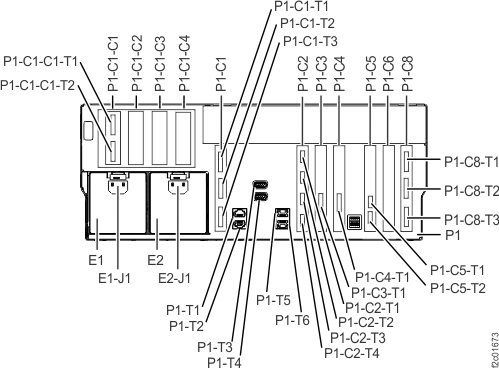
Figure 2. Location codes for the CEC enclosure (rear view) (Models 941, 951) 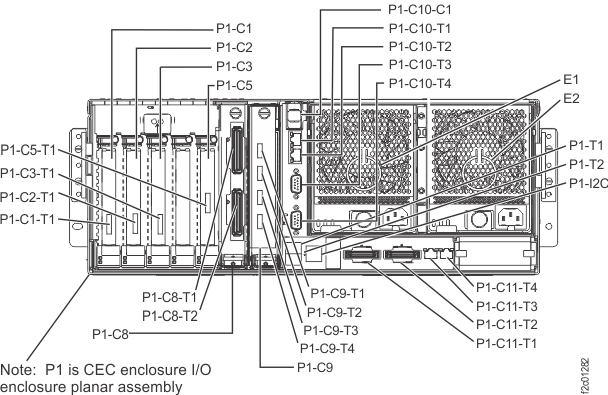
Figure 3. I/O enclosure locations (front)