Storage enclosure part numbers, Models 98x, 8xE (FC/SAS, 12 drive slots)

Information about storage enclosure parts is presented in this topic. Use Table 1 as a directory.

Note: The following part numbers are the most recent for this version of the Parts Catalog. Your storage facility or serviceable event FRU list might contain an older or newer part number. The parts-ordering system recognizes all valid part numbers and automatically substitutes an available part number as needed.
Table 1. Start here, storage enclosure parts, 12 DDM slots (Models 98x, 8xE)
Part name Figure
Cables, Fibre Channel (FC-AL), optical Table 4
Disk drive dummy module Figure 1
Disk drive module (DDM) Figure 1
Fibre Channel interface card (FCIC), optical Figure 2
Storage enclosure midplane Figure 1
All other parts (Find the appropriate figure below)
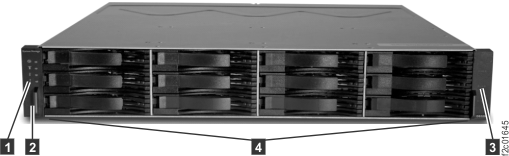
Figure 1. Storage enclosure parts, front
Storage enclosure parts, front
Table 2. Storage enclosure parts, front, 12 DDM slots (Models 98x, 8xE)
Index Part name CCIN
(note 1)
Part number Allowable substitute CCINs
(note 2)
1 Left decorative bezel N/A 99Y0098 N/A
2 Screw, M5 x 16 Hex N/A 23R1521 N/A
3 Storage enclosure midplane (full chassis) HPBP 99Y0810 None
4 Disk drive dummy module N/A 42R7992 N/A
4 Disk drive module (DDM), 4 TB 7.2 K RPM, self-encrypting Q4AA 98Y4619 Q4AE
4 Disk drive module (DDM), 4 TB 7.2K RPM, self-encrypting, category 2 (note 2) Q4AE 00YY027 None
4 Disk drive module (DDM), 6 TB 7.2 K RPM, 4k block, self-encrypting F6AA 00ND125 None
Notes:
  1. Important, read this entire paragraph as there are exceptions to what part number to order. The custom card identification number (CCIN) identifies the physical features and logical behavior of a part. If two parts appear physically identical but have different CCINs, they are not interchangeable unless stated elsewhere in the maintenance package or by the next level of support. If two parts have different part numbers and yet have the same CCIN, they are interchangeable. When you order a part number (P/N) reported in a serviceable event or call home record, check whether the parts-ordering system has a conditional substitute for DS8000® series. CCINs that are in parentheses are reported by earlier levels of the LIC bundle.
  2. For DDMs and SSDs with multiple CCINs for same size and speed, replace with a different CCIN only if that CCIN appears in the column Allowable substitute CCINs.
 
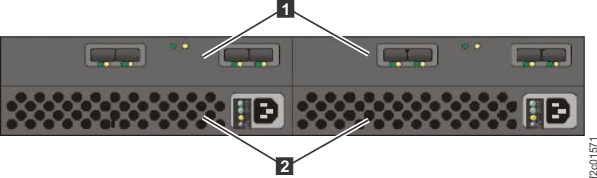
Figure 2. Storage enclosure parts, rear
Storage enclosure parts, rear
Table 3. Storage enclosure parts, rear, 12 DDM slots (Models 98x, 8xE)
Index Part name CCIN1 Part number
1 Fibre Channel interface card (FCIC), optical GPIC 45W8405
2 Storage enclosure power supply EPS1 45W8229
Notes:
  1. Important, read this entire paragraph as there are exceptions to what part number to order. The custom card identification number (CCIN) identifies the physical features and logical behavior of a part. If two parts appear physically identical but have different CCINs, they are not interchangeable unless stated elsewhere in the maintenance package or by the next level of support. If two parts have different part numbers and yet have the same CCIN, they are interchangeable. When you order a part number (P/N) reported in a serviceable event or call home record, check whether the parts-ordering system has a conditional substitute for DS8000 series. CCINs that are in parentheses are reported by earlier levels of the LIC bundle.
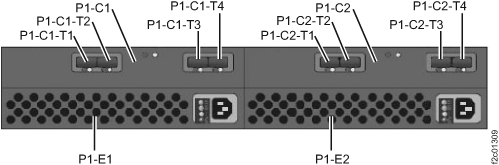
Figure 3. Storage enclosure Fibre Channel (FC-AL) cables, rear (T1, T2, T3, T4 connectors)
Storage enclosure locations rear (model 951/95E)
Figure 4. The format of information on a cable bundle label
The format of information on a cable bundle label
CAUTION:
Cables must be replaced only one at a time by using the appropriate guided maintenance procedure.
Table 4. Fibre Channel (FC-AL) cables, optical (Models 98x, 8xE)
Index Part name CCIN1 Part number
1 Cable, Fibre Channel (FC-AL), optical, orange, 1.3 m (4 ft. 3 in.)2, 3 OCBL 45W8817
2 Cable, Fibre Channel (FC-AL), optical, blue, 2.5 m (8 ft. 2 in.)2 OCBL 45W8818
3 Cable, Fibre Channel (FC-AL), optical, blue, 5.6 m (18 ft. 4 in.)2 OCBL 45W8819
4 Cable, Fibre Channel (FC-AL), optical, blue, 26.0 m (85 ft. 4 in.)2 OCBL 98Y5406
5 Cable, Fibre Channel (FC-AL), optical, green, 940 mm (3 ft. 1 in.)2, 4 OCBL 98Y5572
6 Cable, Fibre Channel (FC-AL), optical, green, 2.3 m (7 ft. 7 in.)2, 4 OCBL 98Y5573
7 Cable, Fibre Channel (FC-AL), optical, green, 4.5 m (14 ft. 9 in.)2, 4 OCBL 98Y5574
8 Cable, Fibre Channel (FC-AL), optical, green, 6.3 m (20 ft. 8 in.)2, 4 OCBL 98Y5575
Notes:
  1. Important, read this entire paragraph as there are exceptions to what part number to order. The custom card identification number (CCIN) identifies the physical features and logical behavior of a part. If two parts appear physically identical but have different CCINs, they are not interchangeable unless stated elsewhere in the maintenance package or by the next level of support. If two parts have different part numbers and yet have the same CCIN, they are interchangeable. When you order a part number (P/N) reported in a serviceable event or call home record, check if the parts-ordering system has a conditional substitute for DS8000 series.
  2. Fibre Channel cables are bundled in groups from the factory. Each bundle contains custom-length cables that are individually labeled for specific racks, enclosures, and connectors. The cable bundles cannot be ordered as FRUs. There are individual FRU cables that can be ordered; each is a different length and without location labels. Find the part number on the cable bundle that contains the cable that must be replaced. The parts-ordering system converts the cable bundle part number to a single cable part number that is longer than the longest cable in the cable bundle.
  3. Only used in rack-1 rack configuration: AB1, "business class" cabling.
  4. Only used in models 980, 98B, 984, 84E, and rack configuration: AB2, 96B, 96C, and 96D, "business class."