This section contains information about LEDs that are on
the T540 laptops. This information is also in the Hardware Maintenance
Manual ThinkPad® ThinkPad T540p and W540, which is included on
the service documentation CD that is part of the ship group. The CD
should be stored in the document box at the front upper left corner
of Rack-1. Although the condition of LEDs might indicate a failure,
the LEDs should not be used as a starting point for a repair.
Status indicators
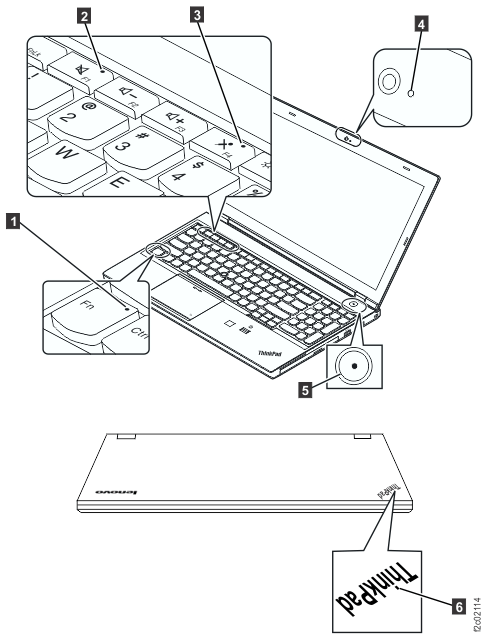
The system status indicators,
shown in Figure 1,
show the status of the computer. Table 1 lists the definitions
of the status indicators. Figure 1. ThinkPad T540 laptop status indicators
Table 1. Status indicators
Status indicator
Definition
Fn Lock indicator
Off (default mode):
The Fn Lock function is disabled. To initiate the special function
of each key, press the corresponding function key directly. To input
F1- F12, press the Fn key and the corresponding function key.
On (legacy mode):
The Fn Lock function is enabled. To input F1- F12, press the corresponding
function key directly. To initiate the special function of each key,
press the Fn key and the corresponding function key.
 Fn Lock indicator
 Speaker mute indicator
 Microphone mute indicator
 Camera status indicator
 System status indicator