Checking the date of last charge for the battery service module (BSM) sets

Procedure

  1. Remove the BSM set enclosure covers (if present) for each rack, as needed. Loosen the screws  1  at both sides to remove.
    Figure 1. BSM set enclosure cover (Models 98x and 8xE, single-phase power) (front)
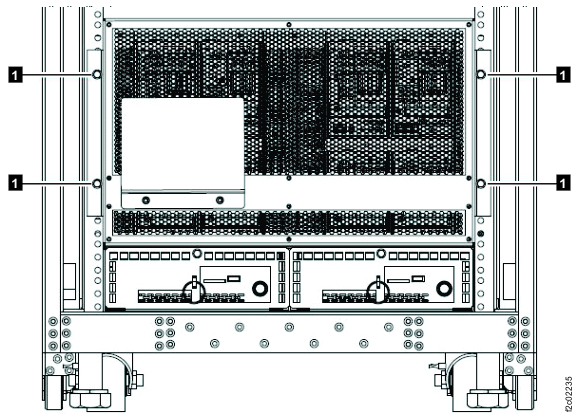
    BSM set enclosure cover (Models 98x, single-phase power) (front)
    Note: BSM set enclosure cover for single-phase power configuration shown, enclosure cover for three-phase power is similar.
  2. Observe the Last Charge  1  label on each primary battery service module (the upper right module). See Figure 2.
    Note: The label can be on the front surface of the primary BSM or on the top surface of the primary BSM power connector. For this step, you use the Last Charge date  1 , not the Born On date  2 .

    Do any primary modules have a Last Charge  1  date more than 8 months before today's date?

    • Yes, go to the next step.
    • No, reinstall the BSM set enclosure covers (if removed) and then go to step 7.
    Figure 2. Battery service module (BSM) date labels
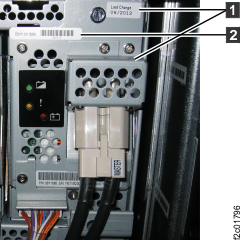
    BSM date labels
  3. Is this rack new from IBM® manufacturing?
    • Yes, go to step 6.
    • No, go to the next step.
    Note: New racks from manufacturing will have a flyer that is similar to one of the following taped under the front cover. See the following examples:
  4. At the site where this rack was previously installed, the service representative should have performed discontinue procedures for this rack. The procedure directs the service representative to write on a piece of paper the date that the rack was discontinued. The dated paper is then stored in the document enclosure at the left rear of the rack. The discontinue date is the new Last Charge Date. Can you locate the paper with the discontinue date of the rack?
    • Yes, go to the next step.
    • No. It is not possible for you to determine whether the battery modules have not been charged for more than 8 months. You will continue with the installation procedure, which will automatically determine if the battery modules can be charged. If they can be charged the installation proceeds as normal. If they cannot be charged, an error is displayed and you are guided to replace the battery modules. Go to the topic Checking for weight reduction, feature code 0200.
  5. Are there any modules with a Last Charge Date more than 8 months before today's date?
  6. The batteries have not been charged for more than 8 months. They are now discharged and cannot be charged by the rack charging system. You must replace all battery module sets in this rack before you continue with the installation.
    1. Replace the battery modules now with the rack powered off. You can use the procedures in the service information center. Open the service information center. If you have a management console available in a Model 98x that is already powered on, you can display the procedure there. If not, use the service documentation CD included in the ship group to view the information center. Go to Exchanging parts > Rack Power and Cooling > Models 98x > DC-UPS battery service module (BSM) set.
  7. Go to the next section.