Routing the mainline power cables
Procedure
-
Remove the tailgate frame bracket, as needed.
Note: For top exit, the tailgate bracket is not removable.
- Remove top screws 1 and side screws 2 .
- Slide the bracket out.
Figure 1. Tailgate frame bracket 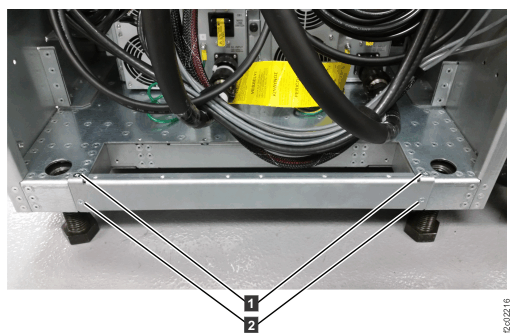
-
For racks with single-phase DC-UPS, route and connect the mainline power cables to
the DC-UPS in the racks being installed. See Figure 4 and Figure 5.
Notes:
- To connect each power cable, position the keyholes in the power cable bracket over the screws 1 and slide the cable forward to the input connector. See Figure 4.
- Each power cable will fit only the location specified on the label. The cables are not interchangeable.
Figure 2. Power cable bracket 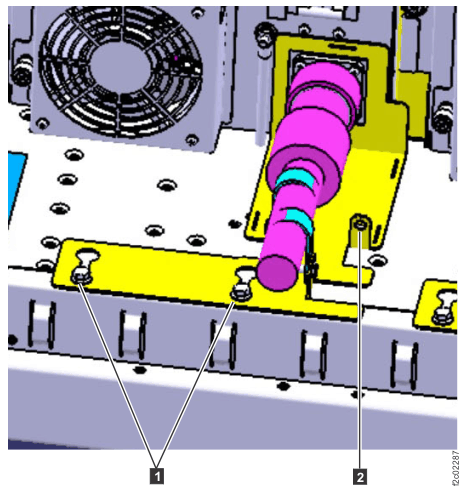
Figure 3. Location codes for the DC-UPS (Models 98x and 8xE, single-phase power) (rear) 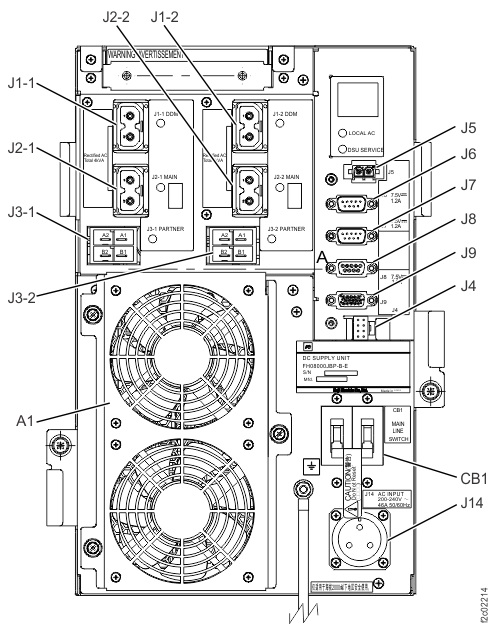
- Confirm that the cable is not powered before connecting it.
- Loosen the screws 1 (Figure 4) at the bottom of the rack behind each DC-UPS.
- Route the cable that is labeled UPS-1 (E1) to UPS E1 (lower left side of the rack). Connect the cable to the input connector (J14) and twist the lock ring clockwise to secure the connector.
- Route the cable that is labeled UPS-2 (E2) to UPS E2 (lower right side of the rack). Connect the cable to the input connector (J14) and twist the lock ring clockwise to secure the connector.
- Do not tighten the screws against the power cable brackets at this time. You will be directed to secure the brackets with screws later in this procedure.
-
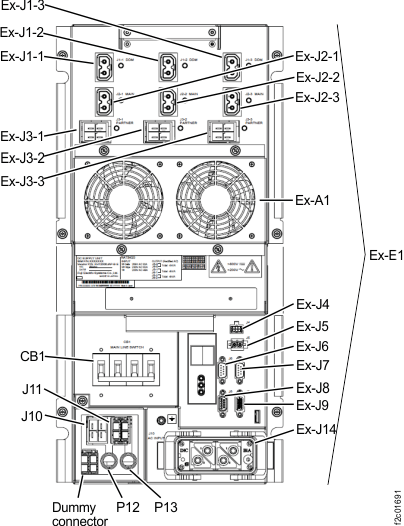
For racks with three-phase DC-UPS, route and connect the mainline power cables to the DC-UPS in
the racks being installed. See Figure 6.
- Confirm that the cable is not powered before connecting it.
- Route the cable that is labeled UPS-1 (E1) to UPS E1 (lower left side of the rack). Connect the cable to the input connector (J14) and pull the connector handles toward you to secure the connector.
- Route the cable that is labeled UPS-2 (E2) to UPS E2 (lower right side of the rack). Connect the cable to the input connector (J14) and pull the connector handles toward you to secure the connector.
Figure 4. Power cable bracket Figure 5. Location codes for the DC-UPS (Models 98x and 8xE, single-phase power) (rear) Figure 6. Location codes for the DC-UPS (Models 98x and 8xE, three-phase power) (rear)