Section-22, Cable bundle 1, installing the upper CEC enclosure (XC1) cable tie bar and
connecting cables
Procedure
- Locate the cable tie bar with the white location code label for CEC
(XC1-Upper).
-
Remove the bubble-wrap from the CEC (XC1, upper) cable tie bar cable group.
- Install the nut clips for the upper CEC (XC1) cable tie.
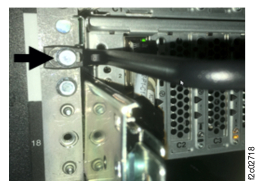
- Install a nutclip in rack rail hole 5 (white arrow), left and right sides. See Figure 1.
Figure 1. CEC enclosure cable tie bar screw position
-
Install the upper CEC (XC1) cable tie bar to the nut clips.
-
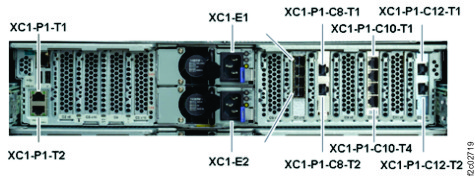
Connect the cables to the CEC (XC1, upper). See Figure 2.
Figure 2. CEC enclosure location codes (rear view) (Models 983)
- Use the hook-and-loop fastener and tie the power cables to the power supplies.