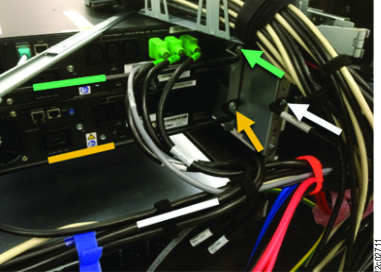
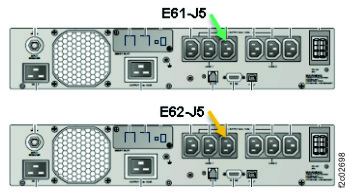
Section-29, Cable bundle 2, connecting green to upper UPS (E61) and yellow to lower UPS
(E62)
Procedure
-
Remove the orange hook-and-loop cable ties and pink bubble-pack from both cable groups as
needed.
- The group for UPS (E61, upper) has green connectors.
- The group for UPS (E62, lower) has yellow connectors.
- Route, connect, and fasten the cables with green connectors to the upper UPS.
- Route the cables over the rear cable tie bar (white) and over the front
cable tie bar (green). See Figure 1.
- Connect the cables to the UPS. See Figure 2.
- Fasten the cables to the front cable tie bar (green) using hook-and-loop cable
ties.
Figure 1. UPS cable tie bars
Figure 2. Locations, UPS (rear)
- Route, connect, and fasten the cables with yellow connectors to the lower UPS.
- Route the cables under the rear cable tie bar (white) and over the front
cable tie bar (yellow). See Figure 1.
- Connect the cables to the UPS. See Figure 2
- Fasten the cables to the front cable tie bar (yellow) using hook-and-loop cable ties.
- Fasten the cables to the rear cable tie bar using two blue hook-and-loop cable ties over
the blue tape bands on the bar.