Section-18, Installing the lower CEC enclosure (XC2) on the rails
About this task
Note: Read and understand all steps in this section before starting step 1.
Procedure
-
At the front of the rack, extend the slide rails forward
 until they click twice into
place. See Figure 1.
until they click twice into
place. See Figure 1.
Figure 1. Extending slide rails and aligning enclosure nail heads with the slots on the rail 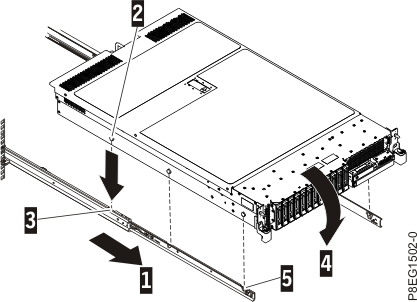
-
Install the enclosure on the rails.
-
Carefully lift the enclosure and tilt it into position over the slide rails so that the rear
nail heads
 on the
enclosure line up with the rear slots
on the
enclosure line up with the rear slots  on the slide rails. Slide the
enclosure down until the rear nail heads slip into the two rear slots. Then, slowly lower the front
of the enclosure
on the slide rails. Slide the
enclosure down until the rear nail heads slip into the two rear slots. Then, slowly lower the front
of the enclosure  until
the other nail heads slip into the other slots on the slide rails. Ensure that the front latch
until
the other nail heads slip into the other slots on the slide rails. Ensure that the front latch
 slides over the nail
heads.
slides over the nail
heads.
-
Lift the blue release latches on the slide rails and push the
enclosure all the way
into the rack until it clicks into place. For details, see Figure 2.
Figure 2. Lift the release latches and push the server into the rack 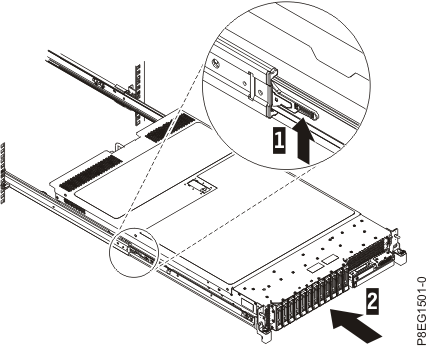
-
Carefully lift the enclosure and tilt it into position over the slide rails so that the rear
nail heads