Section-4, Unpacking and verifying that the ship group is complete
About this task
CAUTION:
- Unpacking this shipping pallet requires two people. The weight of some boxes exceeds the single person weight limit.
- Boxes 2 of 10 and 3 of 10 exceed the two person weight limit. The UPS in each box does not
exceed the two person weight limit.
The UPS can be lifted out while the box is still on the pallet.
Procedure
-
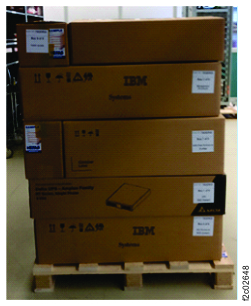
This system arrives in multiple ship group boxes on one pallet. The pallet might include empty
boxes. See Figure 1.
Note: The shipper or customer might have already removed the ship group boxes from the pallet.
Figure 1. Model 983 shipping group pallet (example) 
- Remove the ship group boxes from the pallet.
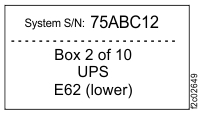
- Each box has a ship group box label. See example, Figure 2. Note:
- If you are unpacking more than one system, keep all boxes with the same system S/N together.
- If the boxes have been discarded, each UPS and enclosure has a System S/N and location code label on the top front edge.
Figure 2. Ship group box label (example) 
- Locate the ship group box printout in Box 1 of 10, in a large plastic bag with other
parts. See Table 1.
Table 1. Example of ship group box printout System Enclosure Location Shipping Box System S/N 75KCC10 Cable bundles 1 - 4 10 of 10 System S/N 75KCC10 SAS Flash Enclosure S/N 2017.D04.J87F018 SAS Flash Enclosure I1-F03 9 of 10 System S/N 75KCC10 SAS Flash Enclosure S/N 2017.D04.J87N002 SAS Flash Enclosure I1-F04 8 of 10 System S/N 75KCC10 I/O Enclosure S/N 1600.1G3.YM10RJ882003 I/O Enclosure I1-G3/G4 7 of 10 System S/N 75KCC10 CEC Enclosure S/N 8284-22A.78819FX CEC Enclosure XC1 (upper) 6 of 10 System S/N 75KCC10 CEC Enclosure S/N 8284-22A.787FD5X CEC Enclosure XC2 (lower) 5 of 10 System S/N 75KCC10 Management Enclosure S/N 5331.AB8.Y1808010A003 Management Enclosure 4 of 10 System S/N 75KCC10 UPS S/N 11S02AM963YM11DN86F049 UPS E61 (upper) 3 of 10 System S/N 75KCC10 UPS S/N 11S02AM963YM11DN86F050 UPS E62 (lower) 2 of 10 System S/N 75KCC10 Ship group parts and printouts of the assembly and installation procedures. 1 of 10 - Locate the ship group parts list in Box 1 of 10, in a large plastic bag with other parts.
- IMPORTANT: Verify that the System S/N of the DS8882F on all shipping boxes is the same. If not, stop and call the next level of support.
- Take inventory of the boxes and check them off on the ship group parts list. For an
example of the box contents see Table 2.
Table 2. Ship group contents for each box Shipping box Contents 1 of 10 Shipping group in plastic bag contains hardcopy instructions, USB DVD drive, optical media, service reference sheets, and UPS rails 2 of 10 UPS E62 (lower) 3 of 10 UPS E61 (upper) 4 of 10 Management enclosure 5 of 10 CEC enclosure (XC2, lower), rails 6 of 10 CEC enclosure (XC1, upper), rails 7 of 10 I/O enclosure (I1-G3/G4), front bezel, rails 8 of 10 Flash enclosure (I1-F04), rails 9 of 10 Flash enclosure (I1-F03), rails 10 of 10 Cable bundles (1, 2, 3, and 4) VGA/USB adapter cable for the IBM ZR1 server rack (optional).
- Determine whether optional feature codes are listed in the ship group. See Table 3.
Table 3. Optional feature codes (example) Feature code Description 0937 IBM Z ZR1 rack (includes the VGA/USB adapter cable for management enclosure). 0938 IBM Z LR1 rack (includes the VGA/USB adapter cable for management enclosure). 1103 Kick step (step stool) 1765 Keyboard/display, 1U tray (for management consoles)