Routing and connecting the rack power control cables to the RPC cards

Procedure

  1. Complete the following steps for one expansion rack at a time, starting with Rack-2. If you have Rack-3, Rack-4, or Rack-5 to install, you are sent back here later.
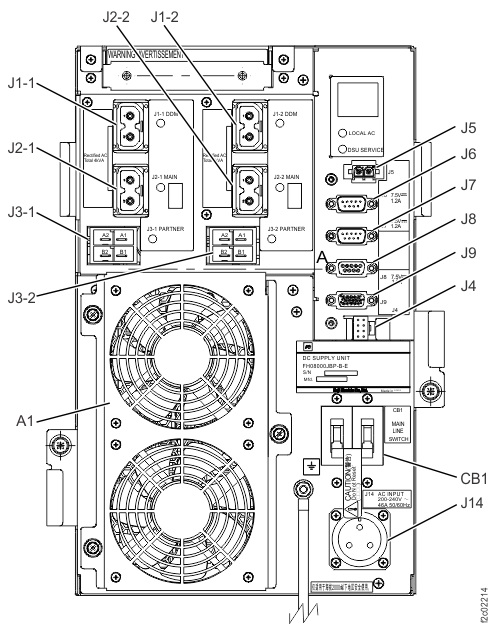
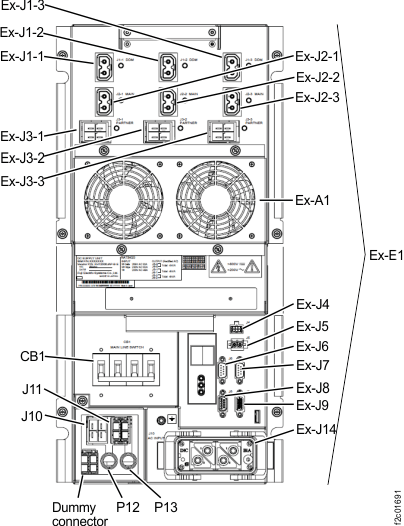
  2. At the rear of the expansion rack that is being installed, find the power control cable that connects to the left and right DC-UPS connector Ex-J6. See Figure 1 or Figure 2. The loose end of the cable has a gray label.
    Figure 1. Location codes for the DC-UPS (Models 98x and 8xE, single-phase power) (rear)
    Location codes for the DC-UPS (Models 98x) (rear)
    Figure 2. Location codes for the DC-UPS (Models 98x and 8xE, three-phase power) (rear)
    Location codes for the DC-UPS (three-phase Models 98x) (rear)
  3. Route the J6 expansion rack power control cable to RPC-1 at the left rear of Rack-1.
    1. Route the expansion rack power control cables through the frame to frame access holes near the top of the rack.
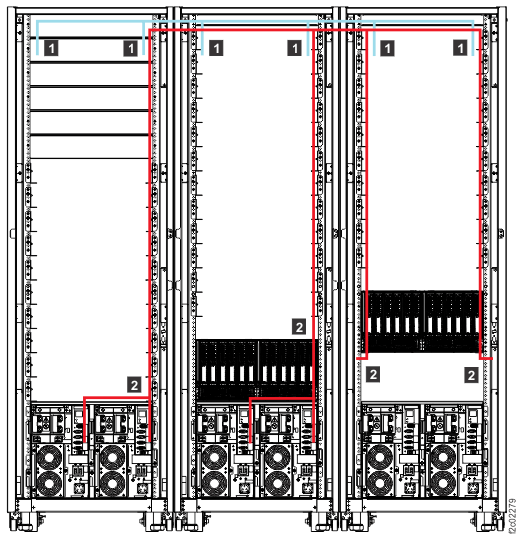
      Note: If the rack power control cables cross an entire rack, route the cables along the bracket between the access holes. For example, Rack-3 cables cross Rack-2 to Rack-1. See  2  in Figure 3.
    2. In Rack-1, route the expansion rack power control cables to RPC-1 (R1-C1). Do not connect the cables until directed in the next step.
      Figure 3. Routing remote power control cables and optical cables between racks
      Note: Models 980 and 98B shown, routing for other models is similar
      Routing remote power control cables and FC-AL cables between racks
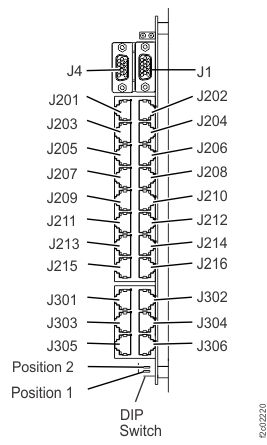
  4. Use Table 1 and Figure 4 to determine which RPC-1 card connector to plug the expansion rack power control cable to. Connect the cable to the RPC card.
    Table 1. Rack number and RPC-1 connector locations
    From DC-UPS connector Ex-J6 in rack number: To Rack-1 RPC-1 card (left, facing rear)
    2 C1-J203
    3 C1-J205
    4 C1-J207
    5 C1-J209
    Figure 4. Location codes for the RPC card (Model 98x)
    Location codes for the RPC card (Model 98x)
  5. At the rear of the expansion rack that is being installed, find the power control cable that connects to the left and right DC-UPS connector Ex-J7 (Figure 1 or Figure 2). The loose end of the cable has a yellow label.
  6. Route the J7 cable from the prior step to RPC-2 at the right rear of Rack-1, using the same method as the J6 cable. See Figure 3.
  7. Use Table 2 and Figure 4 to determine which RPC-2 card connector to plug the expansion rack power control cable to. Connect the cable to the RPC card.
    Table 2. Rack number and RPC-2 connector locations
    From DC-UPS connector Ex-J7 in rack number: To Rack-1 RPC-2 card (right, facing rear)
    2 C2-J203
    3 C2-J205
    4 C2-J207
    5 C2-J209
  8. Use Table 3 to find the expansion rack that you are installing. Go to the section indicated for that expansion rack.
    Table 3. Installing a storage facility - next steps for expansion racks
    Expansion rack that you are currently installing Go to:
    Model 85E all-flash (see note 8.a)
    Model 86E all-flash (see note 8.a)
    Model 88E Rack-2 with 8 (or fewer) flash enclosures
    Model 98F
    Routing and connecting the Rack-2 PCIe and PCN cables to Rack-1
    Model 88E Rack-2 with more than 8 flash enclosures
    Model 88E Rack-3
    Routing and connecting the expansion rack SAS cables
    Model 84E
    Model 98B
    Routing and connecting the expansion rack FC-AL cables (business class models)
    Model 85E Rack-2
    Model 98E (single-phase) Rack-2 (see note 8.b)
    Routing and connecting the Rack-2 PCIe and PCN cables to Rack-1
    Model 86E Rack-2, Rack-3, Rack-4, Rack-5
    Model 98E (three-phase) Rack-2 (see note 8.b)
    Model 98E Rack-3, Rack-4, Rack-5
    Routing and connecting the Rack-2, Rack-3, Rack-4, or Rack-5 FC-AL cables
    Notes:
    1. Examples of all-flash systems include models 982 and 98F, or machine types 5331, 5332, 5333, 5334, 9586
    2. f you are unsure whether the rack is configured for single-phase or three-phase power, observe the J3-x PARTNER connectors at the rear of the DC-UPS.
      • A single-phase DC-UPS has two "partner" connectors: J3-1 and J3-2. See Figure 1.
      • A three-phase DC-UPS has three "partner" connectors: J3-1, J3-2 and J3-3. See Figure 2.