MAP1240 Locating FRUs by using identify indicators

About this task

The primary method to locate a FRU to be exchanged is by using the hierarchy of identify indicators for that FRU. When the FRU to be exchanged has been selected in a serviceable event, or selected using the FRU replace options, the management console causes the hierarchy of identify indicators to be lit.

For example, if you select to exchange a storage enclosure DDM FRU from a serviceable event, the following identify indicators are lit:
  • Rack identify indicator (on the rack operator panel) for the rack that contains the FRU
  • Storage enclosure identify indicator for the enclosure that contains the FRU
  • DDM identify indicator for the specific DDM that is to be replaced
For those FRUs that do not have an identify indicator (see Table 1, Table 2, Table 3), the rack and enclosure identify indicators are still lit. To determine the actual FRU within the enclosure, you need to use the last part of the location code for that FRU. See MAP1245 Finding FRUs by using location codes

For more information about LEDs, see LED indicators.

MAP1240 Section-1

Procedure

  1. Locate the storage facility to be serviced.
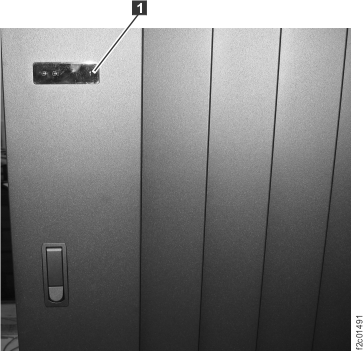
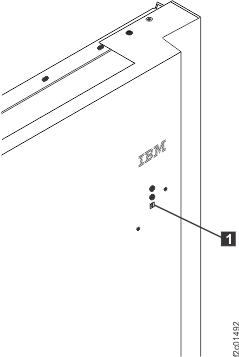
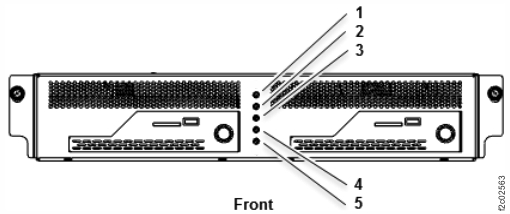
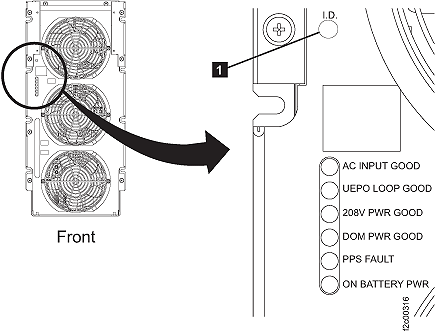
  2. Observe the operator panel identify LED Callout label 1 on each rack in the storage facility.
    • For Rack-1 Model 941, see Figure 1.
    • For Rack-1 Model 951, 961 , 98x (except 983), see Figure 2.
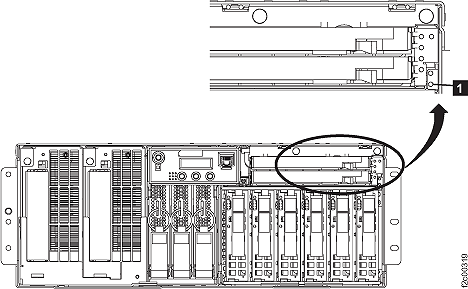
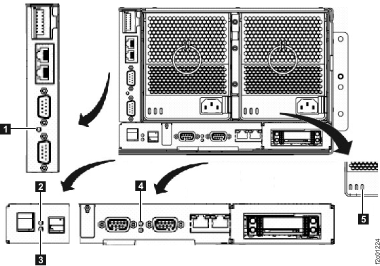
    • For Model 983, the system identify LED Callout label 5 is located on the management enclosure front panel. See Figure 3.
    Figure 1. Model 941 "Identify" indicator (LED) on a rack operator panel
    Model 941 "Identify" indicator (LED) on a rack operator panel
    Figure 2. Model 951, 961 "Identify" indicator (LED) on the upper right of the front cover
    Note: Model 98x front door LEDs are similar, but are located on the left side of the front door.
    Model 951 "Identify" indicator (LED) on the upper right of the front cover
    Figure 3. Model 983 management enclosure front panel
    Management enclosure front panel
  3. For all models except 983, the FRU is in the rack with the operator panel identify LED flashing. Go to step 5.
  4. For model 983, there is no rack operator panel or rack identify LED. Instead, the system identify LED illuminates on the management enclosure.
    Use enclosure identify and FRU identifiy LEDs to locate the FRU. Go to step 5.
  5. The FRU identify LED indicator that you attempt to find in the following steps might not be lit under these circumstances:
    • The LED is burnt out.
    • The FRU that contains the LED is no longer able to control the LED.
    • The LED might be controlled by a different FRU that feeds a signal directly or by a cable to the FRU to be identified. The controlling FRU or the cable might have a problem.
    • If the FRU identify LED indicator is not operational, use the location code to determine the failing FRU.
  6. Open the front and rear covers of the rack containing the FRU determined in the above steps.
  7. You can now locate the area of the rack containing the FRU.
    1. Use the FRU description and FRU location code from a serviceable event FRU list or the exchange FRU option to find the area of the rack containing the FRU:
      • For rack models 941, 94E see Table 1.
      • For rack models 951, 95E see Table 2.
      • For rack models 961, 96E see Table 3.
      • For rack models 98x (except 983), 8xE see Table 4.
      • For model 983, see Table 5.

      The MTMS (machine type model serial number) is the first part of the FRU location code. Example: Location code = U2424.941.75ABCD0-C2 where U2424.941.75ABCD0 = MTMS and C2 = FRU location within the MTMS.

      Note: If a FRU is contained in an enclosure, only the enclosure is listed below. If the FRU is not contained in an enclosure, then it is listed in the table.
      Table 1. Model 941, 94E FRU identify LED locations
      MTMS FRU Description Identify LED location
      CEC enclosure1
      U789D.001.sssssss Multiple FRUs in enclosure MAP1240 Section-13 (CEC Enclosure Models 941, 951)
      HMC server
      4061.mmm.sssssss
      4349.mmm.sssssss
      Multiple FRUs in laptop There is no Identify LED for the HMC.
      I/O enclosure
      U1400.rBn.sssssss Multiple FRUs in enclosure MAP1240 Section-16 (I/O enclosure Models 941, 94E, 951, 95E, 961, 96E)
      Rack and power
      2nnn.mmm.sssssss (Rack, not a FRU) Figure 1
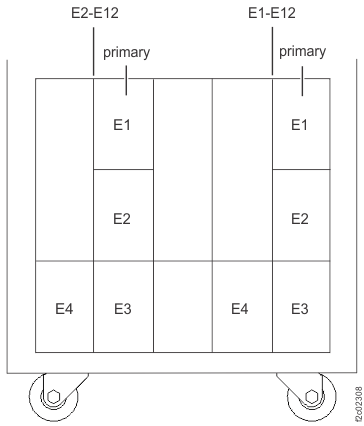
      U2nnn.mmm.sssssss-Exx (xx=10, 11,12) Battery module enclosure MAP1240 Section-2 (battery enclosure)
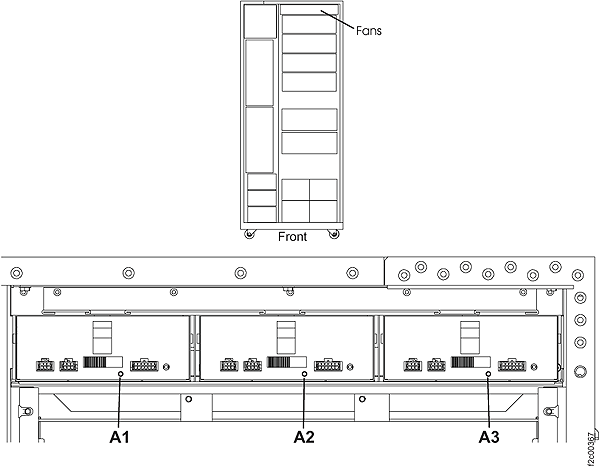
      U2nnn.mmm.sssssss-Ax (x=1,2,3) DASD fan tray MAP1240 Section-4 (DASD fan tray)
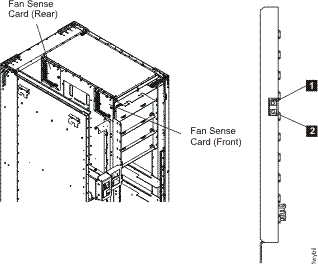
      U2nnn.mmm.sssssss-Cx (x=3,4) Fan sense card MAP1240 Section-5 (fan sense card)
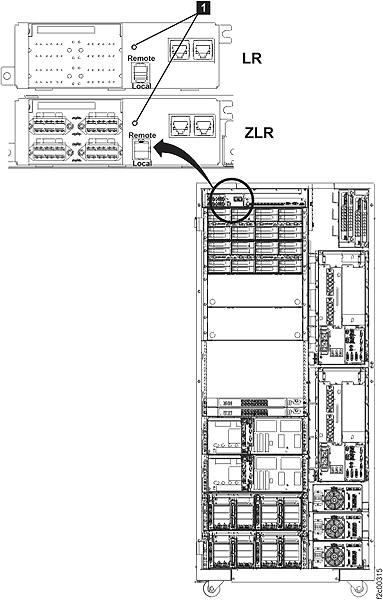
      U2nnn.mmm.sssssss-C6 Local remote switch card / zSeries local remote switch card MAP1240 Section-6 (local remote or zSeries local remote switch card)
      U2nnn.mmm.sssssss-Ex (x=1,2) Primary power supply (PPS) MAP1240 Section-7 (primary power supply, PPS)
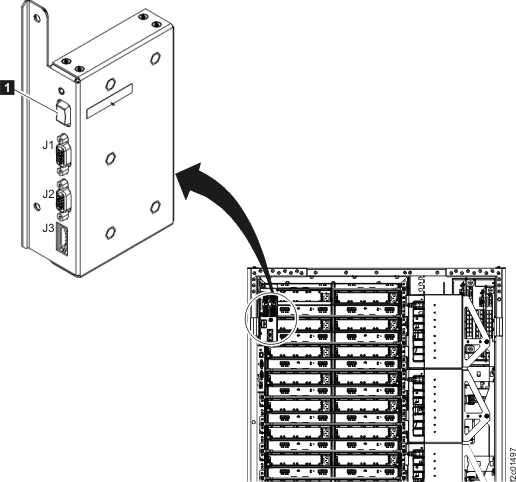
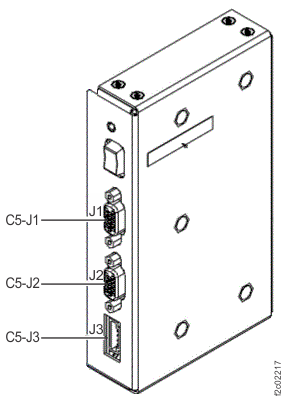
      U2nnn.mmm.sssssss-C5 Rack identity card MAP1240 Section-9 (rack identity card)
      U2nnn.mmm.sssssss-Cx (x=1,2) Rack Power Control (RPC) card MAP1240 Section-10 (RPC card)
      Storage enclosure
      U2107.D01.sssssss Multiple FRUs in enclosure MAP1240 Section-12 (storage enclosure [16 DDM slots] Models 92x, 93x, 92E, 9A2, 9B2, 9AE, 941)
      Storage Facility Image (SFI)
      U2nnn.mmm.ssssssy (y=1, 2) (Not a FRU)  
      Note: 1. A CEC complex might have more than one CEC enclosure, each with a unique ssssss.
      Table 2. Model 951, 95E FRU identify LED locations
      MTMS FRU Description Identify LED location
      CEC enclosure1
      U789D.001.sssssss Multiple FRUs in enclosure MAP1240 Section-13 (CEC Enclosure Models 941, 951)
      HMC server
      4061.mmm.sssssss
      4349.mmm.sssssss

      4242.mmm.sssssss
      Multiple FRUs in laptop There is no Identify LED for the HMC.
      I/O enclosure
      U1400.rBn.sssssss Multiple FRUs in enclosure MAP1240 Section-16 (I/O enclosure Models 941, 94E, 951, 95E, 961, 96E)
      Rack and power
      2nnn.mmm.sssssss   Figure 2
      U2nnn.mmm.sssssss-Exx (xx=10, 11,12) Battery module enclosure MAP1240 Section-2 (battery enclosure)
      U2nnn.mmm.sssssss-C6 Local remote switch card / zSeries local remote switch card MAP1240 Section-6 (local remote or zSeries local remote switch card)
      U2nnn.mmm.sssssss-Ex (x=1,2) Primary power supply (PPS) MAP1240 Section-7 (primary power supply, PPS)
      U2nnn.mmm.sssssss-C5 Rack identity card MAP1240 Section-9 (rack identity card)
      U2nnn.mmm.sssssss-Cx (x=1,2) RPC card MAP1240 Section-10 (RPC card)
      Storage enclosure
      U2107.D02.sssssss Multiple FRUs in enclosure MAP1240 Section-19 (storage enclosure [12 or 24 DDM slots] Models 951, 95E, 961, 96E, 98x, 8xE)
      Storage Facility Image (SFI)
      2nnn.951.ssssss1 (Not a FRU)  
      Note: 1. A CEC complex might have more than one CEC enclosure, each with a unique ssssss.
      Table 3. Model 961, 96E FRU identify LED locations
      MTMS FRU Description Identify LED location
      CEC enclosure
      U78AA.001.sssssss Multiple FRUs in enclosure MAP1240 Section-14 (CEC Enclosure Model 961)
      HMC server
      4061.mmm.sssssss
      4349.mmm.sssssss
      4242.mmm.sssssss
      Multiple FRUs in laptop There is no Identify LED for the HMC.
      I/O enclosure
      U1400.rBn.sssssss Multiple FRUs in enclosure MAP1240 Section-16 (I/O enclosure Models 941, 94E, 951, 95E, 961, 96E)
      Rack and power
      2nnn.mmm.sssssss   Figure 2
      U2nnn.mmm.sssssss-Ey-Exx (y=1,2; xx=10, 11,12) DC-UPS battery service module set (BSM set) MAP1240 Section-3 (DC-UPS battery service module set)
      U2nnn.mmm.sssssss-C6 Local remote switch card / zSeries local remote switch card MAP1240 Section-6 (local remote or zSeries local remote switch card)
      U2nnn.mmm.sssssss-Ex-E1 (x=1,2) DC-UPS DC supply unit (DSU) and fan assembly MAP1240 Section-8 (DC-UPS DC supply unit)
      U2nnn.mmm.sssssss-C5 Rack identity card MAP1240 Section-9 (rack identity card)
      U2nnn.mmm.sssssss-Cx (x=1,2) RPC card MAP1240 Section-10 (RPC card)
      Storage enclosure
      U2107.D02.sssssss Multiple FRUs in enclosure MAP1240 Section-19 (storage enclosure [12 or 24 DDM slots] Models 951, 95E, 961, 96E, 98x, 8xE)
      U2107.D03.sssssss Multiple FRUs in enclosure MAP1240 Section-21 (storage enclosure [30 DDM slots] Models 961, 96E, 98x)
      Storage Facility Image (SFI)
      2nnn.961.ssssss1 (Not a FRU)  
      Table 4. Model 98x, 8xE FRU identify LED locations
      MTMS FRU Description Identify LED location
      CEC enclosure
      U78CB.001.sssssss
      U78C9.001.sssssss
      U78C7.001.sssssss
      Multiple FRUs in enclosure MAP1240 Section-15 (CEC Enclosure Model 98x)
      HMC server
      8100.LI7.sssssss Entire small form factor management console is a FRU. There is no Identify LED for the HMC.
      I/O enclosure
      U1500.rBn.sssssss Multiple FRUs in enclosure MAP1240 Section-17 (I/O enclosure Models 98x, 8xE)
      Rack and power
      2nnn.mmm.sssssss   Figure 2
      U2nnn.mmm.sssssss-Ey-Exx (y=1,2; xx=12) DC-UPS battery service module set (BSM set) MAP1240 Section-3 (DC-UPS battery service module set)
      U2nnn.mmm.sssssss-C6 Local remote switch card / zSeries local remote switch card MAP1240 Section-6 (local remote or zSeries local remote switch card)
      U2nnn.mmm.sssssss-Ex-E1 (x=1,2) DC-UPS DC supply unit (DSU) and fan assembly MAP1240 Section-8 (DC-UPS DC supply unit)
      U2nnn.mmm.sssssss-C5 Rack identity card MAP1240 Section-9 (rack identity card)
      U2nnn.mmm.sssssss-Cx (x=1,2) RPC card MAP1240 Section-10 (RPC card)
      Storage enclosure
      U2107.D02.sssssss Multiple FRUs in enclosure MAP1240 Section-19 (storage enclosure [12 or 24 DDM slots] Models 951, 95E, 961, 96E, 98x, 8xE)
      U2107.D03.sssssss Multiple FRUs in enclosure MAP1240 Section-21 (storage enclosure [30 DDM slots] Models 961, 96E, 98x)
      U2107.D04.sssssss Multiple FRUs in enclosure MAP1240 Section-20 (SAS flash enclosure [24 drive slots] Models 98x, 8xE)
      Storage Facility Image (SFI)
      2nnn.98x.ssssss1 (Not a FRU)  
      Table 5. Model 983 FRU identify LED locations
      MTMS FRU Description Identify LED location
      CEC enclosure
      U78CB.001.sssssss Multiple FRUs in enclosure MAP1240 Section-15 (CEC Enclosure Model 98x)
      HMC server
      8100.LI7.sssssss Entire small form factor management console is a FRU. There is no Identify LED for the HMC.
      I/O enclosure
      U1600.rBn.sssssss Multiple FRUs in enclosure MAP1240 Section-18 (I/O enclosure Model 983)
      Management enclosure
      5nnn.mmm.sssssss   Figure 3
      U5nnn.mmm.sssssss-Cx (x=1,2) RPC card MAP1240 Section-11 (Management enclosure)
      U5nnn.mmm.sssssss-C6 Local remote switch card MAP1240 Section-11 (Management enclosure)
      U5nnn.mmm.sssssss-E3x (x=1,2) Power supply assembly MAP1240 Section-11 (Management enclosure)
      Storage enclosure
      U2107.D04.sssssss Multiple FRUs in enclosure MAP1240 Section-20 (SAS flash enclosure [24 drive slots] Models 98x, 8xE)
      Storage Facility Image (SFI)
      2nnn.98x.ssssss1 (Not a FRU)  

MAP1240 Section-2 (battery enclosure)

Procedure

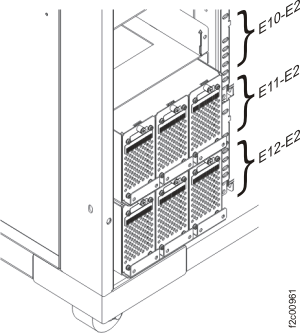
At the rear of the rack, find the battery enclosure with the flashing identify LED Callout label 1.
Figure 4. All models battery module enclosure locations (rear)
Battery module enclosure locations (rear)
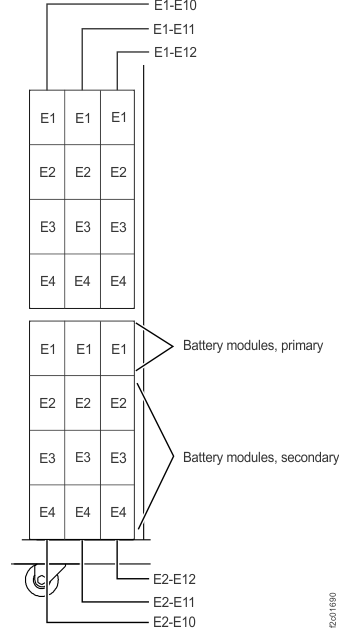
Figure 5. All models battery module set locations (front)
Battery module set locations (front)

MAP1240 Section-3 (DC-UPS battery service module set)

Procedure

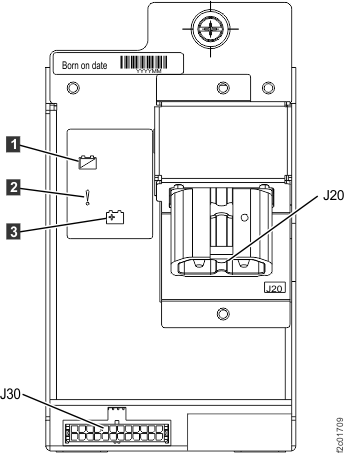
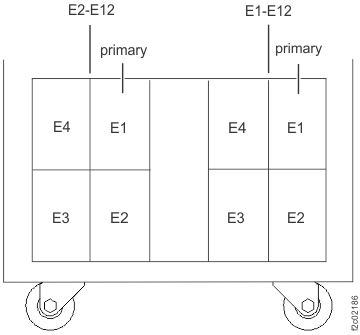
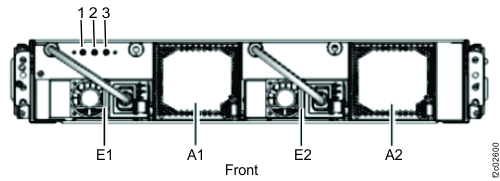
At the front of the rack, find the primary battery service module (Ey-Exx-E1) with the flashing fault/identify LED Callout label 2.
Figure 6. Battery service module, primary, locations (front)
Battery service module, primary, locations (front)
Figure 7. Battery service module (BSM) set locations (Models 961, 96E) (front)
Battery service module (BSM) set locations (front)
Figure 8. Battery service module (BSM) set locations (Models 98x, 8xE single-phase power) (front)
Battery service module (BSM) set locations (Models 98x) (front)
Figure 9. Battery service module (BSM) set locations (Models 98x, 8xE three-phase power) (front)
Battery service module (BSM) set locations (Models 98x, three-phase power) (front)

MAP1240 Section-4 (DASD fan tray)

Procedure

1. At the front of the rack, find the DASD fan tray with the flashing identify LED [A1] [A2] [A3].
Figure 10. Models 92x, 93x, 92E, 9A2, 9B2, 9AE, 941 "Identify" indicator (LED) for a DASD fan tray
Identify LED for DASD fan tray

MAP1240 Section-5 (fan sense card)

Procedure

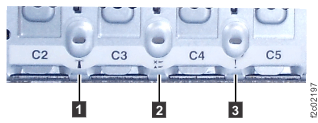
1. At the front and rear of the rack, find the fan sense card with the flashing identify LED Callout label 1.
  • C3 location is at the front of the rack
  • C4 location is at the rear of the rack
Figure 11. Models 92x, 93x, 9A2, 9B2, 941 LEDs on the fan sense cards
LEDs on the fan sense cards

MAP1240 Section-6 (local remote or zSeries local remote switch card)

Procedure

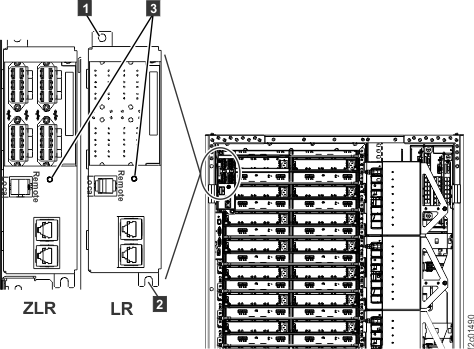
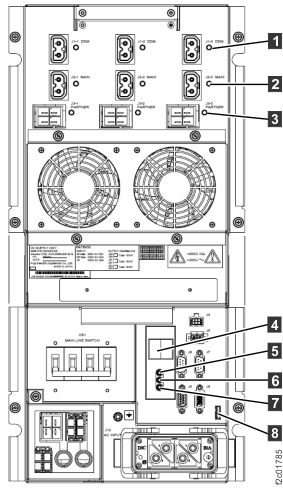
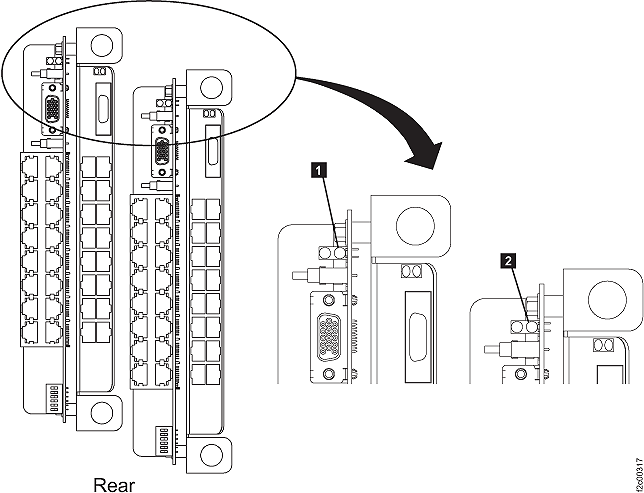
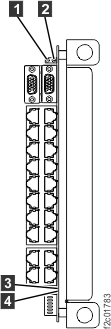
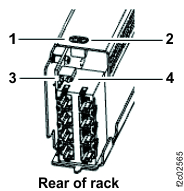
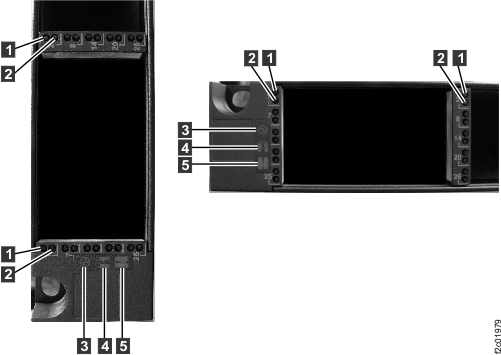
At the rear of the rack, find the local remote switch card or zSeries local remote switch with the flashing identify LED Callout label 1 (Figure 12) or LED Callout label 3 (Figure 13).
Figure 12. Model 941 "Identify" indicators (LEDs) for local remote and zSeries local remote switch cards
Identify LED for local remote and zSeries local remote switch card
Figure 13. Model 951, 961 "Identify" indicators (LEDs) for local remote and zSeries local remote switch cards
Note: Model 98x local remote switch card identify LED is similar; the card is located at right rear of rack.
Model 951 "Identify" indicators (LEDs) for local remote and zSeries local remote switch cards

MAP1240 Section-7 (primary power supply, PPS)

Procedure

  1. At the front of the rack, find the primary power supply with the flashing identify LED Callout label 1.
    • E1 location is upper PPS
    • E2 location is lower PPS
    Figure 14. All models "Identify" indicator (LED) for a PPS
    Identify LED for primary power supply
  2. The Models 941, 94E 5/12V DDM power module identify LED Callout label 1 is at the rear of the rack.
    Figure 15. "Identify" indicator (LED) for a 5/12V DDM power module
    LED power supply DDM
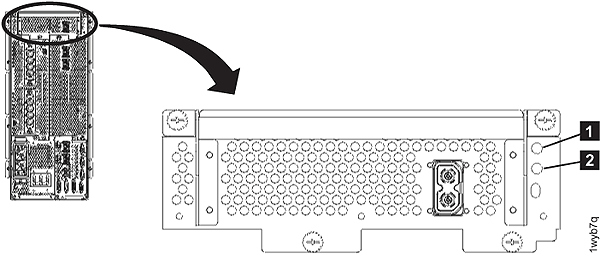
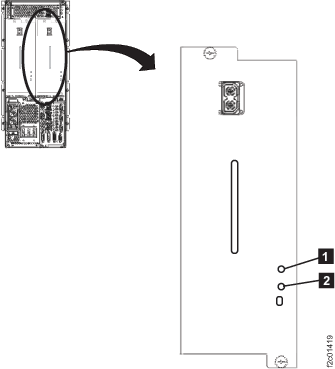
  3. The booster power module identify LED Callout label 1 is at the rear of the rack.
    Figure 16. All models "Identify" indicator (LED) for a booster power module
    All models "Identify" indicator (LED) for a booster power
  4. The Models 951, 95E 208V DDM power module identify LED Callout label 1 is at the rear of the rack.
    Figure 17. "Identify" indicator (LED) for a 208V DDM power module
    LEDs on the 208VDC power module

MAP1240 Section-8 (DC-UPS DC supply unit)

Procedure

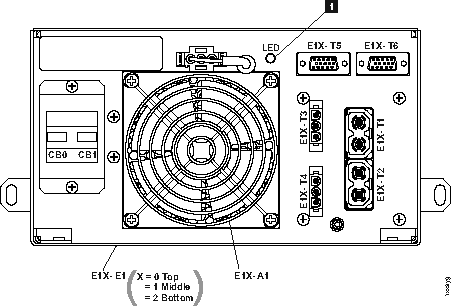
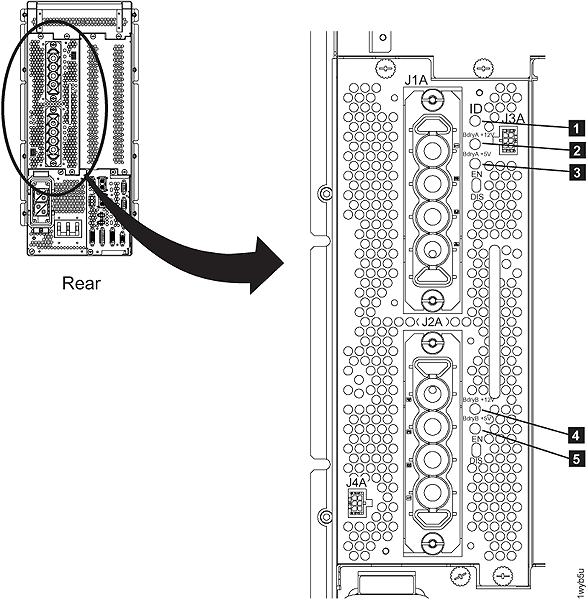
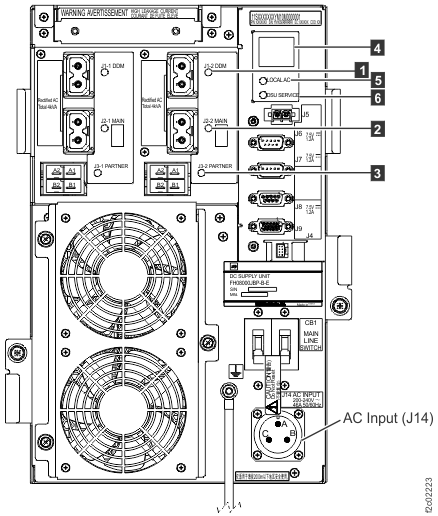
At the rear of the rack, find the DC-UPS DSU with the flashing DSU service LED Callout label 6.
Figure 18. LEDs on the DC-UPS DC Supply Unit (DSU) (Models 961, 96E, 98x, 8xE three-phase), rear of rack
LEDs on the DC-UPS DC Supply Unit (DSU), rear of rack
Figure 19. LEDs on the DC-UPS DC Supply Unit (DSU) (Models 98x, 8xE single-phase), rear of rack
LEDs on the DC-UPS DC Supply Unit (DSU) (Models 98x, 8xE), rear of rack

MAP1240 Section-9 (rack identity card)

Procedure

1. At the rear of the rack, observe the identify LED Callout label 1.
Figure 20. Model 941 "Identify" indicator (LED) on the rack identity card
LEDs on the rack identity card
Figure 21. Models 951, 95E "Identify" indicator (LED) on the rack identity card
Models 951, 95E "Identify" indicator (LED) on the rack identity card
Figure 22. Location codes for the rack identity card
Note: Identify LED is located at top of card, above white service power switch. The card is located at right rear of rack.
Location codes for the rack identity card

MAP1240 Section-10 (RPC card)

Procedure

At the rear of the rack, find the RPC card with the flashing identify LED:
Figure 23. "Identify" indicator (LED) for an RPC card (Models 941, 951)
Identify LED for RPC card
Figure 24. LEDs on the RPC cards (Model 961)
LEDs on the RPC cards
Figure 25. LEDs on the RPC cards (Model 98x)
LEDs on the RPC cards (Model 98x)

MAP1240 Section-11 (Management enclosure)

Procedure

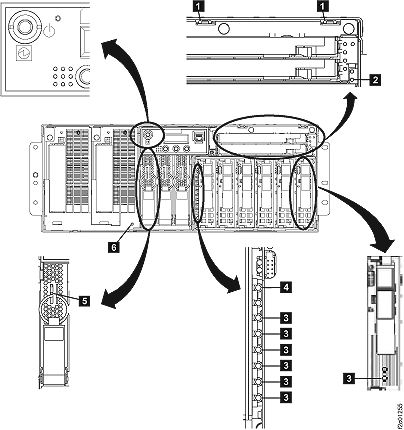
  1. At the front of the rack, locate the management enclosure with the enclosure identify LED Callout label 4 lit solid. See Figure 26.
    Figure 26. Model 983 management enclosure front panel
    Management enclosure front panel
  2. At the front of the rack, slide the management enclosure out to the service position and remove the top cover. See Figure 26.
    Note: The management enclosure is below the two CEC enclosures.
    1. Fully loosen the left and right captive thumb screws.
    2. Slide the management out fully so the sliding rails lock into place.
    3. At the rear of the top cover, fully loosen the left and right captive thumb screws.
    4. Slide the cover back until it lifts off.
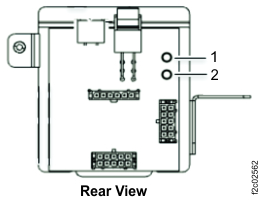
  3. The RPC card identify LED Callout label 1 is shown in Figure 27.
    Figure 27. LEDs on the RPC card
    Management enclosure front panel
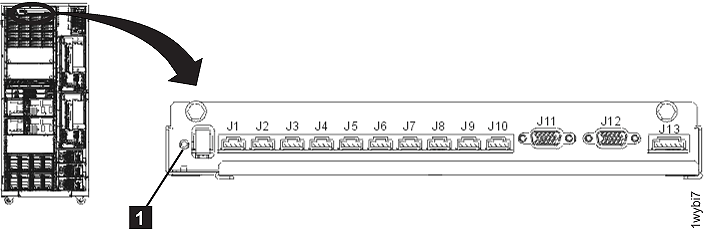
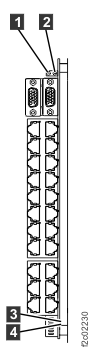
  4. The local remote switch card identify LED Callout label 1 is shown in Figure 28.
    Figure 28. LEDs on the Local remote switch card
    LEDs on the Local remote switch card
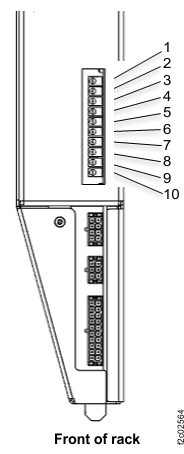
  5. The management enclosure power supply identify LED Callout label 10 is shown in Figure 29.
    Figure 29. LEDs on the management enclosure power supply
    Management enclosure front panel

MAP1240 Section-12 (storage enclosure [16 DDM slots] Models 92x, 93x, 92E, 9A2, 9B2, 9AE, 941)

Procedure

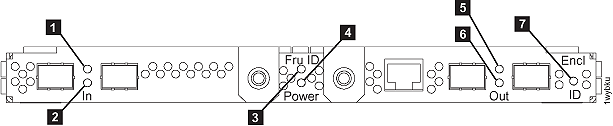
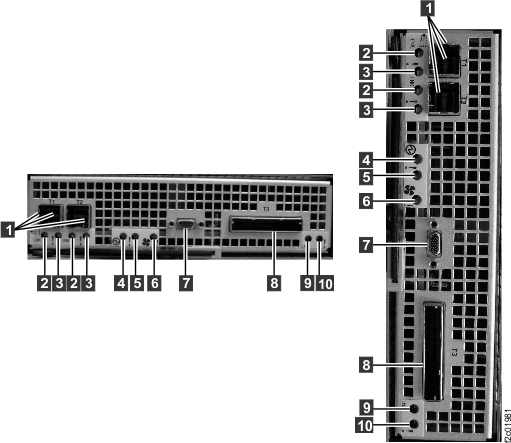
  1. At the front and rear of the rack, find the storage enclosure with the enclosure identify LED Callout label 7 flashing on one or both FCIC cards.
    Figure 30. LEDs on a Fibre Channel interface card (at a storage enclosure)
    LEDs on a fibre channel interface card (at a storage enclosure)
  2. The FCIC card "identify" indicator (LED) Callout label 3 is shown in Figure 30.
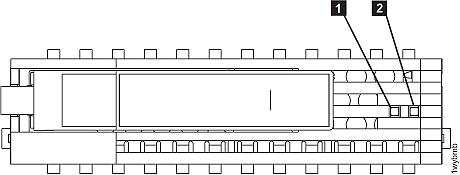
  3. The DDM "Identify" indicator (LED) Callout label 1 is shown in Figure 31.
    Figure 31. LEDs on a disk drive module (DDM)
    LEDs on the disk drive modules (DDMs)

MAP1240 Section-13 (CEC Enclosure Models 941, 951)

Procedure

  1. At the front of the rack, find the CEC enclosure with the enclosure identify LED Callout label 1 flashing.
    Figure 32. The "Identify" indicator (LED) for a CEC enclosure (front)
    Identify LED for storage enclosure
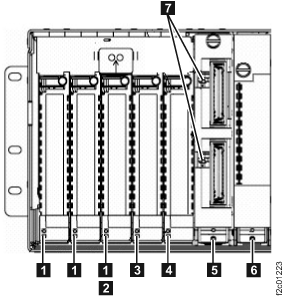
  2. Find the FRU identify LED location that is flashing using Table 6 and Figure 33 through Figure 35.
    Table 6. FRU identify LED locations on the CEC enclosure
    FRU Reference
    CEC enclosure Figure 33, LED Callout label 2; Figure 34, LED Callout label 2
    CEC enclosure control panel No LED, use location code
    CEC enclosure disk drive Figure 33, LED Callout label 3
    CEC enclosure disk drive backplane assembly Figure 33, LED Callout label 4
    CEC enclosure fan Figure 33, LED Callout label 1
    CEC enclosure I/O backplane assembly Figure 34, LED Callout label 3
    CEC enclosure PCIe four port card Figure 35, LED Callout label 6
    CEC enclosure PCIe single port card Figure 35, LED Callout label 1
    CEC enclosure PCIe single port card (slot 5) Figure 35, LED Callout label 4
    CEC enclosure power supply Figure 34, LED Callout label 5
    CEC enclosure RIO card Figure 35, LED Callout label 5
    CEC enclosure RIO card ports 1 and 2 Figure 35, LED Callout label 7
    CEC enclosure service processor card Figure 34, LED Callout label 4
    CEC enclosure system processor backplane assembly Figure 33, LED Callout label 6
    CEC enclosure system processor card No LED, use location code
    (See Exchange the CEC enclosure system processor card for more information.)
    CEC enclosure system processor dummy card No LED, use location code
    CEC enclosure system processor voltage card Figure 33, LED Callout label 5
    CEC enclosure system processor voltage dummy card No LED, use location code
    CEC enclosure VPD card No LED, use location code
    CEC enclosure VPD pass-through card Figure 34, LED Callout label 1
    Figure 33. LEDs on the CEC enclosure (rear)
    LEDs on the I/O enclosure (rear)
    Figure 34. LED CEC enclosure right rear
    LED CEC enclosure right rear
    Figure 35. LED CEC enclosure left rear
    LED CEC enclosure left rear

MAP1240 Section-14 (CEC Enclosure Model 961)

Procedure

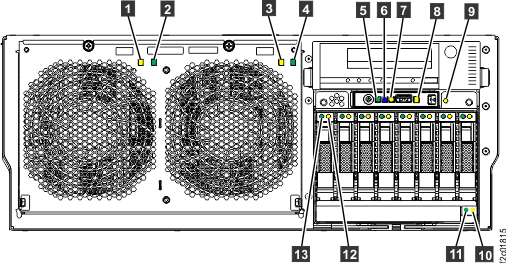
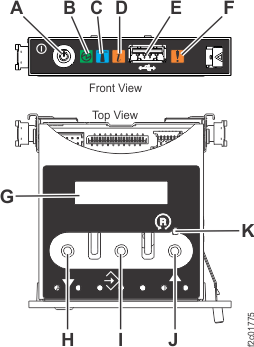
  1. At the front of the rack, find the CEC enclosure with the enclosure identify LED Callout label 6 lit solid. The identify LED is item Callout label C in Figure 37.
    Figure 36. CEC enclosure front LED indicators
    CEC enclosure front LED indicators
    Figure 37. CEC enclosure control panel assembly (Model 961)
    CEC enclosure control panel assembly
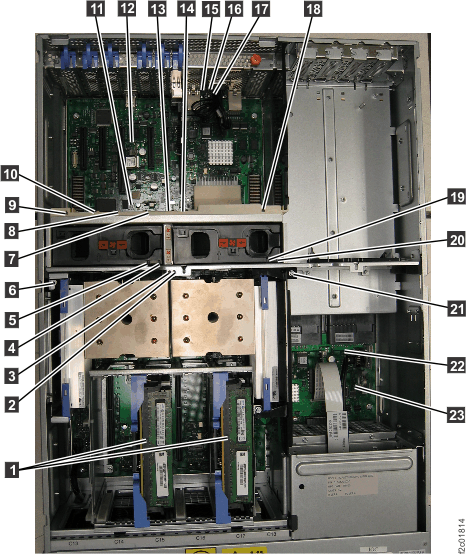
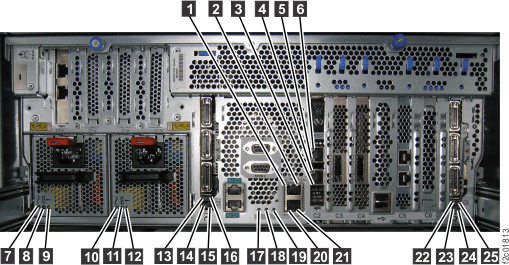
  2. Find the FRU identify LED location using Table 7 and the figures in this section.
    Table 7. FRU identify LED locations on the CEC enclosure (Model 961)
    FRU Reference
    CEC enclosure Figure 36, LED Callout label 6
    Figure 37, LED Callout label C
    Figure 39, LED Callout label 17
    (identify is solid blue LED)
    CEC enclosure control panel No LED, use location code
    CEC enclosure disk drive Figure 36, LED Callout label 12
    CEC enclosure disk drive backplane Figure 36, LED Callout label 9
    CEC enclosure Ethernet two-port card Figure 38, LED Callout label 14
    CEC enclosure fan Figure 36 , LED Callout label 1 Callout label 3
    Figure 38, LED Callout label 5 Callout label 19
    CEC enclosure I2C interface card, with CEC enclosure I2C passive connector card No LED, use location code
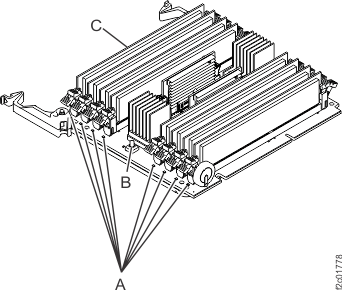
    CEC enclosure memory card Figure 38, LED Callout label 1
    Figure 40, LED Callout label C
    CEC enclosure memory module Figure 40, LED Callout label A (press blue button Callout label B to identify)
    CEC enclosure PCIe three-port card Figure 38, LED Callout label 9 Callout label 18
    CEC enclosure PCIe single-port card Figure 38, LED Callout label 7 Callout label 13
    CEC enclosure power supply Figure 39, LED Callout label 9 Callout label 12
    CEC enclosure processor module Figure 38, LED Callout label 2 Callout label 3
    CEC enclosure RS-485 serial interface card Figure 38, LED Callout label 8
    CEC enclosure system backplane Figure 38, LED Callout label 11
    CEC enclosure voltage regulator module Figure 38, LED Callout label 6 Callout label 21
    CEC enclosure time of day battery Figure 38, LED Callout label 23
    CEC enclosure VPD card Figure 38, LED Callout label 22
    Figure 38. CEC enclosure top LED indicators
    CEC enclosure top LED indicators
    Figure 39. CEC enclosure rear LED indicators
    CEC enclosure rear LED indicators
    Figure 40. Memory card and memory module LED indicators
    Memory card and memory module LED indicators

MAP1240 Section-15 (CEC Enclosure Model 98x)

Procedure

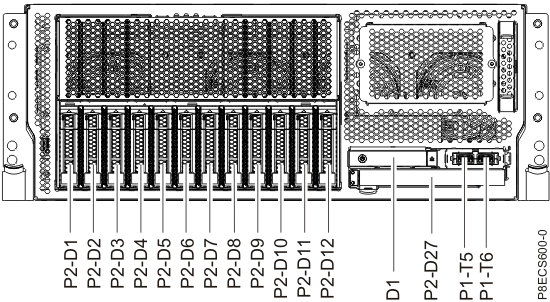
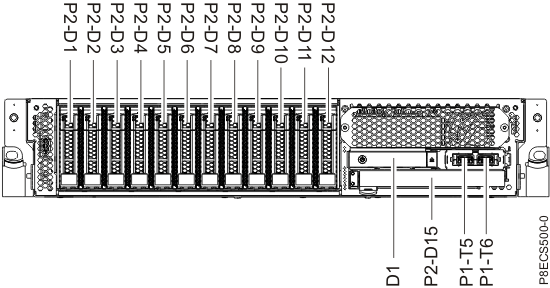
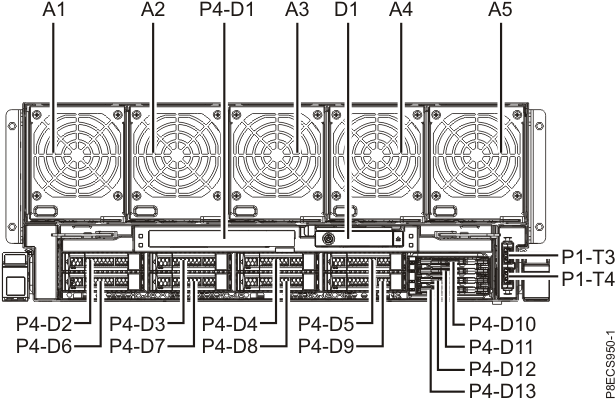
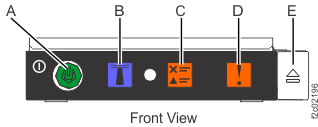
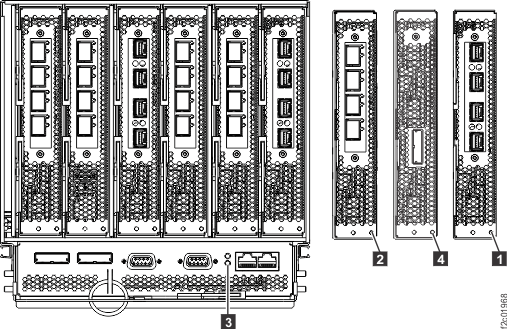
  1. At the front of the rack, find the CEC enclosure with the enclosure identify LED lit solid. The front identify LED, located on the CEC enclosure control panel assembly, is Callout label B in Figure 44. The control panel assembly is location D1 in Figure 41, Figure 42, and Figure 43. The rear identify LED is Callout label 1 in Figure 45.
    Figure 41. CEC enclosure location codes (front view) (Models 981, 985, 986)
    POWER8 front view of CEC enclosure location codes
    Figure 42. CEC enclosure location codes (front view) (Models 980, 983, 984)
    CEC enclosure location codes (front view)
    Figure 43. CEC enclosure location codes (front view) (Models 982, 988)
    CEC enclosure location codes (front view) (Model 982)
    Figure 44. Control panel LEDs
    Control panel LEDs
  2. Find the FRU identify LED location using Table 8 and the figures in this section.
    Note: The FRU identify LEDs for several internal CEC components are not visible from outside the CEC and are not powered when the CEC is in the service position. For these FRUs, location code is used instead of the identify LED.
    Table 8. FRU identify LED locations on the CEC enclosure (Model 98x)
    FRU Reference
    CEC enclosure Front: Figure 44, LED Callout label B
    Rear: Figure 45, LED Callout label 1
    Figure 46, LED on far left

    (identify is solid blue LED)
    CEC enclosure control panel No LED, use location code
    CEC enclosure disk drive Figure 41 and Figure 42, P2-D1, P2-D2 flashing amber LED (not shown)
    Figure 43, P4-D2, P4-D6 flashing amber LED (not shown)
    CEC enclosure disk drive backplane LED not visible from outside; use location code
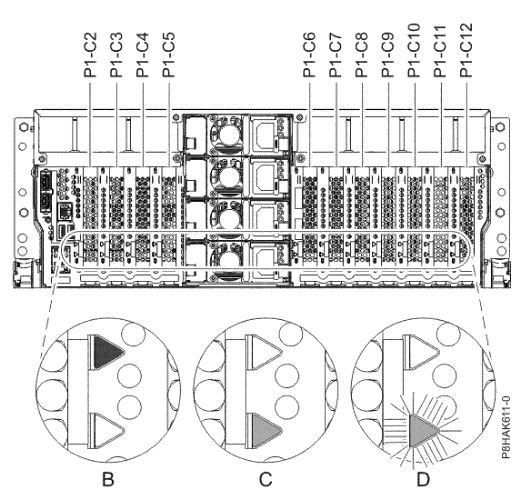
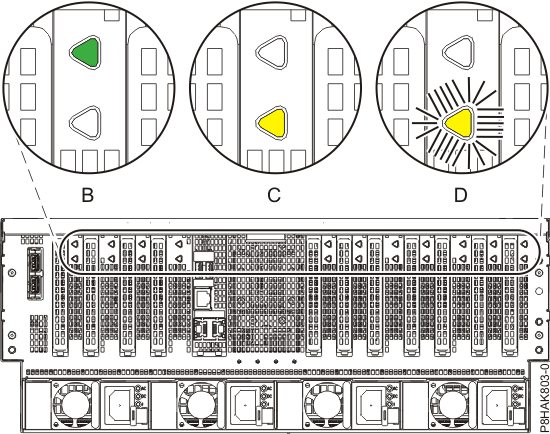
    CEC enclosure Ethernet adapter Figure 47, slot P1-C10, LED  D 
    Figure 48, slot P1-C10, LED  D 
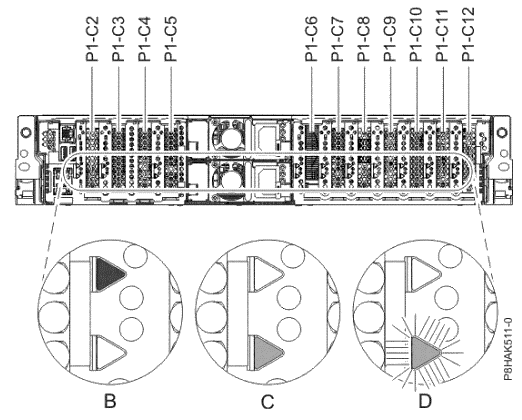
    Figure 49, slot P1-C11, LED  D 
    CEC enclosure fan Models 982, 988: Figure 43, A1, A2, A3, A4, A5 flashing amber LED (not shown)
    Other models 98x: LED not visible from outside; use location code
    CEC enclosure I2C interface card Figure 47, slot P1-C8, LED  D 
    Figure 48, slot P1-C8, LED  D 
    Figure 49, slot P1-C6, LED   D 
    CEC enclosure memory module LED not visible from outside; use location code
    CEC enclosure PCIe two-port card Figure 47, slot P1-C3 / P1-C5 / P1-C6 / P1-C7, LED  D 
    Figure 48, slot P1-C6 / P1-C7, LED  D 
    Figure 49, slot P1-C2 / P1-C3 / P1-C8 / P1-C10, LED  D 
    CEC enclosure PCIe four-port card Figure 48, slot P1-C7, LED   D 
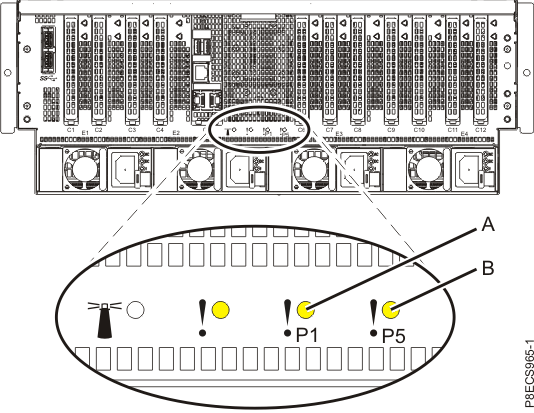
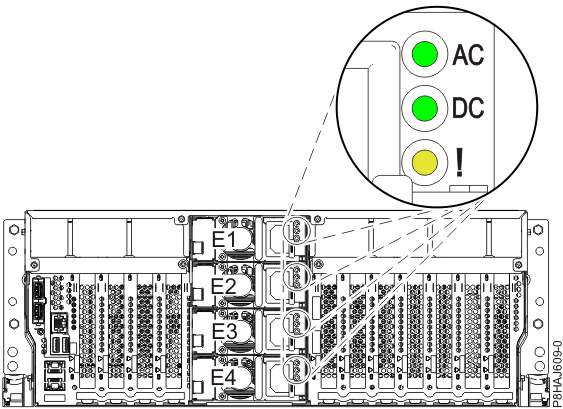
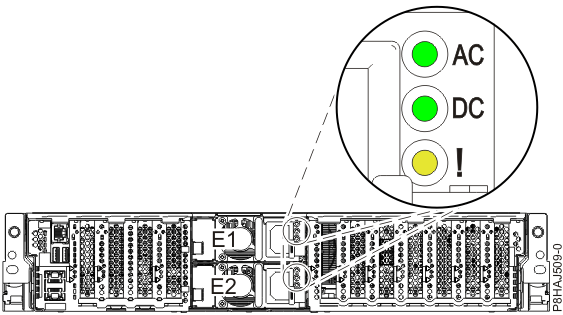
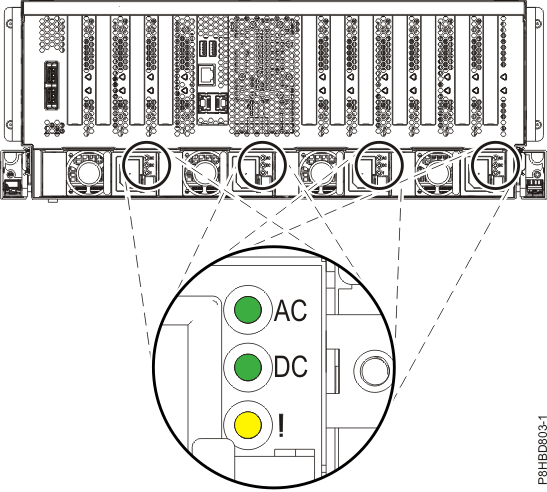
    CEC enclosure power supply Figure 50, LED "!" (flashing)
    Figure 51, LED "!" (flashing)
    Figure 52, LED "!" (flashing)
    CEC enclosure processor module LED not visible from outside; use location code
    CEC enclosure RS-485 serial interface card Figure 47, slot P1-C12, LED  D 
    Figure 48, slot P1-C12, LED  D 
    Figure 49, slot P1-C7, LED  D 
    CEC enclosure service processor card Models 982, 988: LED not visible from outside; use location code
    Other models 98x: N/A
    CEC enclosure system backplane LED not visible from outside; use location code
    CEC enclosure time of day battery LED not visible from outside; use location code
    CEC enclosure VPD card LED not visible from outside; use location code
    Figure 45. CEC enclosure rear LEDs(Models 980, 981, 983, 984, 985, 986)
    Rear view of the CEC enclosure LEDs
    Figure 46. Service indicator LEDs (rear view) (Models 982, 988)
    Service indicator LEDs
    Figure 47. CEC enclosure PCIe adapter slot locations and LEDs (rear view) (Models 981, 985, 986)
    CEC enclosure PCIe adapter slot locations and LEDs (rear view) (model 981)
    Figure 48. CEC enclosure PCIe adapter slot locations and LEDs (rear view) (Models 980, 983, 984)
    CEC enclosure PCIe adapter slot locations and LEDs (rear view) (model 980)
    Figure 49. CEC enclosure PCIe adapter slot locations and LEDs (rear view) (Models 982, 988)
    CEC enclosure PCIe adapter slot locations and LEDs (rear view) (model 982)
    Figure 50. Location of the power supplies and LEDs (Models 981, 985, 986)
    Location of the power supplies and LEDs (Models 981, 985, 986)
    Figure 51. Location of the power supplies and LEDs (Models 980, 983, 984)
    Location of the power supplies and LEDs (Model 980)
    Figure 52. Location of the power supplies and LEDs (Models 982, 988)
    Location of the power supplies and LEDs (Model 982)

MAP1240 Section-16 (I/O enclosure Models 941, 94E, 951, 95E, 961, 96E)

Procedure

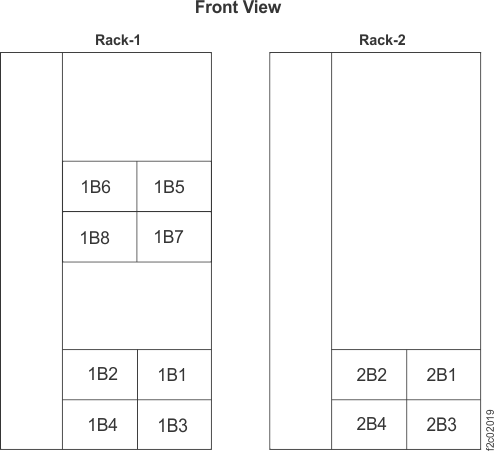
  1. At front of rack, note the I/O enclosure location codes, as shown in Figure 53.
    Figure 53. I/O enclosure locations (front)
    I/O enclosure locations (front)
    Note: Locations 1B5, 1B6, 1B7 and 1B8 exist in DS8870 all-flash only
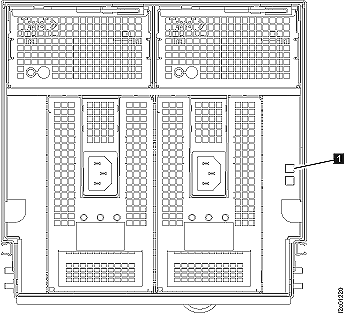
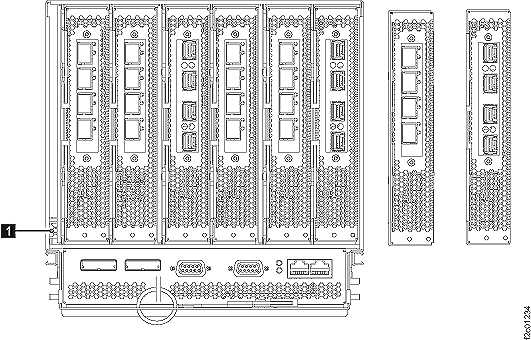
  2. Find the I/O enclosure with the I/O enclosure identify blue LED Callout label 1 on solid. See Figure 54 and Figure 55.
    Figure 54. "Identify" indicator (LED) for an I/O enclosure (front)
    The "Identify" indicator (LED) for an I/O enclosure (rear)
    Figure 55. "Identify" indicator (LED) for an I/O enclosure (rear)
    "Identify" indicator (LED) for an I/O enclosure (rear)
  3. Find the FRU identify LED location that is flashing using Table 9.
    Table 9. FRU identify LED locations on the I/O enclosure
    FRU Reference
    I/O enclosure device adapter card Figure 56, LED Callout label 1
    I/O enclosure Fibre Channel host card, long wave Figure 56, LED Callout label 2
    I/O enclosure Fibre Channel host card, short wave Figure 56, LED Callout label 2
    I/O enclosure fan Figure 57, LED Callout label 1
    I/O enclosure identify Figure 54, LED Callout label 1
    Figure 55, LED Callout label 1
    I/O enclosure power supply Figure 57, LED Callout label 2
    I/O enclosure PCIe/SPCN card Figure 56, LED Callout label 3
    I/O enclosure PCIe storage interface card Figure 56, LED Callout label 4
    Figure 56. LEDs on the I/O enclosure (rear)
    LEDs on the CEC enclosure (rear)

    Figure 57. LEDs on the I/O enclosure (front)
    LEDs on the I/O enclosure (front)

MAP1240 Section-17 (I/O enclosure Models 98x, 8xE)

Procedure

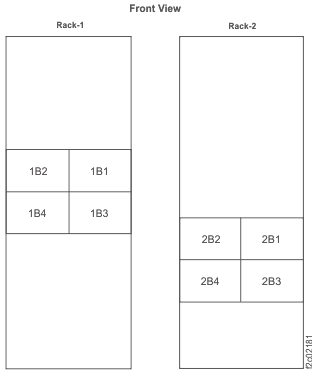
  1. At the front of rack, note the I/O enclosure location codes, as shown in Figure 58.
    Figure 58. I/O enclosure locations (front) (models 98x, 8xE)
    Image that shows the front I/O enclosure locations (models 98x).
    Note: Enclosures 1B1, 1B2, 2B1, and 2B2 are not present in some models.
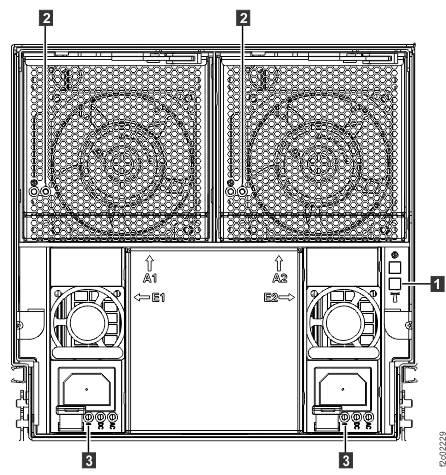
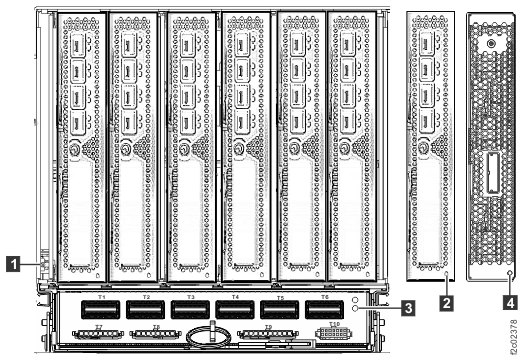
  2. Find the I/O enclosure with the I/O enclosure identify LED Callout label 1 on solid. See Figure 59 and Figure 60.
    Figure 59. I/O enclosure identify LEDs (front) (Models 98x, 8xE)
    I/O enclosure identify LEDs (front) (models 98x
    Figure 60. I/O enclosure identify LEDs (rear) (Models 98x, 8xE)
    I/O enclosure identify LEDs (rear) (models 98x)
    Figure 61. Microbay LEDs
    Microbay LEDs
  3. Find the FRU identify LED location that is flashing using Table 10, Figure 59, Figure 60, and Figure 61.
    Table 10. FRU identify LED locations on the I/O enclosure (Models 98x, 8xE)
    FRU Reference
    I/O enclosure device adapter card, FC optical Figure 60, LED Callout label 2
    I/O enclosure device adapter card, SAS (flash) Figure 60, LED Callout label 2
    I/O enclosure Fibre Channel host card, long wave or short wave Figure 60, LED Callout label 2
    I/O enclosure fan Figure 59, LED Callout label 2
    I/O enclosure identify Figure 59, LED Callout label 1
    Figure 60, LED Callout label 1
    Microbay Figure 61, LED Callout label 2
    I/O enclosure power supply Figure 59, LED Callout label 3
    I/O enclosure PCIe and PCN card Figure 60, LED Callout label 3
    I/O enclosure PCIe storage interface card Figure 60, LED Callout label 4

MAP1240 Section-18 (I/O enclosure Model 983)

Procedure

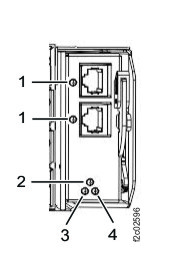
  1. Find the I/O enclosure with the I/O enclosure identify LED Callout label 2 on solid. See Figure 62 and Figure 63.
    Figure 62. LEDs on I/O enclosure (2U) (front) (Model 983)
    LEDs on I/O enclosure (2U) (front)
    Figure 63. LEDs on I/O enclosure (2U) (rear) (Model 983)
    LEDs on I/O enclosure (2U) (rear)
    Figure 64. LEDs on I/O enclosure (2U) adapter (PCN) (Model 983)
    LEDs on I/O enclosure (2U) adapter (PCN)
    Figure 65. LEDs on I/O enclosure (2U) adapter (PCIe and SAS device) (Model 983)
    Note: Fully populated adapter shown. LEDs are similar for all adapter versions.
    LEDs on I/O enclosure (2U) adapter (PCIe, SAS device, zHyperLink)
    Figure 66. LEDs on I/O enclosure (2U) adapter (Fibre Channel host) (Model 983)
    LEDs on I/O enclosure (2U) adapter (Fibre Channel host)
    Figure 67. LEDs on I/O enclosure (2U) fan
    I/O enclosure (2U) fan assembly LEDs (Model 983)
    Figure 68. LEDs on I/O enclosure (2U) power supply
    Management enclosure power supply LEDs
  2. Find the FRU identify LED location using Table 11.
    Table 11. FRU identify LED locations on the I/O enclosure (2U) (Model 983)
    FRU Reference
    I/O enclosure (2U) adapter (Fibre Channel host) Figure 66, LED Callout label 3
    I/O enclosure (2U) adapter (PCIe) Figure 65, LED Callout label 4
    I/O enclosure (2U) adapter (PCIe and SAS device) Figure 65, LED Callout label 4
    I/O enclosure (2U) adapter (PCN) Figure 64, LED Callout label 4
    I/O enclosure (2U) fan Figure 67, LED Callout label 2
    I/O enclosure (2U) identify (enclosure identify is solid blue) Figure 62, LED Callout label 2
    Figure 64, LED Callout label 2
    I/O enclosure (2U) midplane assembly Figure 62, LED Callout label 3
    I/O enclosure (2U) power supply Figure 68, LED Callout label 3

MAP1240 Section-19 (storage enclosure [12 or 24 DDM slots] Models 951, 95E, 961, 96E, 98x, 8xE)

Procedure

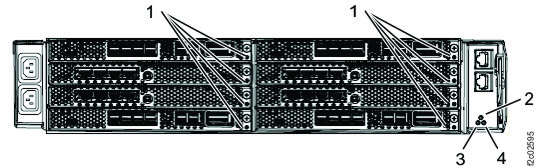
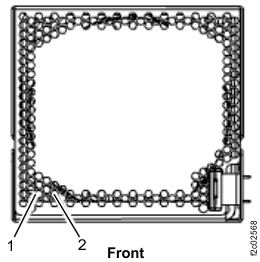
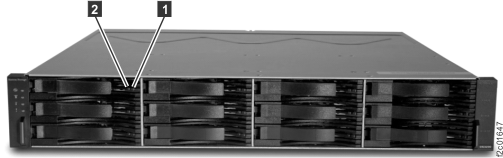
  1. At the front of the rack, find the storage enclosure with the enclosure identify LED Callout label 2 lit solid.
    Figure 69. LEDs on the front of the storage enclosure
    Storage enclosure LEDs
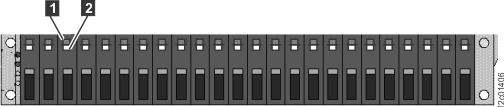
  2. To locate a DDM: at the front of the rack, find the DDM with the identify LED Callout label 2 flashing.
    Figure 70. Disk drive modules (DDMs) LEDs (24 DDM slot storage enclosure)
    Disk drive modules (DDMs) LEDs (24 DDM slot storage enclosure)
    Figure 71. Disk drive modules (DDMs) LEDs (12 DDM slot storage enclosure)
    Disk drive modules (DDMs) LEDs (12 DDM slot storage enclosure)
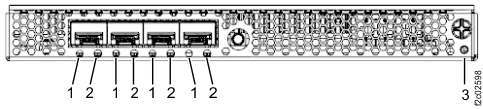
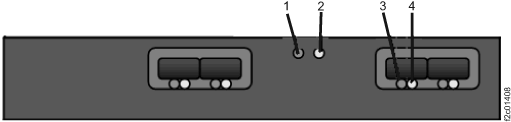
  3. To locate a Fibre Channel interface card (FCIC): at the rear of the rack, find the FCIC with the attention/identify LED Callout label 2 flashing.
    Figure 72. LEDs on a Fibre Channel interface card (at a storage enclosure)
    Fibre channel interface card (FCIC) LEDs
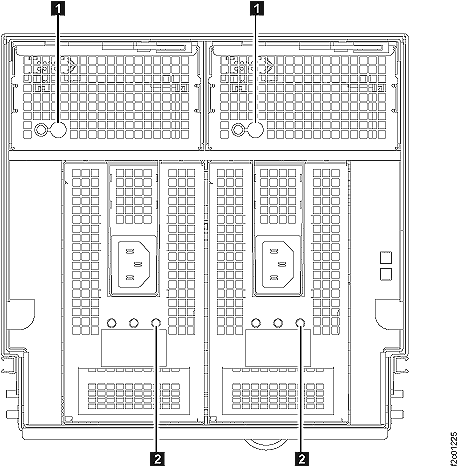
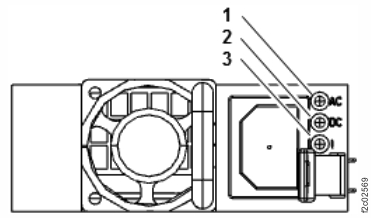
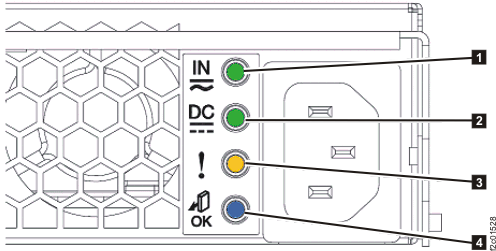
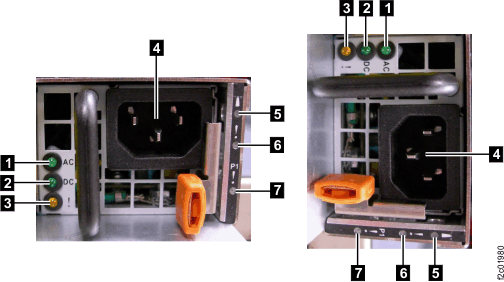
  4. To locate a storage enclosure power supply: at the rear of the rack, find the storage enclosure power supply with the attention/identify LED Callout label 3 flashing.
    Figure 73. Storage enclosure power supply LEDs
    Storage enclosure power supply LEDs

MAP1240 Section-20 (SAS flash enclosure [24 drive slots] Models 98x, 8xE)

Procedure

  1. At the front of the rack, find the storage enclosure with the enclosure identify LED Callout label 2 lit solid.
    Figure 74. LEDs on the front of the storage enclosure
    Storage enclosure LEDs
  2. To locate a drive: at the front of the rack, find the drive with the identify LED Callout label 2 flashing.
    Figure 75. Drive module LEDs
    Disk drive modules (DDMs) LEDs (24 DDM slot storage enclosure)
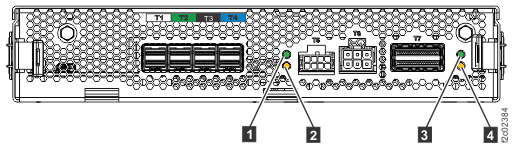
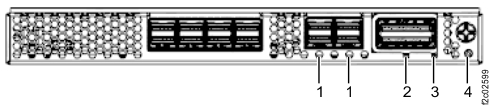
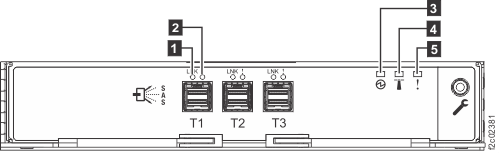
  3. To locate an enclosure services manager (ESM): at the rear of the rack, find the ESM with the attention/identify LED Callout label 5 flashing.
    Figure 76. Enclosure services manager (ESM) LEDs
    Enclosure services manager (ESM) LEDs
  4. To locate a storage enclosure power supply: at the rear of the rack, find the storage enclosure power supply with the attention/identify LED Callout label 3 flashing.
    Figure 77. Storage enclosure power supply LEDs
    Storage enclosure power supply LEDs

MAP1240 Section-21 (storage enclosure [30 DDM slots] Models 961, 96E, 98x)

Procedure

  1. At the front of the rack, find the storage enclosure with the enclosure identify LED Callout label 4 lit solid. See Figure 78.
    Figure 78. Storage enclosure midplane LEDs (front view)
    Note: Models 98x do not have the vertical enclosure option.
    Storage enclosure midplane LEDs (front view)
  2. To locate a DDM: at the front of the rack, find the DDM with the identify LED Callout label 2 flashing. See Figure 78.
  3. To locate a RAID controller card, at the rear of the rack find the card with the attention/identify LED Callout label 5 flashing.
    Figure 79. Storage enclosure RAID controller card (rear view)
    Note: Models 98x do not have the vertical enclosure option.
    Storage enclosure RAID controller card (rear view)
  4. To locate a storage enclosure power supply: at the rear of the rack, find the storage enclosure power supply with the attention/identify LED Callout label 3 flashing.
    Figure 80. Storage enclosure power supply and midplane (rear view)
    Note: Models 98x do not have the vertical enclosure option.
    Storage enclosure power supply and midplane (rear view)