MAP2111 Isolating the Identify/Attention indicator on the rack operator panel
(Rack models 921, 922, 931, 932, 92E, 941,
94E, 9A2, 9B2, 9AE)
This MAP describes the control circuit for the Identify/Attention indicator on the rack operator panel and includes procedures for how to isolate faults within it.
About this task
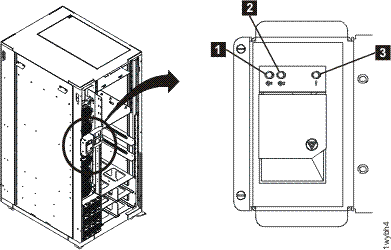
Each rack operator panel has an Identify indicator  . See Figure 1. The indicator flashes two
times per second when active. It is driven by the rack identity card. The rack identity card can receive an "activate Identify" signal
from a CEC enclosure, an I/O enclosure, a fan sense card, or an RPC card.
. See Figure 1. The indicator flashes two
times per second when active. It is driven by the rack identity card. The rack identity card can receive an "activate Identify" signal
from a CEC enclosure, an I/O enclosure, a fan sense card, or an RPC card.
In Rack-1 only, the Identify indicator is also used as an Attention indicator (on solid). The Attention condition indicates that the storage facility needs service. If the Identify and Attention signals are present at the same time, the Identify signal (flashing) takes precedence over the Attention signal (on solid). The rack identity card receives an "activate Attention" request only from a CEC enclosure.
When the rack Identify indicator is flashing, the Identify indicator on at least one of the related parts (the enclosures or cards mentioned above) must also be flashing. If the Identify indicator on a related part is not flashing, an indicator is burnt out or the "activate Identify" signal is being asserted falsely.
MAP2111 Section-1
Procedure
on the rack operator panel. See Figure 1.
What is the state of the indicator?
- On solid, this is not a valid state for the Model 941, call the next level of support.
- If the service representative is not logged in to the management console and the LED is flashing, it indicates Attention status that means one or more open serviceable events needing repair exist. When the service representative logs into the management console, the attention indication will be disabled and the LED will be off. Go to MAP2111 Section-2.
- If the service representative is logged into the management
console and the LED is flashing, it indicates Identify status that means the service representative
is in the process of replacing a part that was selected from a serviceable FRU list or from the
Parts Exchange menu option. Go toMAP2111 Section-3Note: Most, but not all, FRUs have identify indicators. The "light path" identify LEDs are a hierarchy of LEDs that can identify the rack, enclosure, FRU, and even the FRU connector that a cable is connected to.
- Off, go to MAP2111 Section-4.
MAP2111 Section-2
Procedure
-
Observe the Attention indicator
 on each of the CEC enclosures. See Figure 2.
Is the Attention indicator on any of the CEC enclosures lit solid?
- Yes, use MAP2112 Activating or Deactivating CEC or I/O enclosure indicators to switch off the Attention indicator on that CEC enclosure. The rack operator panel Attention indicator should be off when both CEC enclosure attention indicators are off.
- No, an Attention indicator on a CEC enclosure might be burned out, but the signal is still active. Go to the next step.
Figure 2. The Identify/Attention indicator (LED) on a CEC enclosure (front view) 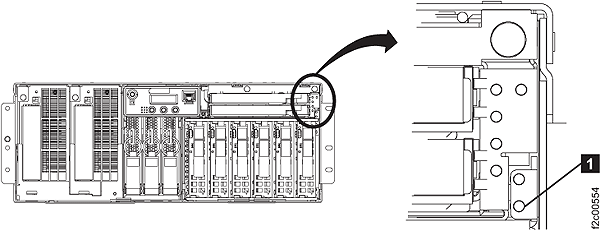
MAP2111 Section-3
Procedure
- The Identify indicator on the rack operator panel flashes
when the indicator on one or more of the following parts flashes:
- The Identify indicator on a CEC enclosure. See Figure 2.
- The Identify indicator
 on a fan sense card. See Figure 3.
 - The Identify indicator on an I/O enclosure. See Figure 4.
- The Identify indicator on RPC card 2. See Figure 5.
- The Identify indicator on RPC card 1. See Figure 5.
Is the Identify indicator on one of the parts previously mentioned flashing?
- Yes, the Identify indicator on the rack operator panel is working as expected. Go to the next step.
- No, go to step 4.
Figure 3. LEDs on the fan sense cards 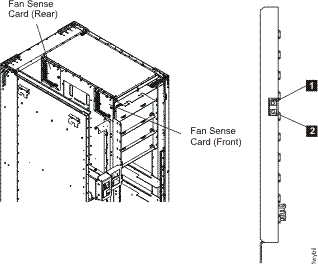
Figure 4. The "Identify" indicator (LED) for an I/O enclosure (rear) 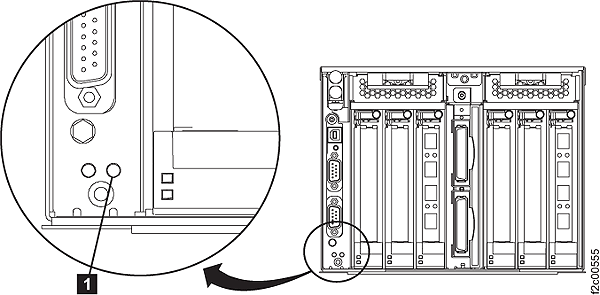
Figure 5. The Identify indicators (LEDs) for the RPC cards 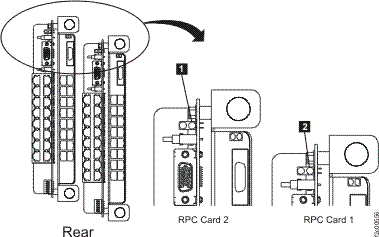
- The Identify indicator
- Reconnect the cable to the Rack ID card connector.
Observe the rack identify indicator. Is the indicator blinking?
- Yes, inspect the cable and connectors and then replace the cable if needed. An open circuit in the cable or connector cannot cause this problem.
- No, replace the source part using the guided parts replacement procedures (refer to MAP1230 Replace a FRU without using a serviceable event) and reconnect the cable when done. If this does not repair the problem, call the next level of support.
Figure 6. Connectors on the rack identity card 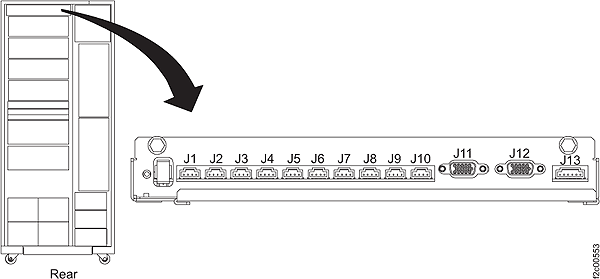
Table 1. Connectors on the rack identity card and their sources of input Rack identity card connector1 Source of input signal Possible failing part Part Connector location code See Figure J1 Fan sense card (front) C3-T14 Figure 7 Fan sense card (front) J2 Fan sense card (rear) C4-T14 Figure 7 Fan sense card (rear) J3 CEC enclosure XC12, 3 P1-T3 Figure 9 Service processor card J4 CEC enclosure XC22, 3 P1-T3 Figure 9 Service processor card J5 I/O enclosure XI12, 3 P1-T1 Figure 10 I/O enclosure backplane J6 I/O enclosure XI22, 3 P1-T1 Figure 10 I/O enclosure backplane J7 I/O enclosure XI32, 3 P1-T1 Figure 10 I/O enclosure backplane J8 I/O enclosure XI42, 3 P1-T1 Figure 10 I/O enclosure backplane J11 only in Rack-1 RPC card 1 C1-T1 Figure 11 RPC card 1 J11 only in Rack-2, 3, 4, or 5 Primary Power Supply PPS (upper) E1-T5 Figure 12 and Figure 13 PPS Sequence Module J12 only in Rack-1 RPC card 2 C2-T1 Figure 11 RPC card 2 J12 only in Rack-2, 3, 4, or 5 Primary Power Supply PPS (lower) E2-T5 Figure 12 and Figure 13 PPS Sequence Module Notes:- See Figure 6.
- To locate the enclosure, see Figure 8.
- The Identify indicator might be burnt out. Use MAP2112 Activating or Deactivating CEC or I/O enclosure indicators to display the status of the Identify indicator for this enclosure. If the status is on, the Identify indicator on the rack operator panel is working as expected and the enclosure indicator status needs to be set to off. If the status is off, replace the possible failing part.
Figure 7. Location codes for the fan sense card 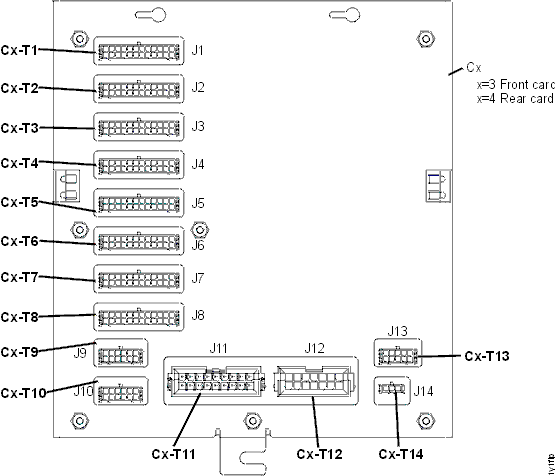
Figure 8. The physical location codes for the CEC enclosures and the I/O enclosures (rear view) 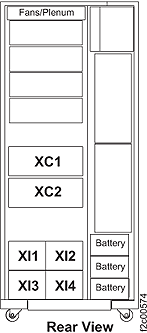
Figure 9. Location codes for the CEC enclosure (rear) 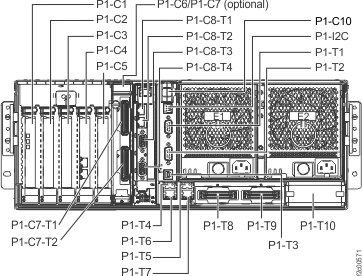
Figure 10. I/O enclosure locations (rear) 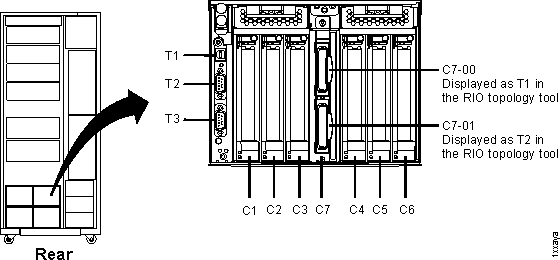
Figure 11. Location codes for the RPC cards (Models 941, 951) 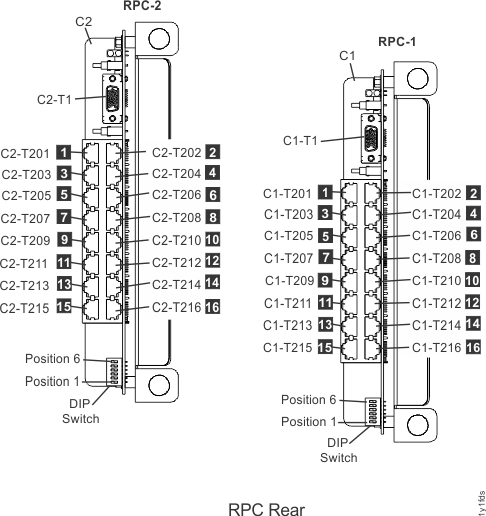
Figure 12. Location codes for the PPS (rear) 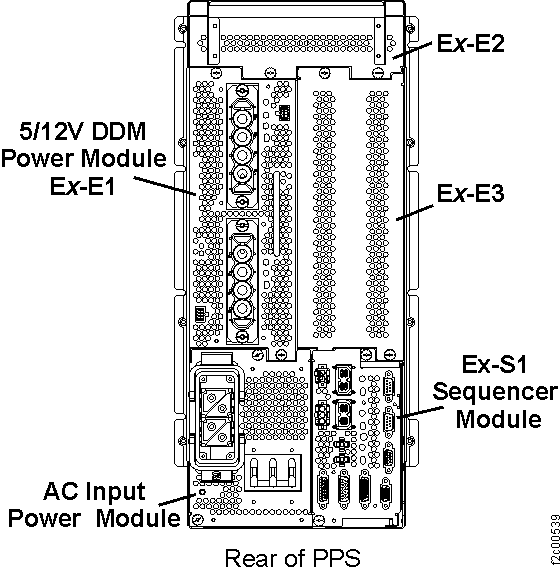
Figure 13. Location codes for the PPS sequencer module 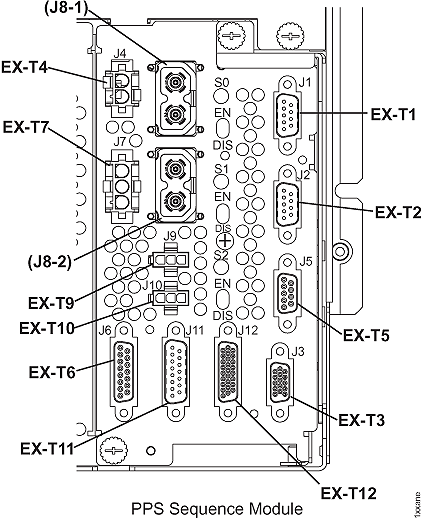
MAP2111 Section-4
Procedure
- Ensure that the input cable between the enclosure or card and the rack identity card is correctly connected.
- The rack identity card might be failing. Use the ASMI to manually test the Identify indicator on the CEC enclosure to determine if the Identify indicator on the rack operator panel never works or if it only fails from one enclosure. See MAP2112 Activating or Deactivating CEC or I/O enclosure indicators.
- Contact your next level of support.