MAP32D0 Storage enclosure installation failed - flash drive error (30 SSD slots, 1.8 inches)

MAP32D0 Section-1

Procedure

  1. Refer to the serviceable event FRU list that sent you here.
    1. For each SSD in the FRU list, read the location code. The location code is the special format that is used during MES and installations.
      An example of a location code is Rw-Bx-P1-Dz, where:
      • w = 1-2, the rack number
      • x = 01-04, 11-14, storage enclosure location, top to bottom
      • z = slot 1-30, the SSD slot location
    2. For each location code, locate the physical location by using Figure 1, Figure 2, Figure 3, Figure 4, Figure 5, Figure 6, and Figure 7.
      Figure 1. Rack 1-2 storage enclosure (30 SSD slots) locations R1-B01 to R1-B04, R2-B01 to R2-B04 (Models 961, 96E) (front view)
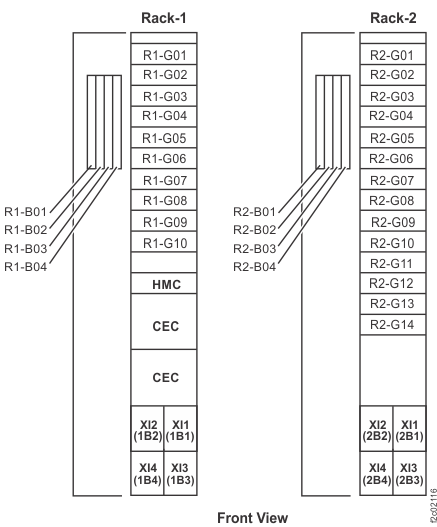
      Rack 1-2 storage enclosure (30 SSD slots, 12 and 24 DDM slots) and I/O enclosure location codes (front view)
      Figure 2. Rack-1 storage enclosure (30 SSD slots), locations R1-B01 to R1-B14 (Model 961 DS8870 all flash) (front view)
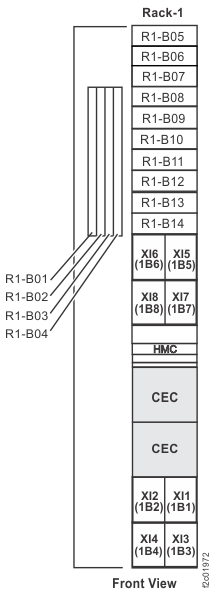
      Front view of Rack 1 storage enclosure (30 SSD slots) and I/O enclosure location codes for DS8870 all flash
      Figure 3. Rack 1-5 storage enclosure and I/O enclosure location codes (single-phase Models 981, 98E) (front view)
      Note: High-performance flash enclosures are in Rack-1 and Rack-2.
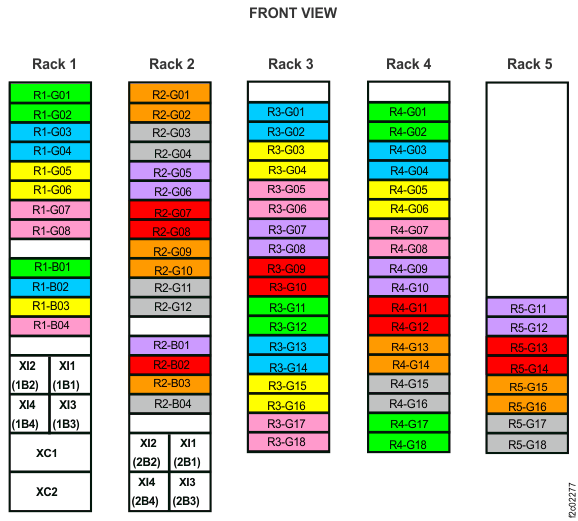
      Rack 1-5 storage enclosure and I/O enclosure location codes (Models 981, 98E) (front view)
      Figure 4. Rack 1-5 storage enclosure and I/O enclosure location codes (three-phase Models 981, 98E) (front view)
      Note: High-performance flash enclosures are in Rack-1 and Rack-2.
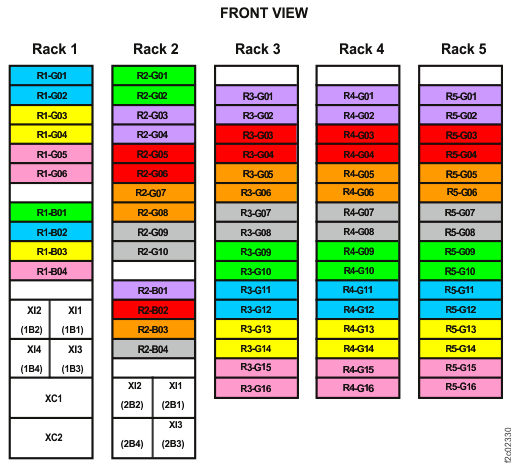
      Rack 1-5 storage enclosure and I/O enclosure location codes (three-phase Models 981, 98E) (front view)
      Figure 5. Rack 1-3 storage enclosure and I/O enclosure location codes (Models 980, 98B) (front view)
      Note: High-performance flash enclosures are in Rack-1 and Rack-2.
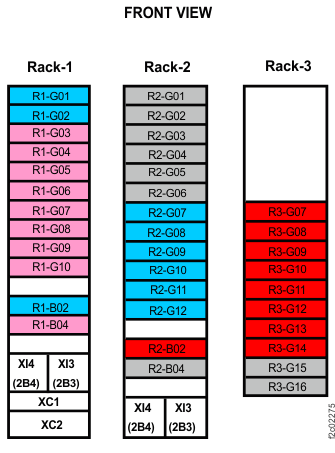
      Rack 1-3 storage enclosure and I/O enclosure location codes (Models 980, 98B) (front view)
      Figure 6. Rack 1-2 storage enclosure and I/O enclosure location codes (Models 982, 98F) (front view)
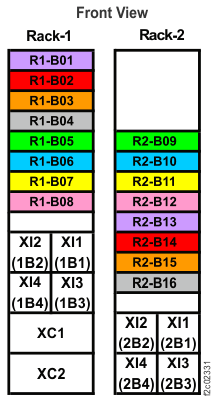
      Rack 1-2 storage enclosure and I/O enclosure location codes (Models 982, 98F) (front view)
      Figure 7. Storage enclosure locations, 30 SSD slots, 1.8 inches (Models 961, 96E, 98x) (front view)
      Note: Models 98x do not have the vertical enclosure option.
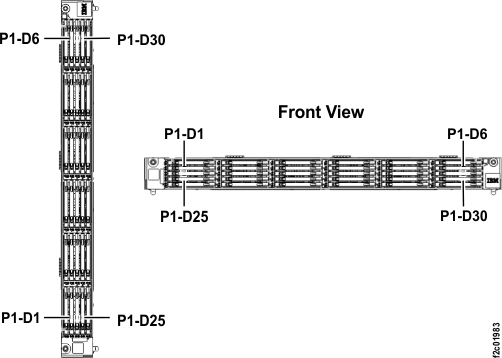
      Storage enclosure locations, 30 SSD slots, 1.8 inches (front view)
  2. The normal serviceable event FRU replace procedure cannot be used. The code objects are not yet created because the installation failed. Continue to the following step:
    1. Replace each SSD in the FRU list with a new SSD now. The SSD can be hot-plugged without damage to the storage enclosure and SSD.
  3. Is the SSD activity LED indicator Callout label 1 lit solid or flashing?
    • Yes, go to the next step.
    • No, try reseating the SSD. If it still fails, replace the SSD with another new SSD. If it still fails, replace the storage enclosure midplane FRU.
      Continue to the next step.
      Note: You cannot use normal guided maintenance to replace the midplane because the installation failed before all the code objects were created. Instead, remove all power from the storage enclosure and refer to Exchange the storage enclosure midplane. After the new midplane is installed, reconnect all storage enclosure power.
  4. Are there any other open serviceable events for the storage enclosures that you are installing?
    • Yes, there are other open serviceable events for the storage enclosures that are being installed. Find
      the SRCs for the serviceable events in Table 1, and take the appropriate action.
    • No, there are no other open serviceable events for the storage enclosures that are being installed (besides the BE34004D, BE340080, or BE3400AA that called this MAP).
      Go to step 5.
    Table 1. Open serviceable events for storage enclosures that are being installed
    SRC Action
    BE34004D, BE340080, or BE3400AA Replace the listed SSD FRUs for all BE34004D, BE340080, or BE3400AA by hot-plugging. Then, go to step 5.
    BE1E2010 or BE1E218C If the serviceable event occurred as part of the failed storage enclosure installation, close it (with BE34004D, BE340080, or BE3400AA) in step 5. Otherwise, contact your next level of support.
    Other SRCs for the storage enclosure that is being installed Contact your next level of support.
  5. Close the open serviceable events for the storage enclosures that are being installed. This
    includes any BE1E2010 or BE1E218C that occurred as part of the failed storage enclosure installation.
  6. Resolve any other open serviceable events.
  7. Retry the storage enclosure installation procedure:
    1. The installation process installs the storage enclosures and provides a "FRU verification test" for the SSDs you replaced. If the installation fails with the same SRC and SSD, contact your next level of support.
    2. Exit this procedure and complete the installation.