MAP3310 Storage enclosure installation failed - RAID controller error (30 SSD slots, 1.8 inches)
MAP3310 Section-1
The RAID controller card at the location that is listed in the serviceable event failed power-on self-test during storage enclosure installation.
About this task
The FRU list of the serviceable event that sent you here
contains:
- MAP3310
- Location of the affected RAID controller card in the storage
enclosure you are installing in
MES format
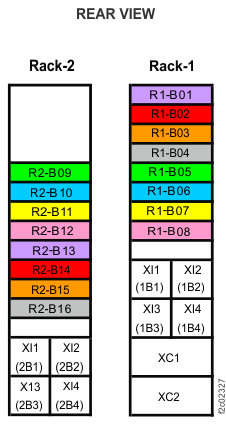
. For example: R1-B04-C1. For more location information, see Figure 2, Figure 3, Figure 4, Figure 5, Figure 6, Figure 7, and Figure 8, or refer to MES and installation instructions location codes (Models 980, 98B, 981, 98E, 982, 98F).
Complete the following steps to correct the RAID controller error.
Procedure
- Check the storage enclosure power supply LEDs.
See Figure 1.
The following indications are correct:
- AC
 is lit.
 - DC
 is lit.
 - ! (fault/identify)
 is out (not lit).
Figure 1. Storage enclosure power supply and midplane (rear view) Note: Models 98x do not have the vertical enclosure option.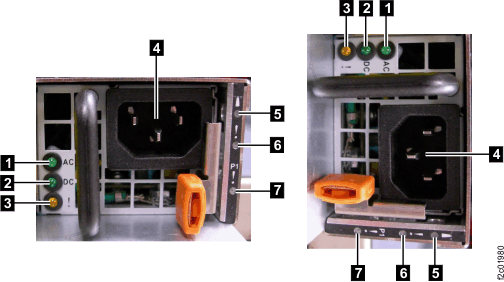
- AC
- If the installation still fails, contact your next level
of support.
Figure 2. Storage enclosure, 30 SSD slots 1.8 inches (rear view) (Models 961, 98x) Note: Models 98x do not have the vertical enclosure option.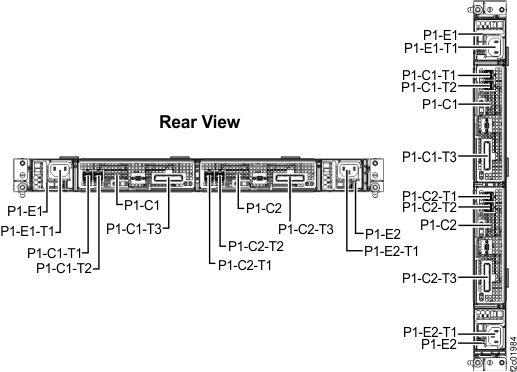
Figure 3. Rack 1-2 storage enclosure (30 SSD slots, 12 and 24 DDM slots) and I/O enclosure location codes (Models 960, 961) (rear view) 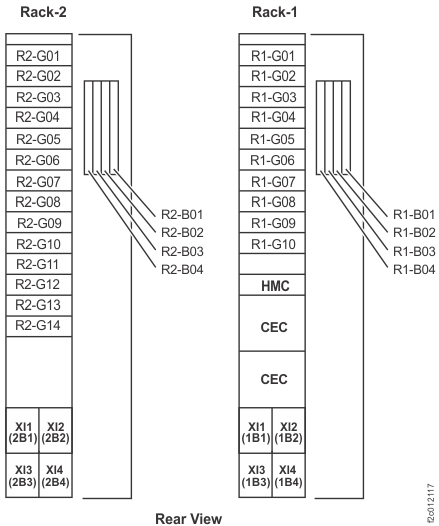
Figure 4. Rack 1 storage enclosure (30 SSD slots) and I/O enclosure location codes (Model 961 DS8870 all flash) (rear view) 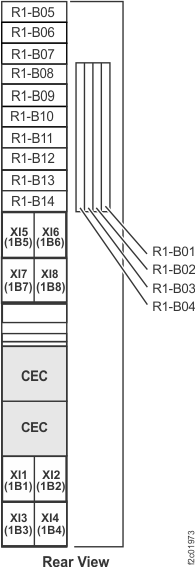
Figure 5. Rack 1-5 storage enclosure and I/O enclosure location codes (single-phase Models 981, 98E) (rear view) Note: High-performance flash enclosures are in Rack-1 and Rack-2.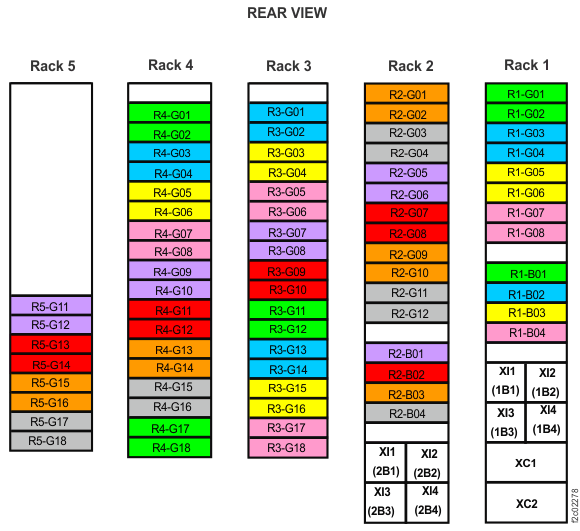
Figure 6. Rack 1-5 storage enclosure and I/O enclosure location codes (three-phase Models 981, 98E) (rear view) Note: High-performance flash enclosures are in Rack-1 and Rack-2.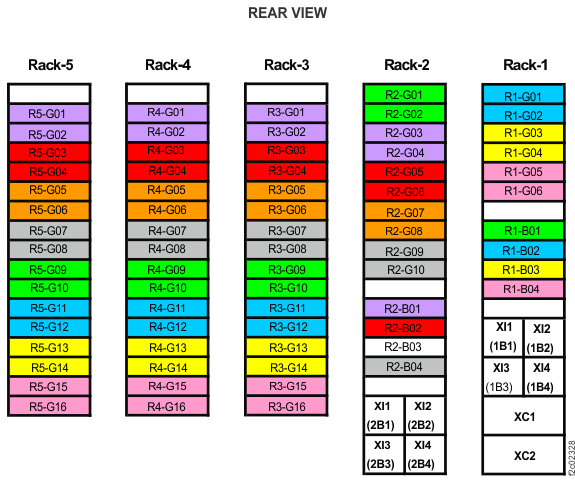
Figure 7. Rack 1-3 storage enclosure and I/O enclosure location codes (Models 980, 98B) (rear view) Note: High-performance flash enclosures are in Rack-1 and Rack-2.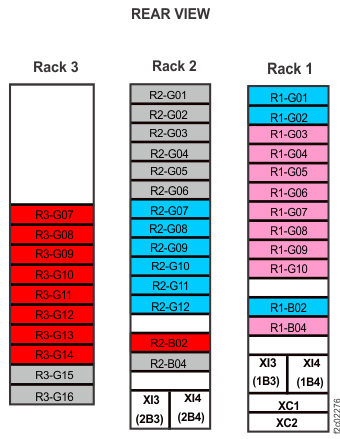
Figure 8. Rack 1-2 storage enclosure and I/O enclosure location codes (Models 982, 98F) (rear view)