MAP65A0 Problem creating HMC critical console backup to DVD or CEC LPAR
The manual or automatic process to write the HMC critical
console backup DVD encountered a problem.
Procedure
Is the HMC at LIC bundle VRMF 64.2.xx.xx or later?
- Yes, HMC and Storage Facility Critical Data is saved to all CEC LPAR boot drives. Go to
step 6.
- No, the HMC critical console backup data is saved to a DVD disc. Go to the next step.
Is the HMC critical console backup DVD disc is in the HMC
DVD-RAM drive?
Yes, go to the next step.
No, insert the disc and retry the operation. Exit this MAP.
Is the disc a DVD-RAM disc that has been formatted?
Note: The
disk should be properly labeled for the 2107/242x critical
console backup.
Yes, go to the next step.
No, insert the proper disc and retry the operation. Exit this
MAP.
Remove the disc, reinsert it in the drive, and then immediately
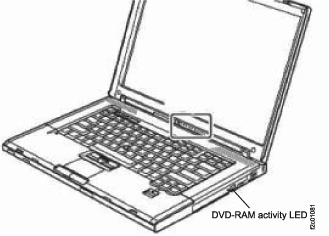
observe the activity LED for the DVD-RAM drive. See Figure 1 (X335 server)
or Figure 2 (X336
server) or Figure 3 (X3550 server)or Figure 4 (laptop management
console).
Is the LED flashing?
Yes, go to the next step.
No, it appears that the disc is not being read by the drive.
Perform the procedure in MAP6550 DVD RAM Drive Problem.
If the drive passes the diagnostic test, there might be a problem
with the code. Contact your next level of support.
Figure 1. The DVD-RAM LED on the front of the X335 management console server
Figure 2. The DVD-RAM LED on the front of the X336 management console server
Figure 3. X3550 management console server DVD drive activity LED (front view)
Figure 4. Laptop management console server DVD
drive activity LED
Insert a different DVD-RAM disc and retry the operation.
Does it still fail?
Yes, it appears that the disc is not being read by the drive.
Perform the procedure in MAP6550 DVD RAM Drive Problem.
If the drive passes the diagnostic test, there might be a problem
with the code. Contact your next level of support.
No, the original disc is faulty or it is not formatted correctly.
Exit this MAP.
Perform the
following steps to back up HMC and Storage Facility Critical Data
for each HMC managing this storage complex. The process will only
fail if it cannot successfully write the information to at least one
CEC LPAR boot drive.
Display open serviceable events and look for serviceable events related to CEC boot drive
problems.
If more than one CEC has a problem, repair the problems and then retry saving the critical
console backup information.
If only one CEC has a problem, call contact your next level of support. The
process should automatically successfully save the information to
the working CEC enclosure LPAR boot drives.