MAP7040 Private network isolation procedure 40

The Network Topology tool has been used to determine that one or both management consoles lost connectivity to all nodes on a single storage facility (both CEC enclosures) through the Gray network (eth3).

MAP7040 Section-1

Procedure

  1. Does the failing management console have working links through interface eth3 (the Gray network) to other storage facilities or management consoles?
    Figure 1. Ethernet connectors on the rear of the X335 management console server
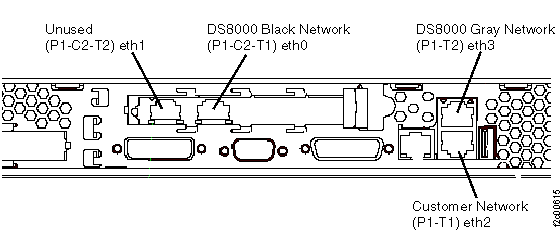
    Management console rear view with Ethernet locations
    Figure 2. Ethernet connectors on the rear of the X336 management console server
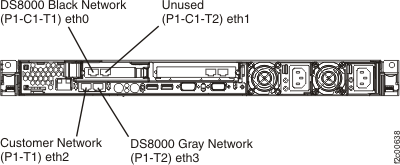
    X336 management console Ethernet ports
    Figure 3. Ethernet connectors X3550 management console server (rear view)
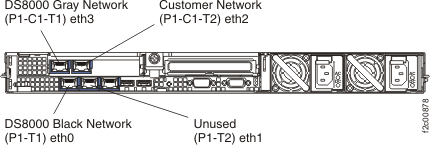
    X3550 management console server (front view)
    Figure 4. eth0 (black network) and eth3 (gray network) USB Ethernet adapters for Thinkpad W500 (similar for Thinkpad T510, T520, T530, T540)
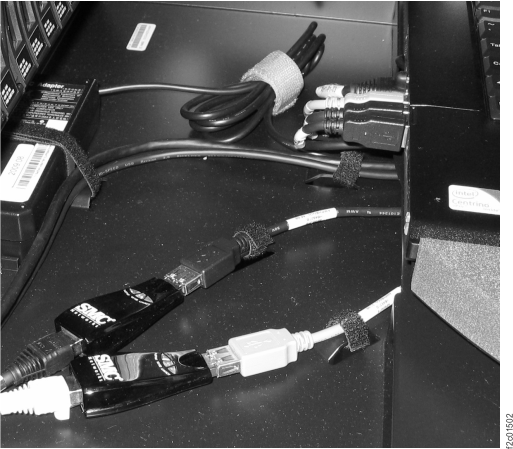
    eth0 (black network) and eth3 (gray network) USB Ethernet adapters for Thinkpad W500 (similar for Thinkpad T510)
    Figure 5. Ethx and Ethx LEDs on the rear of the model 98x management console server
    Note: Ethernet ports: eth3  2 ; eth2  3 ; eth0  4 
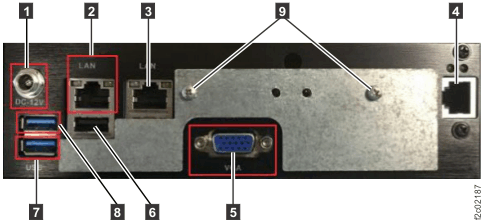
    Model 98x management console cable connections (rear)
  2. Locate the Ethernet switch SW2 (Gray network) at the rear of the storage facility with which the management console cannot communicate. See Figure 6 for 16-port switches and Figure 7, Figure 8, and Figure 9 for 8-port switches.
    Is the Ethernet switch SW2 powered on?
    Figure 6. 16-port Ethernet switch port designations (SW1, SW2 - Tx) - Models 921/931, 922/932, 9A2/9B2
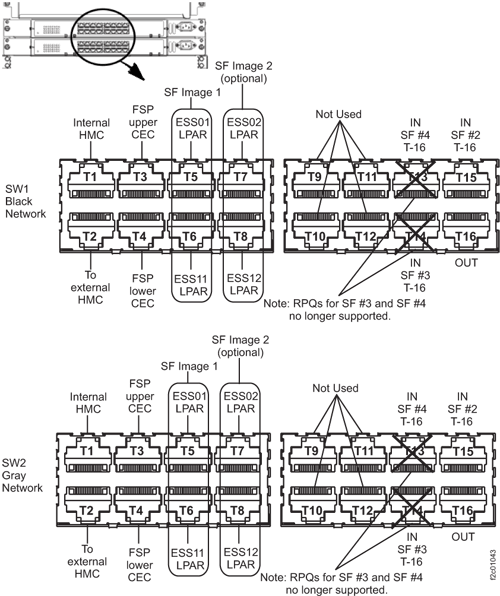
    Ethernet switch port designations (SW1, SW2 - Tx)
    Figure 7. 8-port Ethernet switch port designations (SW1, SW2-Tx) Models 921/931, 922/932, 9A2/9B2
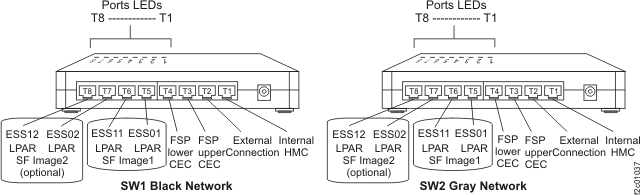
    8-port Ethernet switch port designations (SW1, SW2-Tx)
    Figure 8. 8-port Ethernet switch port designations (SW1, SW2-Tx) Model 941, Model 951, and Model 961
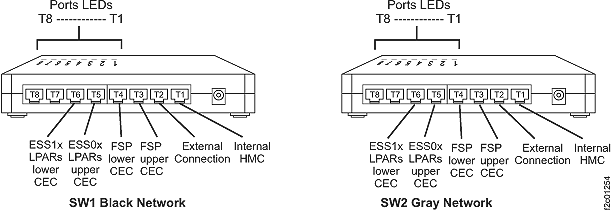
    8-port Ethernet switch port designations (SW1, SW2-Tx)
    Figure 9. 8-port Ethernet switch port designations (SW1, SW2-Tx) Models 98x
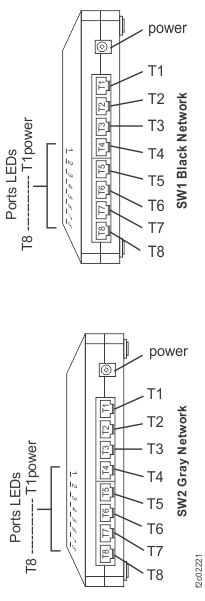
    8-port Ethernet switch port locations, Model 98x
  3. Select the type of Ethernet switches in the affected storage facility:
    • 16-port Ethernet switches, go to step 4.
    • 8-port Ethernet switches, go to step 8.
  4. Observe the 16-port Ethernet switch SW2-T16 port LEDs in the storage facility with which the management console cannot communicate. Reference Table 1 for a description and interpretation of the Ethernet Switch port LEDs.
    Table 1. 16-port Ethernet switch port LED descriptions
    LED State Meaning
    Upper On 1000 Mb/s connection
    Off 100 Mb/s connection (Normal for FSP connection only)
    Lower Off No link
    On Link, No Activity
    Flashing Link, Activity

    There are two LEDs for each port. Is the lower Link LED lit solidly or flashing?

  5. Temporarily move the Ethernet cable to an unused port on the same switch. Observe the Ethernet switch port LEDs corresponding to the new location.
    Is the lower Link LED lit solidly or flashing?
    • Yes, it appears that the Ethernet switch in this rack is failing. Go to MAP7040 Section-3.
    • No, move the Ethernet cable back to port T16 and continue with the next step.
  6. Return to the storage facility that houses the failing management console and locate Ethernet switch SW2. Use Table 2 to determine the SW2 Ethernet port where the cable from the failing storage facility should be plugged. Observe the Ethernet switch port LEDs.
    Is the lower Link LED lit solidly or flashing?
    • Yes, verify that you have the correct port location. If necessary, trace the cable back from the failing storage facility.
    • No, continue with the next step.
    Table 2. Storage facility Ethernet switch ports
    Storage Facility # SW1 port # Black Network SW2 port # Gray Network
    SF #2 (all except model 98x) SW1-T15 SW2-T15
  7. Temporarily move the Ethernet cable to an unused port on the same switch. Observe the Ethernet switch port LEDs corresponding to the new location.
    Is the lower Link LED lit solidly or flashing?
    • Yes, it appears that the Ethernet switch in this rack (housing the failing MC) is failing. Go to MAP7040 Section-3.
    • No, it appears that the Ethernet cable between the storage facilities is failing. Go to MAP7040 Section-4.
  8. Observe the 8-port Ethernet switch SW2-T2 (model 98x, SW1-T7) port LEDs in the storage facility with which the management console cannot communicate. See Figure 7 and Figure 8 .
    • When viewed from the rear of the rack, the Ethernet ports are numbered 1 - 8 from right to left (top to bottom for model 98x). The LED indicator for each port is on the top front edge of the switch and are also numbered T1 to T8 from right to left (top to bottom for model 98x).
    • See Table 3 for a description and interpretation of the Ethernet switch port LED.
    Table 3. 8-port Ethernet switch port LED description
    LED State Meaning
    Blue port LED Off No link
    On Link, No Activity
    Flashing Link, Activity
    Is the blue port LED lit solidly or flashing?
  9. Is there an unused port on the same switch?
    • Yes, go to the next step.
    • No, this can only occur on an 8-port switch. Temporarily unplug the cable from port T8 (T1 for model 98x), and then continue at the next step.
      Note: For Models 9A2/9B2, this might cause a new serviceable event to be opened for Ethernet communications from the second LPAR on this CEC enclosure. After this cable is reconnected in the following step, you can close that serviceable event.
  10. Temporarily move the Ethernet cable to an unused port on the same switch. Observe the Ethernet switch port LEDs corresponding to the new location.
    Is the port LED lit solidly or flashing?
    • Yes, it appears that the Ethernet switch in this rack is failing. Move the Ethernet cable back to its original port. If you unplugged the cable from T8 (T1 for model 98x) to create an unused port, then reconnect that cable now. Then, go to MAP7040 Section-4.
    • No, move the Ethernet cable back to its original port and continue with the next step.
  11. Return to the storage facility that houses the failing management console and locate Ethernet switch SW2. Use Table 4 to determine the SW2 Ethernet port where the cable from the failing storage facility should be plugged. Observe the Ethernet switch port LEDs.
    Is the lower Link LED lit solidly or flashing?
    • Yes, verify that you have the correct port location. If necessary, trace the cable back from the failing storage facility.
    • No, continue with the next step.
    Table 4. Storage facility Ethernet switch ports for 8-port Ethernet switches
    Storage Facility # SW1 port # Black Network SW2 port # Gray Network
    SF #2 (all except model 98x) SW1-T2 SW2-T2
  12. Is there an unused port on the same switch?
    • Yes, go to the next step.
    • No, temporarily unplug the cable from port T8 (T1 for model 98x), and then continue at the next step.
      Note: For Models 9A2/9B2, this might cause a new serviceable event to be opened for Ethernet communications from the second LPAR on this CEC enclosure. After this cable is reconnected in the following step, you can close that serviceable event.
  13. Temporarily move the Ethernet cable to an unused port on the same switch. Observe the Ethernet switch port LEDs corresponding to the new location.
    Is the port LED lit solidly or flashing?
    • Yes, it appears that the Ethernet switch in this rack (housing the failing MC) is failing. Move the Ethernet cable back to its original port. If you unplugged the cable from T8 (T1 for model 98x) to create an unused port, then reconnect that cable now. Then, go to MAP7040 Section-3.
    • No, it appears that the Ethernet cable between the storage facilities is failing. Move the Ethernet cable back to its original port. If you unplugged the cable from T8 (T1 for model 98x) to create an unused port, then reconnect that cable now. Then, go to MAP7040 Section-4.

MAP7040 Section-2

Procedure

  1. Verify that the link failure is still present by using the Network topology test tool as described in MAP7001 Using the network topology tool. Is the link still failing?
  2. Return to the storage facility with which the management console cannot communicate. Select the type of Ethernet switches it has:
    • 16-port Ethernet switches, go to step 3
    • 8-port Ethernet switches, go to 4.
  3. At the storage facility with which the management console cannot communicate, temporarily move the Ethernet cable plugged in SW2-T16 to an unused port on the same switch. Verify if the link failure is still present by using the Network topology test tool as described in MAP7001 Using the network topology tool.
    Is the link still failing?
    • Yes, move the Ethernet cable back to port T16 and go to step 6.
    • No, it appears that the Ethernet switch is failing. Go to MAP7040 Section-3.
  4. Is there an unused port on the 8-port SW2 switch?
    • Yes, go to the next step.
    • No, temporarily unplug the cable from port T8 (T1 for model 98x), and then continue at the next step.
      Note: For Models 9A2 and 9B2, this might cause a new serviceable event to be opened for Ethernet communications from the second LPAR on this CEC enclosure. After this cable is reconnected in the following step, you can close that serviceable event.
  5. At the storage facility with which the management console cannot communicate, temporarily move the Ethernet cable plugged in SW2-T2 (SW1-T7 for model 98x) to an unused port on the same switch. Verify if the link failure is still present by using the Network topology test tool.
    Is the link still failing?
    • Yes, move the Ethernet cables back to their original ports and continue with the next step.
    • No, it appears that the Ethernet switch is failing. Go to MAP7040 Section-3
  6. Return to the storage facility that houses the failing management console and locate Ethernet switch SW2. Select the type of Ethernet switches it has:
    • 16-port Ethernet switches, go to step 7.
    • 8-port Ethernet switches, go to step 8.
  7. Use Table 2 to determine the SW2 Ethernet port where the cable from the failing storage facility should be plugged. Temporarily move the Ethernet cable to an unused port on the same switch. Observe the Ethernet switch port LEDs corresponding to the new location. Verify if the link failure is still present by using the Network topology test tool as described in MAP7001 Using the network topology tool.
    • Yes, it appears that the Ethernet cable between the storage facilities is failing. Move the Ethernet cable back to its original port and then go to MAP7040 Section-4.
    • No, it appears that the Ethernet switch is failing. Move the Ethernet cable back to its original port and then go to MAP7040 Section-3.
  8. Is there an unused port on the 8-port SW2 switch?
    • Yes, go to the next step.
    • No, temporarily unplug the cable from port T2 (T7 for model 98x), and then continue at step 9.
      Note: For Models 9A2 and 9B2, this may cause a new serviceable event to be opened for Ethernet communications from the second LPAR on this CEC enclosure. After this cable is reconnected in the following step, you can close that serviceable event.
  9. Temporarily move the Ethernet cable plugged in SW2-T2 (SW1-T7 for model 98x) to an unused port on the same switch. Verify if the link failure is still present by using the Network topology test tool.

    Is the link still failing?
    • Yes, it appears that the Ethernet cable between the storage facilities is failing. Move the Ethernet cables back to their original ports and then go to MAP7040 Section-4.
    • No, it appears that the Ethernet switch is failing. Move the Ethernet cable back to its original port and then go to MAP7040 Section-3.

MAP7040 Section-3

About this task

Note: In this section the SW2 Ethernet switch will be replaced.

Procedure

  1. Go to Exchanging parts to replace the SW2 Ethernet switch. Return here when the Ethernet switch has been replaced.
  2. Verify the fix by using the Network topology test tool as described in MAP7001 Using the network topology tool. Is the network problem resolved?

MAP7040 Section-4

About this task

Note: In this section the Ethernet cable between the storage facilities will be replaced.

Procedure

  1. Replace the cable between the storage facilities. Continue with the next step when the cable has been replaced.
  2. Verify the fix by using the Network topology test tool as described in MAP7000 Section-1, step 3. Is the network problem resolved?