Exchange the storage enclosure solid state disk (SSD)
Before you begin
 Use approved ESD procedures to prevent damage.
Attention:
- This procedure is not a stand-alone procedure. Customer disruption and damage to the hardware might occur when microcode and power boundaries are not in the proper conditions for this service action.
- If a serviceable event FRU repair directed you to this procedure, the microcode and power boundaries are already set.
- If a serviceable event FRU repair did not direct you to this procedure, see MAP1230 Replace a FRU without using a serviceable event.
Notes:
- All the cables and FRUs to be removed must be uniquely identified so they can be reinstalled correctly.
- If an installed earthquake resistance kit prevents you from accessing this FRU, refer to MAP1600.
Remove the solid state disk (SSD)
Before you begin
Always handle a defective disk drive module carefully. Damage to defective disk drive modules can have a negative effect on failure analysis test results and warranty recovery.
Procedure
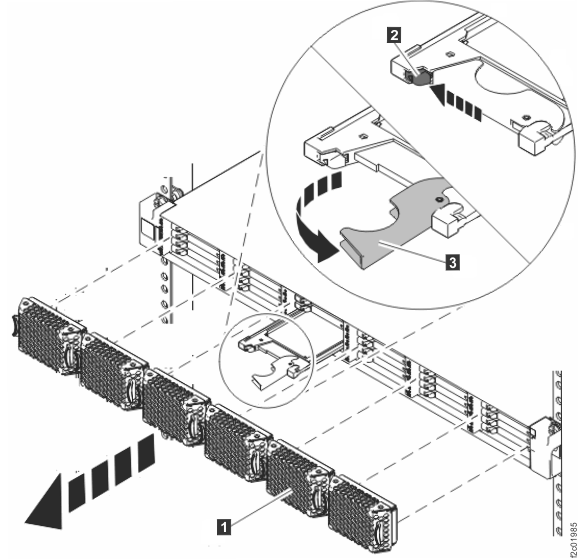
- Remove the solid state disk (SSD). See Figure 1.
- Remove the bezel for the SSD being replaced.
- Gently press the bottom latch
 to release the SSD handle.
- Pull the handle
 out and up. This action partly ejects
the SSD out of its slot.
out and up. This action partly ejects
the SSD out of its slot. - Gently slide the SSD straight out of the slot.
Figure 1. Removing a flash drive (horizontal shown, vertical similar)