Exchange the main line power cable

Before you begin

Icon for electrostatic discharge wrist strapUse approved ESD procedures to prevent damage.

Attention:
  • This procedure is not a stand-alone procedure. Customer disruption and damage to the hardware might occur when microcode and power boundaries are not in the proper conditions for this service action.
  • If a serviceable event FRU repair directed you to this procedure, the microcode and power boundaries are already set.
  • If a serviceable event FRU repair did not direct you to this procedure, see MAP1230 Replace a FRU without using a serviceable event.
Notes:
  • All the cables and FRUs to be removed must be uniquely identified so they can be reinstalled correctly.
  • If an installed earthquake resistance kit prevents you from accessing this FRU, refer to MAP1600.

Remove the main line power cable

Procedure

  1. To locate this FRU, take one of the following actions and then return here and continue to replace the FRU:
    • If this FRU has a FRU identify indicator, use the FRU identify indicator, which is listed in MAP1240 Locating FRUs by using identify indicators. If not, use the location code.
      Note: There might be cases where the FRU failure or fencing conditions prevent the FRU LED indicator from being lit even if the FRU has power.
    • Use the location code, which is listed in MAP1245 Finding FRUs by using location codes.
    • If there is no FRU identify indicator or location code, you were sent here by an isolation MAP or symbolic FRU procedure. Use the information in that procedure and the figures in this procedure to locate the proper part to exchange.
  2. Most, but not all, FRUs have identify indicators. Use the flashing amber or solid blue FRU identify indicators to ensure that you are working on the correct enclosure or FRU.
  3. Instruct the customer to turn off the circuit breaker that supplies main line ac voltage to the power receptacle for the main line power cable that you are replacing.
  4. Confirm the LOCAL AC LED  5  is out on the DC-UPS DSU you are servicing. See Figure 1 or Figure 2.

    The LOCAL AC LED is located above J5 (single-phase) or to the right of DC-UPS DSU main line switch CB1 (three-phase).

    Figure 1. LEDs on the DC-UPS DC supply unit (DSU) (Models 98x, single-phase power) (rear)
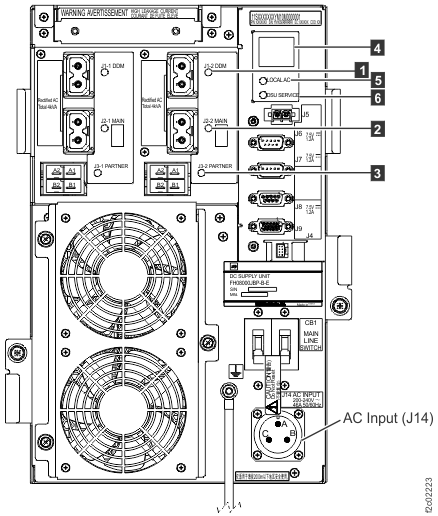
    LEDs on the DC-UPS DC Supply Unit (DSU) (Models 98x, 8xE), rear of rack
    Figure 2. LEDs on the DC-UPS DC supply unit (DSU) (Models 98x, three-phase power) (rear)
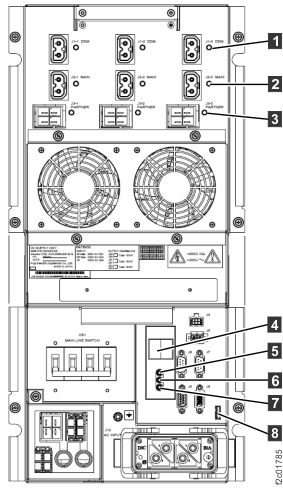
    LEDs on the DC-UPS DC Supply Unit (DSU), rear of rack
  5. Attention: Use lockout and tagout procedures as defined in the Electrical Safety for IBM® Customer Engineers.
  6. Set the DC-UPS DSU main line switch CB1 to off (down). See Figure 3 or Figure 4.
    Figure 3. Location codes for the DC-UPS (Models 98x, single-phase power) (rear)
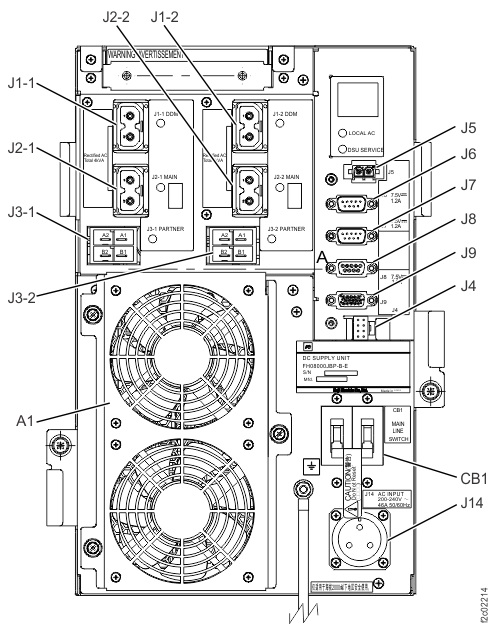
    Location codes for the DC-UPS (Models 98x) (rear)
    Figure 4. Location codes for the DC-UPS (Models 98x, three-phase power) (rear)
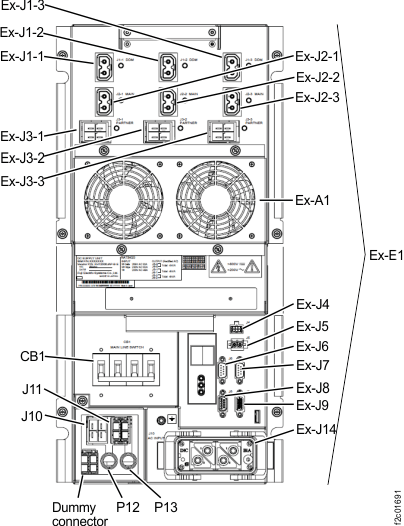
    Location codes for the DC-UPS (Models 961, 96E) (rear)
  7. Remove the tailgate frame bracket, as needed.
    Note: For top exit, the tailgate bracket is not removable.
    1. Remove top screws Callout label 1 and side screws Callout label 2.
    2. Slide the bracket out.
    Figure 5. Tailgate frame bracket
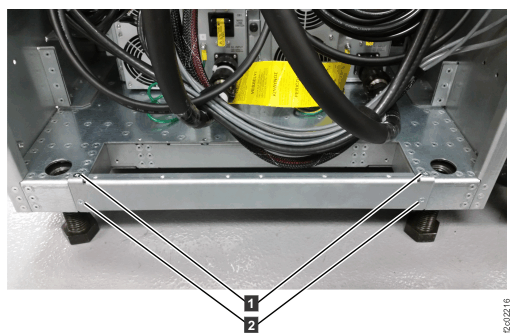
    Tailgate frame bracket
  8. For three-phase power, go to step 13. For single-phase power, continue to the next step.
  9. Behind the DC-UPS DSU (single-phase), loosen the screws Callout label 1 (Figure 6) that secure the power cable bracket to the frame.
  10. Unfasten the screw Callout label 2 that secures the safety cover Callout label 3 to the power cable bracket. Remove the cover. See Figure 6.
  11. At the DC-UPS DSU, twist the lock ring counterclockwise to release the main line power cable. Disconnect the cable and slide it to the rear to release the bracket from the screws. See Figure 6 and Figure 3.
    Figure 6. Power cable bracket and safety cover
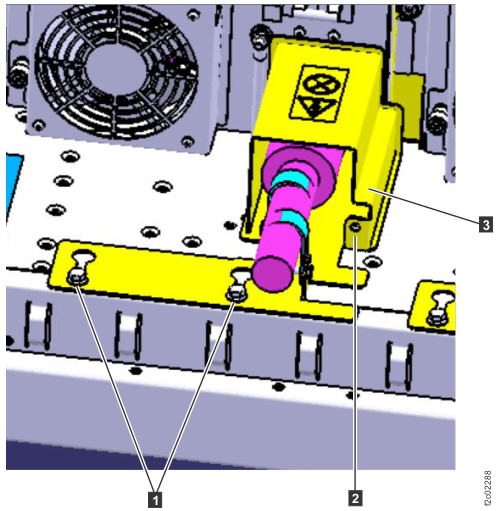
    Power cable bracket and safety cover
  12. Go to step 14.
  13. At the DC-UPS DSU being repaired (three-phase), disconnect the main line power cable. Push the two release levers at the side of power connector J14. See Figure 4.
  14. Carefully pull the main line cable away from the rack and the tailgate.
  15. Disconnect the customer end of the cable:
    • If the customer-end of the cable has a connector fitting, disconnect it.
    • If the customer-end of the cable is hard-wired to the customer power, have the customer electrician disconnect it.

Install the main line power cable

About this task

Procedure

  1. Connect the main line power cable to the customer power.
    • If the customer-end of the cable has a connector fitting, connect it.
    • If the customer-end of the cable is hard-wired to the customer power, have the customer electrician connect it.
  2. Route the cable through the tailgate. See Figure 5.
    Attention: Confirm that the cable is not powered before you connect it.
  3. For three-phase power, go to step 7. For single-phase power, continue to the next step.
  4. Connect the main line power cable to the DC-UPS DSU (single-phase). See Figure 3.
    1. Position the keyholes in the power cable bracket over the screws Callout label 1 and slide the cable forward to the input connector. See Figure 6.
    2. Twist the lock ring clockwise to secure the connector.
  5. Secure the power cable bracket and safety cover on the main line power cable. See Figure 6.
    1. Tighten the screws Callout label 1 to secure the bracket to the frame.
    2. Install the cover Callout label 3 and secure it with the screw Callout label 2.
  6. Go to step 8.
  7. Connect the main line power cable to the DC-UPS (three-phase) and ensure both latches are secure.
  8. Instruct the customer to turn on the main line circuit breaker that supplies main line ac voltage to the power receptacle for the DC-UPS DSU that you are replacing.
  9. Set the DC-UPS DSU main line switch CB1 to on (up). See Figure 3 or Figure 4.
  10. Reinstall the tailgate bracket (if it was removed) with all four screws. See Figure 5.
  11. Exit this service information center parts exchange procedure and return to the procedure that sent you here.