Exchange the storage enclosure power sense cable
Before you begin
 Use approved ESD procedures to prevent damage.
Attention:
- This procedure is not a stand-alone procedure. Customer disruption and damage to the hardware might occur when microcode and power boundaries are not in the proper conditions for this service action.
- If a serviceable event FRU repair directed you to this procedure, the microcode and power boundaries are already set.
- If a serviceable event FRU repair did not direct you to this procedure, see MAP1230 Replace a FRU without using a serviceable event.
Notes:
- All the cables and FRUs to be removed must be uniquely identified so they can be reinstalled correctly.
- If an installed earthquake resistance kit prevents you from accessing this FRU, refer to MAP1600.
Note: The
FC-AL fabric for this and the directly associated storage enclosures
must be in the proper state to protect the customer from data loss.
Remove storage enclosure power sense cable
Procedure
- Each disk drive module (DDM)
 , Fibre Channel interface card
  and FC-AL cable
  must be reinstalled in the exact same
position. See Figure 1.
must be reinstalled in the exact same
position. See Figure 1.
- Observe the cable labeling to ensure you will be able to
reconnect the cables correctly. Disconnect the FC-AL cables from the two Fibre Channel interface (FCIC) cards . Squeeze the top of the FC-AL cable
connector to release it from the FCIC card. See Figure 1. Note: There will be four FC-AL cables if this is the last storage enclosure in this group. There will be eight FC-AL cables if this is not the last storage enclosure in this group.
- Remove each DDM from the storage enclosure and set
in a safe place. See Figure 1.
Note: It is recommended you write down the serial number and position of each DDM prior to removing them.
Figure 1. DDM Fibre Channel cable 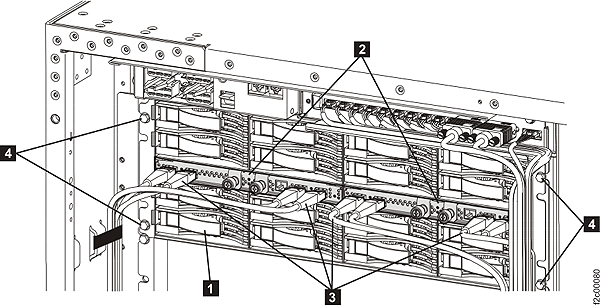
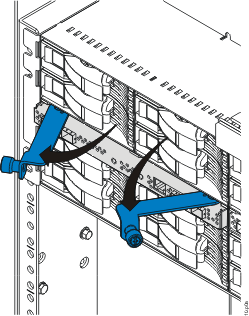
- Press the blue latch to release the DDM handle. See Figure 2.
- Pull the handle out and to your left . This action partly ejects the DDM
out of its slot. See Figure 2.
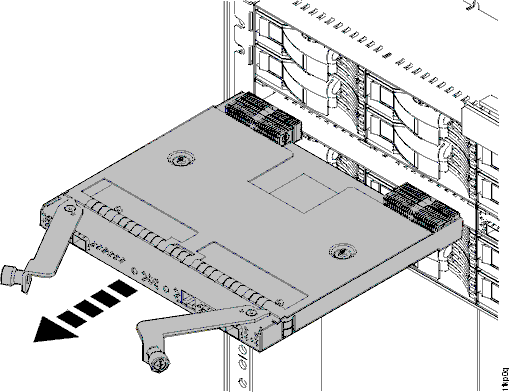
- Pull the DDM toward you and completely out of the
slot. See Figure 2.
Figure 2. Removing the disk drive module (16 DDM slot storage enclosure shown; 12 DDM slot storage enclosure DDM similar) 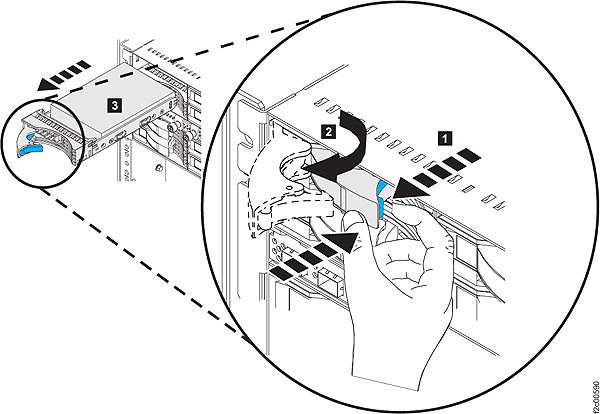
- Press the blue latch
- Remove each FCIC card from the storage enclosure and set in a safe place. It is recommended you write down the serial number and position of each part prior to removing them.
- Remove the four screws fastening the storage enclosure to
the rack mount rails and then remove the storage enclosure from the
rack. See Figure 5.
Note: Anytime you are not replacing the cable, latch the sheet metal air flap in the down position. This ensures the remaining storage enclosures maintain adequate cooling air flow.
Figure 5. Storage enclosure sheet metal air flap 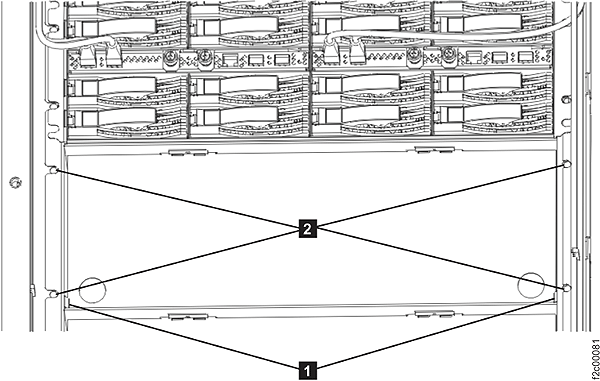
- Disconnect the cable from the power connector and the sense connector . Loosen the two screws , slide the connector assembly to the
left until the keyhole slots are free. Remove the cable assembly from
the rack. See Figure 6.
Figure 6. Sense cable connectors 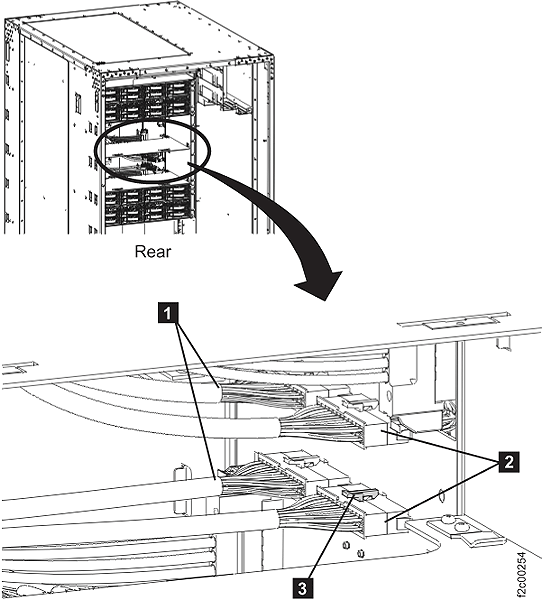
Install storage enclosure power sense cable
Procedure
- Unlatch the sheet metal air flap so it can swing to the up position.
- Install the new cable.
- Install the storage enclosure in the rack and fasten it with the four screws.
- Install each disk drive module (DDM) and Fibre Channel interface card in the exact same position.
- Install each FC-AL cable in the exact same position as it was in the old storage enclosure.
- Exit this service information center parts exchange procedure and return to the procedure that sent you here.