Exchange the SPCN cable

Before you begin

Icon for electrostatic discharge wrist strapUse approved ESD procedures to prevent damage.

Attention:
  • This procedure is not a stand-alone procedure. Customer disruption and damage to the hardware might occur when microcode and power boundaries are not in the proper conditions for this service action.
  • If a serviceable event FRU repair directed you to this procedure, the microcode and power boundaries are already set.
  • If a serviceable event FRU repair did not direct you to this procedure, see MAP1230 Replace a FRU without using a serviceable event.
Notes:
  • All the cables and FRUs to be removed must be uniquely identified so they can be reinstalled correctly.
  • If an installed earthquake resistance kit prevents you from accessing this FRU, refer to MAP1600.

Remove the SPCN cable

About this task

Note: Both ends of the SPCN cable use the same connector.
Procedure

  1. To locate this FRU, take one of the following actions and then return here and continue to replace the FRU:
    • If this FRU has a FRU identify indicator, use the FRU identify indicator, which is listed in MAP1240 Locating FRUs by using identify indicators. If not, use the location code.
      Note: There might be cases where the FRU failure or fencing conditions prevent the FRU LED indicator from being lit even if the FRU has power.
    • Use the location code, which is listed in MAP1245 Finding FRUs by using location codes.
    • If there is no FRU identify indicator or location code, you were sent here by an isolation MAP or symbolic FRU procedure. Use the information in that procedure and the figures in this procedure to locate the proper part to exchange.
  2. Most, but not all, FRUs have identify indicators. Use the flashing amber or solid blue FRU identify indicators to ensure that you are working on the correct enclosure or FRU.
  3. This cable can be exchanged concurrently, the service processor and I/O enclosure stay fully powered on.
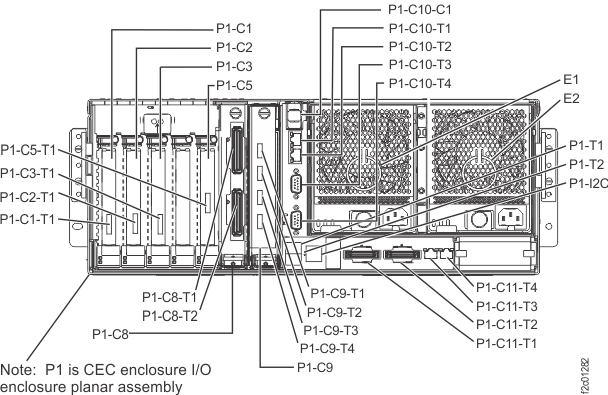
  4. At the rear of the CEC enclosure, disconnect the cable from the service processor connector as listed in the serviceable event location code: either P1-C11-T1 or P1-C11-T2. See Figure 1.
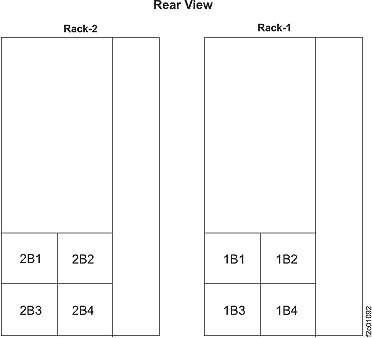
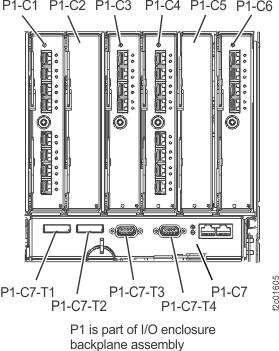
  5. Trace the cable to the I/O enclosure connector and disconnect it: either P1-C7-T3 or P1-C7-T4. See Figure 2 and Figure 3.
    Figure 1. CEC enclosure location codes, rear view
    Location codes for the CEC enclosure (rear view)
    Figure 2. I/O enclosure locations at rear of rack (models 961, 96E)
    I/O enclosure locations at rear of rack
    Figure 3. I/O enclosure locations (rear) (models 961, 96E)
    I/O enclosure locations (rear)

Install the SPCN cable

Procedure

  1. Ensure that the proper location code labels are applied to each end of the new cable. If the cable is not labeled, complete steps 1.a, 1.b, and 1.c.
    1. Observe the location code label on each end of the cable that has been removed.
    2. Select the proper location code labels from the label sheet shipped with the new cable.
    3. Apply the labels to the new cable.
      Note: The cable is not directional, and has the same connectors on each end.
  2. Route the new cable and connect it at both ends.
  3. Reinstall the cable retention hardware as needed.
  4. Exit this service information center parts exchange procedure and return to the procedure that sent you here.