Exchange the I/O enclosure backplane assembly
Before you begin
CAUTION:
This assembly contains mechanical moving parts. Use care when
you service this assembly. (C025)
 Use approved ESD procedures to prevent damage.
Attention:
- This procedure is not a stand-alone procedure. Customer disruption and damage to the hardware might occur when microcode and power boundaries are not in the proper conditions for this service action.
- If a serviceable event FRU repair directed you to this procedure, the microcode and power boundaries are already set.
- If a serviceable event FRU repair did not direct you to this procedure, see MAP1230 Replace a FRU without using a serviceable event.
Notes:
- All the cables and FRUs to be removed must be uniquely identified so they can be reinstalled correctly.
- If an installed earthquake resistance kit prevents you from accessing this FRU, refer to MAP1600.
About this task
Note: The I/O enclosure must be fully removed from the rack
for this procedure.
Remove the I/O enclosure backplane assembly
Before you begin
Note: You need a 5-mm socket to remove the hex head
screws for this FRU.
Procedure
- At the front of the rack, for the I/O enclosure
that is being repaired, unplug the power input cable from power supplies
E1 and E2. See Figure 1.
Figure 1. I/O enclosure locations (front) (models 98x, 8xE) 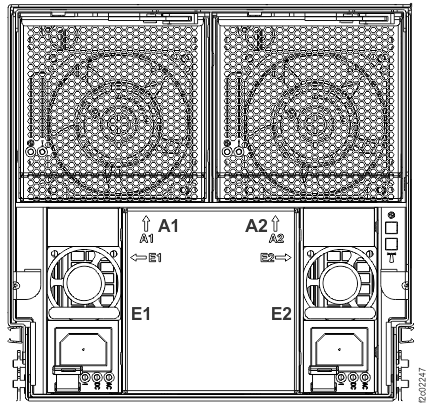
-
At the rear of the rack, unlatch and pull out the I/O
enclosure PCIe and PCN card C7 about 2.5 cm or 1 inch. See Figure 2.
You can leave the cables attached but you might need to unplug one or more cables to gain access to the blue lever latch.
Note: Undocking these cards make it easier to slide the I/O enclosure planar assembly out the front later in this procedure.Figure 2. I/O enclosure locations (rear) (models 98x, 8xE) 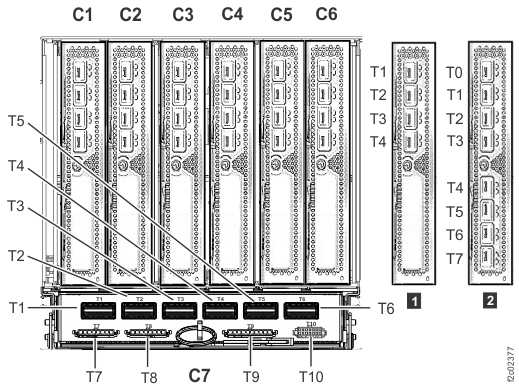 Notes:
- I/O enclosure PCIe storage interface card (locations C3 and C6) not shown.
- The older generation I/O enclosure PCIe and PCN card might not include T3, T4, and T10 ports.
-
Unlatch
 and slide each device adapter card and host adapter card out about 2.5 cm
or 1 inch. Leave the cables attached. See Figure 3 (device adapter
shown; host adapter similar).
Note: Undocking these cards make it easier to slide the I/O enclosure planar assembly out the front later in this procedure.
and slide each device adapter card and host adapter card out about 2.5 cm
or 1 inch. Leave the cables attached. See Figure 3 (device adapter
shown; host adapter similar).
Note: Undocking these cards make it easier to slide the I/O enclosure planar assembly out the front later in this procedure.Figure 3. I/O enclosure device adapter card, optical (4-port) blue retention levers 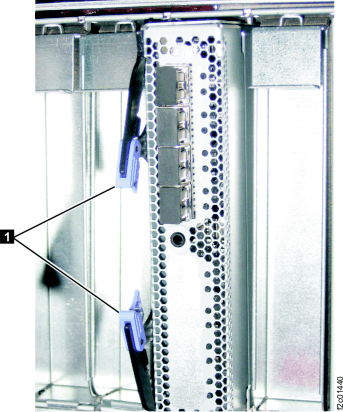
- At the front of the rack, unscrew the two thumbscrews
that fasten the planar assembly to the I/O enclosure midplane sheet
metal.
- The thumbscrews are accessed through a bulkhead that opens behind the power supply baffle you removed earlier.
- Reach through the opening and unscrew the two thumbscrews. They are captive and do not fall off. See Figure 4.
Figure 4. I/O enclosure backplane screws 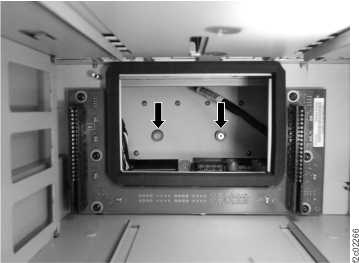
-
At the front of the rack, remove the I/O enclosure backplane retaining screws . See
Figure 5.
Figure 5. I/O enclosure retaining screws 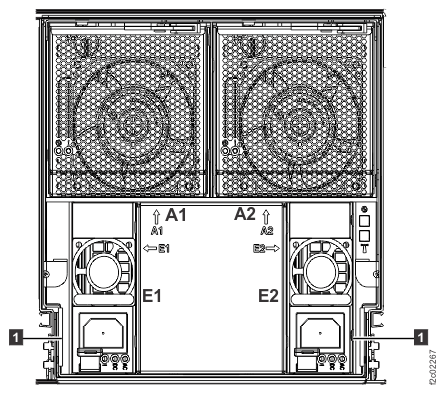
-
Use the brackets to pull
out the planar assembly. See Figure 6.
Note: The rubber air seals can make the planar assembly hard to pull out.
Figure 6. I/O enclosure backplane assembly screws and brackets details 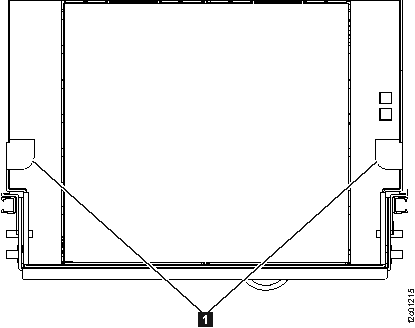
Install the I/O enclosure backplane assembly
Procedure
-
At the front of the rack slide the I/O enclosure backplane assembly in by pushing the two
brackets , as shown in Figure 6.