Exchange the I/O enclosure power supply

Before you begin

Icon for electrostatic discharge wrist strapUse approved ESD procedures to prevent damage.

Attention:
  • This procedure is not a stand-alone procedure. Customer disruption and damage to the hardware might occur when microcode and power boundaries are not in the proper conditions for this service action.
  • If a serviceable event FRU repair directed you to this procedure, the microcode and power boundaries are already set.
  • If a serviceable event FRU repair did not direct you to this procedure, see MAP1230 Replace a FRU without using a serviceable event.
Notes:
  • All the cables and FRUs to be removed must be uniquely identified so they can be reinstalled correctly.
  • If an installed earthquake resistance kit prevents you from accessing this FRU, refer to MAP1600.

Remove the I/O enclosure power supply

About this task

Attention: Power supplies are hot-pluggable FRUs. Remove only one power supply at a time.

Procedure

  1. To locate this FRU, take one of the following actions and then return here and continue to replace the FRU:
    • If this FRU has a FRU identify indicator, use the FRU identify indicator, which is listed in MAP1240 Locating FRUs by using identify indicators. If not, use the location code.
      Note: There might be cases where the FRU failure or fencing conditions prevent the FRU LED indicator from being lit even if the FRU has power.
    • Use the location code, which is listed in MAP1245 Finding FRUs by using location codes.
    • If there is no FRU identify indicator or location code, you were sent here by an isolation MAP or symbolic FRU procedure. Use the information in that procedure and the figures in this procedure to locate the proper part to exchange.
  2. Most, but not all, FRUs have identify indicators. Use the flashing amber or solid blue FRU identify indicators to ensure that you are working on the correct enclosure or FRU.
  3. The management console keyboard can be moved between the operating and stowed position as needed to allow service clearance at the front of the I/O enclosure.
  4. Observe the I/O enclosure power supply that is not being replaced in this I/O enclosure. See Figure 1.

    The output power good LED Callout label 4 on the I/O enclosure power supply must be lit before you go to the next step. This ensures that the I/O enclosure remains powered on when the failing power supply is removed. If the power good LED is not lit, DO NOT CONTINUE. Instead, contact your next level of support.

    • Callout label 5 input power to power supply
    • Callout label 4 output power from power supply
    • Callout label 3 identify for I/O enclosure power supply
    Figure 1. LEDs on the I/O enclosure (front)
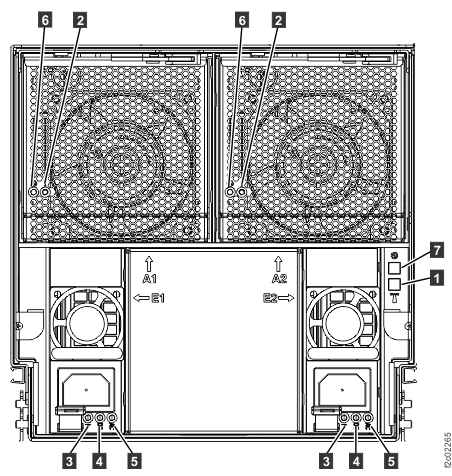
    LEDs on the I/O enclosure (front)
  5. Observe the I/O enclosure power supply that is being replaced.

    The input power good LED Callout label 5 and the output power LED Callout label 4 are still lit even though the HMC screen said that the FRU was powered off. This is normal. The power good LEDs will be off after the power input cable is disconnected in the next step.

  6. At the power supply that is being replaced, disconnect the power input cable from the power supply. See Figure 2.
    Figure 2. I/O enclosure locations (front) (models 98x, 8xE)
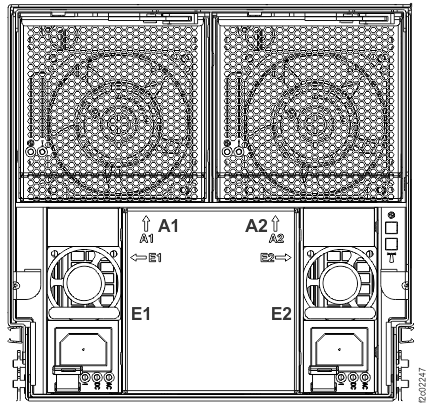
    I/O enclosure locations (front) (models 98x)
  7. Push the orange release button beneath the input power connector. See Figure 2.
  8. Pull out the power supply straight from the I/O enclosure.

Install the I/O enclosure power supply

Procedure

  1. Slide the new power supply into the I/O enclosure until it latches into place.
  2. Connect the power input cable to the power supply.
  3. Before you go to the next step, read all of these substeps so you know what to do if the FRU verification test fails.
    The test will not start until after this window has been closed.
    • If the test is successful, you do not need to perform the remaining tasks in these substeps.
    • If the test fails and you have not already replaced all FRUs listed in the serviceable event that sent you here, you must replace the remaining FRUs.
    • If the test fails and you have already replaced all FRUs listed in the serviceable event that sent you here, you must use these substeps to reset the I/O enclosure.
      Note: If you need to review these substeps after this window has closed, you can start the service information center and then display Exchanging parts > I/O enclosure > Models 9xx > I/O enclosure power supply
    • To reset the I/O enclosure, do a pseudo repair of the I/O enclosure backplane assembly. This removes all power from the I/O enclosure and fully resets it.

      You do not remove any parts and do not disconnect any cables at the rear of the racks.

      1. To do a pseudo repair of the I/O enclosure backplane assembly, click Storage Facility Management > storage facility > Exchange Parts.
      2. When the procedure in the service information center instructs you to exchange the I/O enclosure backplane assembly, do not exchange the backplane assembly. Instead, follow the instructions to unplug and reconnect the I/O enclosure power cables and then complete the repair normally.
        Note: If you need to reread this step at any time, you can find this procedure in the service information center with the following steps:
        1. Click Help in the upper right of the HMC GUI screen to launch the Service Information Center.
        2. From the navigation area of the Service Information Center, click Exchanging Parts > I/O enclosure > Models 9xx > I/O enclosure power supply.
    • Go to the next step.
  4. If you moved the management console to the alternative service position, return it now to the standard service position.
  5. To continue this repair, click Close at the top of this screen.