Exchange the PCIe cable, Models 941, 94E
Before you begin
 Use approved ESD procedures to prevent damage.
Attention:
- This procedure is not a stand-alone procedure. Customer disruption and damage to the hardware might occur when microcode and power boundaries are not in the proper conditions for this service action.
- If a serviceable event FRU repair directed you to this procedure, the microcode and power boundaries are already set.
- If a serviceable event FRU repair did not direct you to this procedure, see MAP1230 Replace a FRU without using a serviceable event.
Notes:
- All the cables and FRUs to be removed must be uniquely identified so they can be reinstalled correctly.
- If an installed earthquake resistance kit prevents you from accessing this FRU, refer to MAP1600.
Both ends of the PCIe cable use the same connector.
Remove the PCIe cable
Procedure
- Remove the PCIe cable.
Each PCIe cable
goes between a CEC enclosure and an I/O enclosure.
Gently pull on the green release handle and then unplug the cable.
Either end of the cable can be unplugged first.- Figure 1 shows the location codes at the CEC enclosure end of the cable.
- Figure 2 shows the location codes at the I/O enclosure end of the cable.
- Figure 3 shows the location codes of the CEC and I/O enclosures in Rack-1 and Rack-2.
- Table 1 and Table 2 show the PCIe cable connections.
Note: The PCIe cable can be "hot-plugged." The FRU the cable connects to, at both ends, can stay powered on. However, the FRU on one end of the cable has already been quiesced and placed in service mode by the microcode before sending you to this procedure.Figure 1. PCIe cable at CEC enclosure 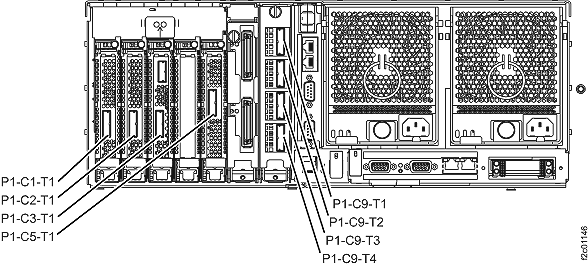
Figure 2. PCIe cable at I/O enclosure 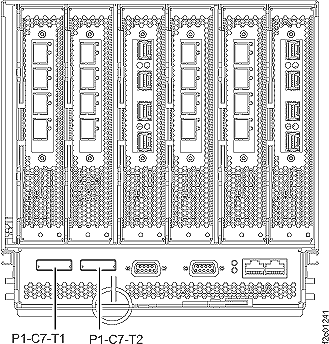
Figure 3. CEC and I/O enclosure location codes, Rack-1 and Rack-2 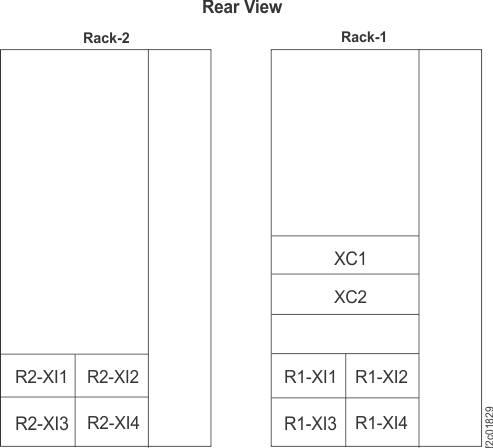
Table 1. PCIe cable connections (Rack 1 I/O enclosures), Model 941 From Rack-1 CEC enclosure To Rack-1 I/O enclosure R1-XC1-P1-C1-T1 R1-XI1-P1-C7-T1
(U1400.1B1.sssssss-P1-C7-T1)R1-XC1-P1-C2-T1 R1-XI2-P1-C7-T1
(U1400.1B2.sssssss-P1-C7-T1)R1-XC1-P1-C3-T1 R1-XI3-P1-C7-T1
(U1400.1B3.sssssss-P1-C7-T1)R1-XC1-P1-C5-T1 R1-XI4-P1-C7-T1
(U1400.1B4.sssssss-P1-C7-T1)R1-XC2-P1-C1-T1 R1-XI1-P1-C7-T2
(U1400.1B1.sssssss-P1-C7-T2)R1-XC2-P1-C2-T1 R1-XI2-P1-C7-T2
(U1400.1B2.sssssss-P1-C7-T2)R1-XC2-P1-C3-T1 R1-XI3-P1-C7-T2
(U1400.1B3.sssssss-P1-C7-T2)R1-XC2-P1-C5-T1 R1-XI4-P1-C7-T2
(U1400.1B4.sssssss-P1-C7-T2)Table 2. PCIe cable connections (Rack 2 I/O enclosures), Model 941 From Rack-1 CEC enclosure To Rack-2 I/O enclosure R1-XC1-P1-C9-T1 R2-XI1-P1-C7-T1
(U1400.2B1.sssssss-P1-C7-T1)R1-XC1-P1-C9-T2 R2-XI2-P1-C7-T1
(U1400.2B2.sssssss-P1-C7-T1)R1-XC1-P1-C9-T3 R2-XI3-P1-C7-T1
(U1400.2B3.sssssss-P1-C7-T1)R1-XC1-P1-C9-T4 R2-XI4-P1-C7-T1
(U1400.2B4.sssssss-P1-C7-T1)R1-XC2-P1-C9-T1 R2-XI1-P1-C7-T2
(U1400.2B1.sssssss-P1-C7-T2)R1-XC2-P1-C9-T2 R2-XI2-P1-C7-T2
(U1400.2B2.sssssss-P1-C7-T2)R1-XC2-P1-C9-T3 R2-XI3-P1-C7-T2
(U1400.2B3.sssssss-P1-C7-T2)R1-XC2-P1-C9-T4 R2-XI4-P1-C7-T2
(U1400.2B4.sssssss-P1-C7-T2)Note: For a point-to-point diagram, see the link that matches your configuration: