Exchange the power distribution unit (PDU)
Before you begin
 Use approved ESD procedures to prevent damage.
Attention:
- This procedure is not a stand-alone procedure. Customer disruption and damage to the hardware might occur when microcode and power boundaries are not in the proper conditions for this service action.
- If a serviceable event FRU repair directed you to this procedure, the microcode and power boundaries are already set.
- If a serviceable event FRU repair did not direct you to this procedure, see MAP1230 Replace a FRU without using a serviceable event.
Notes:
- All the cables and FRUs to be removed must be uniquely identified so they can be reinstalled correctly.
- If an installed earthquake resistance kit prevents you from accessing this FRU, refer to MAP1600.
DANGER
Hazardous
voltage, current, or energy levels are present inside of a component
to which this label is attached. (L001) 
Remove the power distribution unit (PDU)
Procedure
- Open the left rear cover. Remove the two screws
 that secure the right rear cover (trained
service personnel access area only).
that secure the right rear cover (trained
service personnel access area only).
Open the right rear cover. (Figure 1)Note: The screws must be reinstalled when the cover is closed to prevent customer access.Figure 1. Removing retaining screws on right rear machine cover 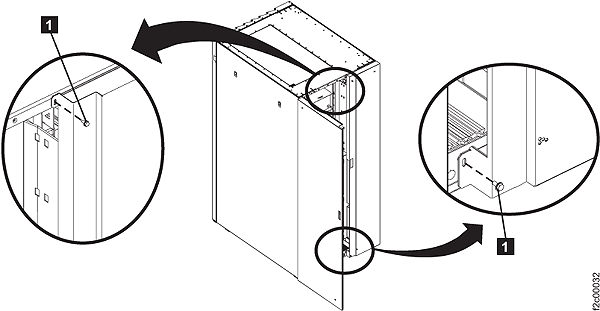
- To locate this FRU, do one of the following
and then return here and continue to replace the FRU:
- If this FRU has a FRU identify indicator,
use the FRU identify indicator, which is listed in MAP1240 Locating FRUs by using identify indicators. If not, use the location code.Note: There may be cases where the FRU failure or fencing conditions prevent the FRU LED indicator from being lit even if the FRU has power.
- Use the location code, which is listed in MAP1245 Finding FRUs by using location codes. (Figure 2)
- If there is no FRU identify indicator or location code, you were sent here by an isolation MAP or symbolic FRU procedure. Use the information in that procedure as well as the figures in this procedure to locate the proper part to exchange.
Figure 2. Locations for power distribution units 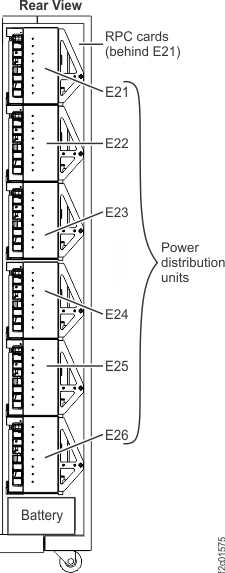
- If this FRU has a FRU identify indicator,
use the FRU identify indicator, which is listed in MAP1240 Locating FRUs by using identify indicators. If not, use the location code.
- Unfasten and then rotate all six power distribution
units (PDUs) away from the rear of the rack. Note: The PDU service tools should not be used to hold the PDUs open in the service position. The forces of moving the PDU being replaced out of alignment with the adjacent PDUs could bend the tools.
Figure 3. Power distribution units in normal position (rack rear view) 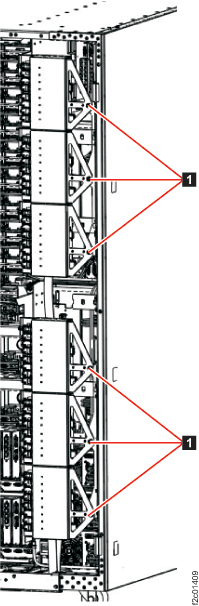
- Remove the PDU alignment bracket.
- The upper three PDUs are held in a group by a PDU alignment bracket. The lower three PDUs are held in a group by a PDU alignment bracket.
- Pull the spring plunger
 , slide the alignment bracket
  up and remove it.
Figure 4. PDU alignment bracket 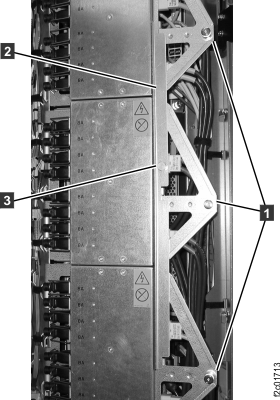
- Disconnect the PDU power input cables J9 and J10 from the right side.
Figure 5. Locations for power distribution unit (PDU) connectors 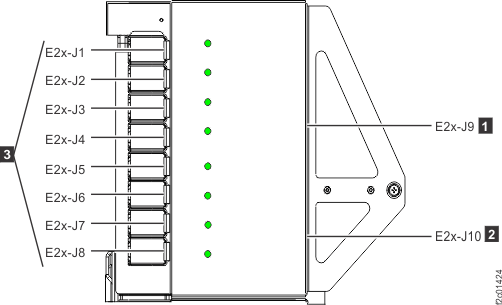
- Unlatch and disconnect all power output cables J1-J8 (Figure 5).