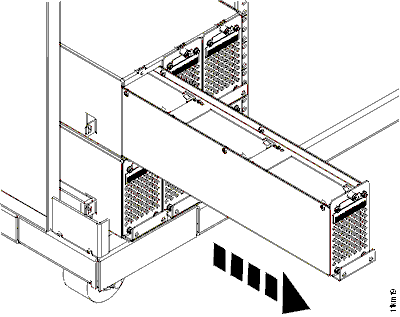
Exchange the battery module set
Before you begin
 Use approved ESD procedures to prevent damage.
Attention:
- This procedure is not a stand-alone procedure. Customer disruption and damage to the hardware might occur when microcode and power boundaries are not in the proper conditions for this service action.
- If a serviceable event FRU repair directed you to this procedure, the microcode and power boundaries are already set.
- If a serviceable event FRU repair did not direct you to this procedure, see MAP1230 Replace a FRU without using a serviceable event.
Notes:
- All the cables and FRUs to be removed must be uniquely identified so they can be reinstalled correctly.
- If an installed earthquake resistance kit prevents you from accessing this FRU, refer to MAP1600.
- The battery module set contains three battery modules. Each battery module does not exceed the weight to be replaced by a single service provider. All three battery modules must be replaced as a set.
- You are using this procedure to exchange a battery FRU (battery module set or battery module enclosure). Unless specifically directed by a MAP or next level of support, you must actually replace the FRU with a new FRU. Performing a "pseudo-repair" with an out-of-date or defective FRU, or closing a serviceable event without exchanging the FRU, can result in data loss.
Remove the battery module set
Procedure
- If this is an expansion rack and it has old level sheet metal, the sheet metal
baffle
 to the left of the gate and at the bottom of the storage enclosure chassis might need to be
removed to allow the gate to swing open. Remove the two screws that fasten the baffle to the 19" rack mount vertical rails. If the baffle is the new level
sheet metal, it has a flexible plastic cutout that bends out of the way when the gate is swung
open.
to the left of the gate and at the bottom of the storage enclosure chassis might need to be
removed to allow the gate to swing open. Remove the two screws that fasten the baffle to the 19" rack mount vertical rails. If the baffle is the new level
sheet metal, it has a flexible plastic cutout that bends out of the way when the gate is swung
open.
Figure 1. Air baffle 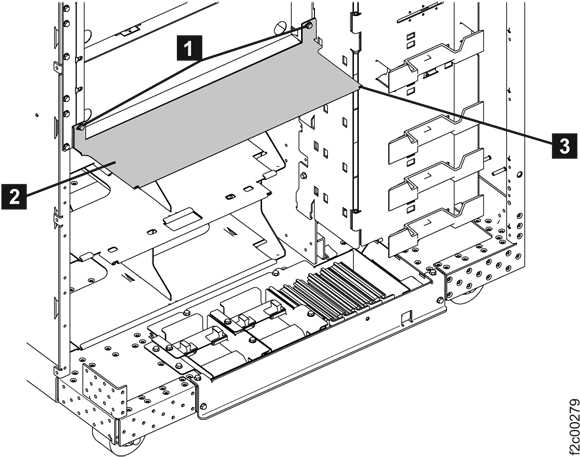
- At the rear of the rack remove the two screws
 and open the 208VDC bus bar gate to the service position.
 Figure 2. 208VDC bus bar gate service position 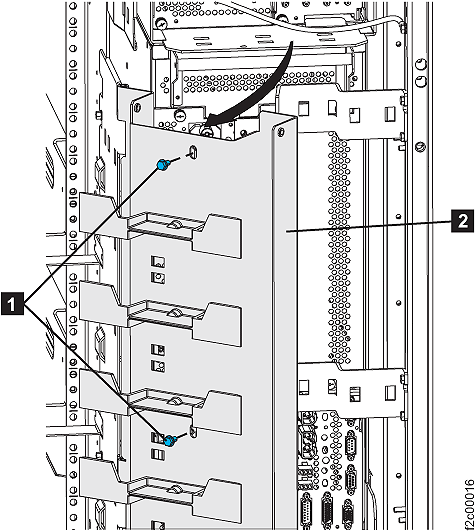
- Are any of the following cables either unplugged
or missing? See Figure 3.
- , are PPS to battery module enclosure
I2C signal cables.
 ,
,  are battery enclosure to the 208VDC
bus bar cables.
are battery enclosure to the 208VDC
bus bar cables. ,
,  are PPS to battery module enclosure
charging cables.
are PPS to battery module enclosure
charging cables.
- Yes, do not replace the battery module set. Instead, go to the next step, and when you are directed to replace each battery module, connect the disconnected cable(s). Most likely this error was caused by the cable, not the battery module set.
- No, go to the next step.
Figure 3. Cables for battery module enclosure 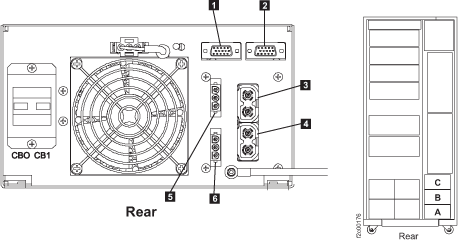
- Loosen the thumbscrew at the top of each battery module .
Figure 4. Loosening the thumbscrew 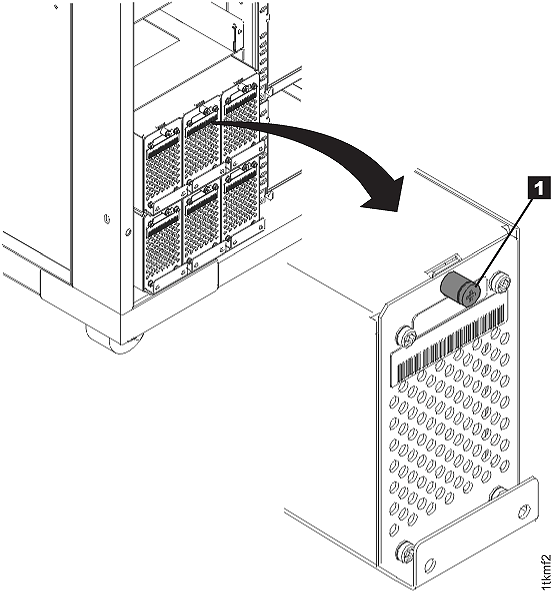
- Gently slide each battery module unit out of its slot.
Support the weight of the module when the module is near being removed.
Figure 5. Removing the battery module